Why Time Management Tools Improve Profits for Small Business

Time management tools are software solutions that help businesses monitor, plan, and allocate work hours to increase profitability. The core reason why time management tools improve profits is simple: they close the gap between hours worked and hours billed, while cutting the administrative waste that drains margins. Businesses that implement professional time tracking see up to 30% higher profitability by reducing overhead and capturing lost billable hours. For small business owners in restaurants, construction, and professional services, that gap is not a rounding error. It is the difference between a profitable quarter and a break-even one.
Why time management tools improve profits through better hour capture
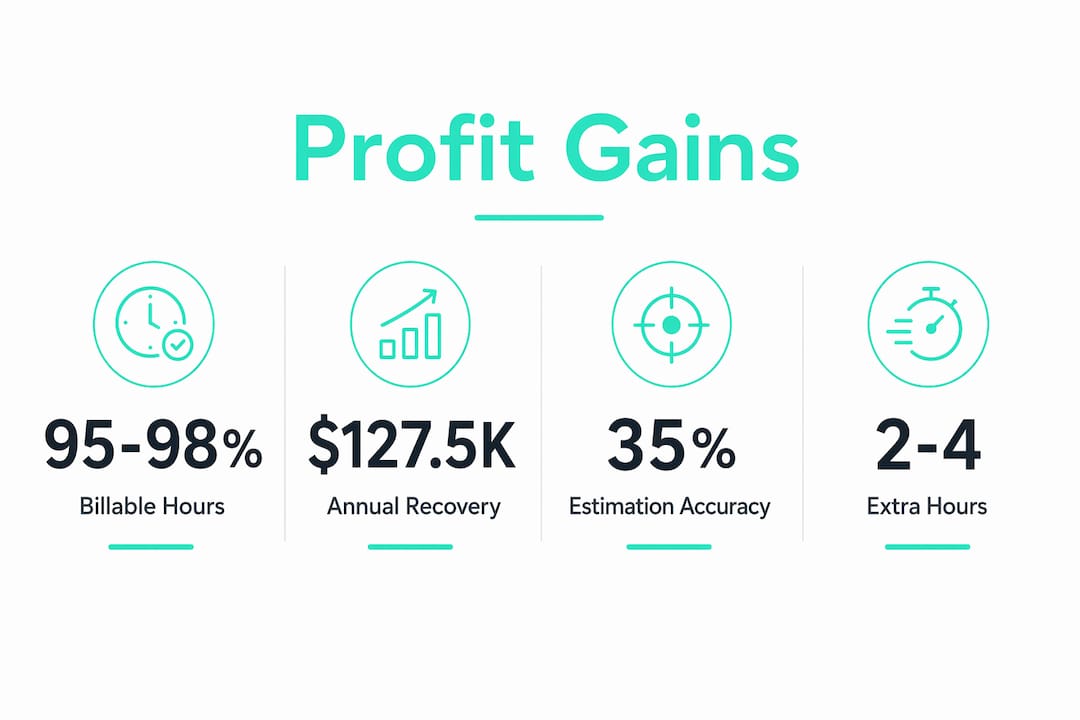
The most direct path from time tracking to profit runs through billable hour recovery. Professional firms without disciplined tracking capture only 72% of billable hours, while firms with it capture 95%. For a 50-person firm billing at standard rates, that gap equals $127,500 in annual revenue. That is not money lost to bad clients or slow markets. It is money that was earned but never invoiced.
The problem gets worse when teams reconstruct hours at the end of the week. Live time tracking captures 95, 98% of billable hours, compared to just 65, 75% from end-of-week memory. Memory is unreliable. A 30-minute call on Tuesday disappears by Friday. Multiply that across a team of ten and the revenue loss becomes structural.

Manual billing also creates administrative overhead that compounds the damage. When managers spend hours reconciling timesheets, chasing down missing entries, and correcting payroll errors, they are paying for inefficiency twice. First in lost billable hours, then in the labor cost of fixing the mess. Accurate, real-time tracking eliminates both problems at once.
What the revenue gap looks like in practice
| Scenario | Billable hour capture | Annual revenue impact (10-person team) |
|---|---|---|
| No time tracking | 65, 72% | Significant revenue left uncaptured |
| End-of-week reconstruction | 75, 80% | Partial recovery, still leaking margin |
| Live, real-time tracking | 95, 98% | Near-complete capture, maximum billing |
The table shows that the jump from no tracking to live tracking is not incremental. It is a structural shift in how much revenue a business actually collects from the work it already does.
Pro Tip: Set up real-time clock-in prompts tied to project codes. Teams that log hours as they work, rather than at day’s end, consistently capture more billable time with less effort.
How integrated time tools improve project delivery and resource use
Time tracking does more than protect billing. It changes how work gets done. Teams using integrated time management tools complete 25% more tasks and achieve 94.5% on-time delivery for project milestones. That improvement comes from visibility. When managers can see where hours are going in real time, they can catch overruns before they become delays.
Resource allocation is the second major gain. Without time data, managers guess at workload. With it, they can see which team members are overloaded and which have capacity. That visibility prevents burnout on one side and idle time on the other. Both cost money.
The role of all-in-one time management tools becomes clear here. Fragmented systems force managers to cross-reference a time app, a project board, and a billing sheet separately. Centralizing time and tasks in one system increases focused work output by over 50% by cutting context switching and decision fatigue. Every time a manager switches between apps to find an answer, they lose momentum and introduce error.
Key features that drive operational efficiency in integrated time tools include:
- Real-time dashboards that show hours logged against project budgets as work happens
- Automated overtime alerts that flag labor cost overruns before they hit payroll
- Break and shift tracking that keeps teams compliant with FLSA labor standards
- GPS geofencing that confirms employees are clocking in from the right location
- Payroll export integration that converts tracked hours directly into pay runs without manual entry
Pro Tip: Review your team’s time data weekly at the category level, not the minute level. Broad patterns reveal where time is being lost. Granular scrutiny creates anxiety without adding insight.
The behavioral value of tracking time beyond the numbers
Time data changes how people estimate and plan. Individuals who consistently track their time improve estimation accuracy by 35% within eight weeks. That improvement compounds. Better estimates lead to better project bids, more accurate client quotes, and fewer budget overruns. Over a six-month project, a 30% efficiency gain equals nearly eight weeks of reclaimed project time.
The behavioral shift matters as much as the data itself. When business owners and managers see exactly where hours go, they make different decisions. A task that feels like it takes 20 minutes but actually takes 90 minutes gets repriced or delegated. A client that consumes disproportionate hours relative to revenue gets restructured or released.
Time management tools work best when used to understand time patterns rather than to monitor or judge employees. Punitive tracking kills adoption. Teams that feel surveilled log hours inaccurately or stop logging altogether. The goal is planning accuracy, not surveillance.
Sustaining the habit requires low friction. Practices that support long-term tracking success include:
- Starting with broad categories rather than granular task codes
- Reviewing data weekly in a 15-minute session rather than daily
- Tying tracking to a visible outcome, such as a billing report or project budget update
- Building clock-in prompts into existing workflows rather than adding a separate step
- Celebrating wins when tracked data reveals a recoverable revenue opportunity
Structured time audits combined with acting on the findings produce 2, 4 extra productive hours per week. Over a year, that compounds to 100, 200 recovered hours per person. For a small business owner billing those hours at even a modest rate, the financial return is substantial.
How to choose the right time management tool for profit impact
Not all time tracking tools connect to financial outcomes. A basic timer records hours. An integrated platform links those hours to project budgets, client invoices, and payroll. The difference between the two determines whether time data improves profits or just fills a spreadsheet.
Disconnected systems create revenue black holes. Hours logged in one app that do not flow automatically into billing create a reconciliation step. That step introduces errors, delays invoices, and costs manager time. Every manual handoff between systems is a point where revenue can leak.
Small businesses should avoid enterprise platforms built for organizations with dedicated HR and finance teams. Those tools carry complexity that slows adoption and requires training time that small teams do not have. The right tool fits into daily workflow from day one. Zero-cost employee hour tracking options now offer features that previously required expensive subscriptions, including overtime calculations, break tracking, and payroll exports.
| Tool type | Key benefit | Best fit |
|---|---|---|
| Basic timer apps | Simple hour logging | Sole proprietors, freelancers |
| Standalone time trackers | Team-level reporting | Small teams under 10 people |
| Integrated time and billing platforms | Links hours to invoices and budgets | Professional service firms |
| All-in-one workforce management tools | Payroll, compliance, and scheduling in one | Small businesses with hourly staff |
Time management data becomes a strategic asset when it connects utilization rates, project margins, and capacity planning in a single view. That connection is what separates tools that improve profits from tools that just record time. For small business owners, the selection criterion is straightforward: does this tool show me where money is being made or lost, and does it do so without requiring a full-time administrator to run it?
Key Takeaways
Time management tools improve profits by closing the gap between hours worked and hours billed, while giving managers the data to plan, allocate, and bill with accuracy.
| Point | Details |
|---|---|
| Billable hour recovery | Live tracking captures 95, 98% of billable hours versus 65, 75% from end-of-week reconstruction. |
| Revenue gap is measurable | A 50-person firm gains up to $127,500 annually by moving from untracked to disciplined time logging. |
| Integrated tools outperform fragmented ones | Centralizing time and tasks in one system increases focused output by over 50%. |
| Behavioral change drives long-term ROI | Consistent tracking improves estimation accuracy by 35% within eight weeks. |
| Tool selection determines profit impact | Only tools that connect hours to billing and payroll convert time data into financial outcomes. |
What I’ve learned from watching small businesses adopt time tracking
Most small business owners I’ve worked with start tracking time for compliance reasons. They want to stay on the right side of FLSA rules or satisfy a client contract. The profit impact catches them off guard. Within a month of consistent tracking, they find hours they were doing but not billing. They find tasks consuming twice the time they estimated. They find one client generating 40% of their hours but only 20% of their revenue.
The owners who get the most from these tools share one habit: they review the data weekly and act on it. They do not obsess over every minute. They look for patterns. Which projects run over budget? Which team members are consistently underutilized? Which services take longer than the quote assumed? Those questions, answered with real data, change how a business prices and plans.
The mistake I see most often is treating time tracking as a monitoring tool rather than a planning tool. When managers use it to catch employees slacking, adoption collapses. When they use it to build better estimates and protect margins, teams buy in because they see the benefit too. Accurate tracking means fewer unpaid overtime disputes and cleaner paychecks.
For small businesses with hourly workers, the strategic value of time tracking goes beyond billing. It shows you exactly where your labor dollar goes. That visibility is the foundation of every good business decision you will make about staffing, pricing, and growth.
Saad
Kloqk makes time tracking work for small business profits
Small business owners who want to close the revenue gap between hours worked and hours billed need a tool that works from day one without a setup fee or a learning curve.

Kloqk’s employee time tracking features include real-time dashboards, GPS geofencing, photo verification for clock-ins, automated overtime calculations, and direct payroll exports. All of it is free, with no per-seat charges. For businesses in restaurants, construction, and field services, Kloqk turns every clock-in into a payroll-ready record that protects margins and keeps teams compliant with federal and state labor law. If your current system still relies on manual timesheets or end-of-week hour reconstruction, the revenue you are leaving on the table is recoverable starting today.
FAQ
Why do time management tools improve profits?
Time management tools improve profits by capturing more billable hours and reducing administrative overhead. Businesses using live tracking recover up to 30% more revenue compared to those relying on manual or reconstructed logs.
How much revenue can a small business recover with time tracking?
A 50-person professional firm can recover up to $127,500 annually by moving from untracked hours to disciplined time logging. Even a single consultant increasing utilization from 65% to 75% gains $20,800 in annual revenue.
What is the difference between basic timers and integrated time management tools?
Basic timers record hours but do not connect to billing or payroll. Integrated platforms link time data directly to invoices, project budgets, and payroll exports, eliminating the manual reconciliation step where revenue leaks.
How long does it take to see results from time tracking?
Most businesses see measurable improvement within four to eight weeks. Estimation accuracy improves by 35% within eight weeks, and structured time audits produce 2, 4 extra productive hours per week from the first month onward.
Can time tracking tools help with labor law compliance?
Time tracking tools that include FLSA-compliant overtime calculations, break tracking, and audit-ready records protect small businesses from wage disputes and regulatory penalties, reducing legal risk alongside improving profitability.
Recommended
Sources
Every figure on this page traces to one of these. Primary law and government sources are listed first.
- 1. getharvest.com
- 2. magnetic.app
- 3. ginja.io
- 4. beyondtime.ai
Written by
Priya NairPeople Operations Writer
Priya focuses on HR and hiring for small teams, onboarding, scheduling people fairly, and the day-to-day of managing hourly staff without an HR department.
Keep Reading
Track Hours the Easy Way
Kloqk is a free time clock that handles punches, breaks, overtime, and payroll-ready reports.
Start free