Retail Time Tracking Best Practices for Managers

Retail time tracking best practices are defined as the combination of location-verified clock-ins, written compliance policies, and payroll-integrated recordkeeping that together produce accurate, legally defensible hours for every employee. The Fair Labor Standards Act requires retail employers to keep timekeeping records for at least two years, and the burden of proof in any wage dispute falls on the employer. That legal exposure makes time tracking a foundational business control, not just a payroll convenience. Get it wrong and you face wage claims, back pay, and penalties. Get it right and you gain cleaner payroll, lower labor costs, and a workforce that trusts the system.
1. What technologies drive accurate retail time tracking?
Mobile clock-ins are the starting point for any modern retail time tracking system. Employees clock in from their own phones, which removes the need for shared terminals and gives managers a real-time view of who is on the floor. The flexibility matters in retail, where shift starts are staggered and floor coverage changes by the hour.
Location verification closes the gap that mobile alone cannot. Geofencing and QR-code clock-ins tie each punch to a confirmed physical location, so a cashier cannot clock in from the parking lot or a back office. This directly cuts buddy punching, the practice where one employee clocks in for another. Buddy punching is one of the most common and costly forms of employee time theft in retail.
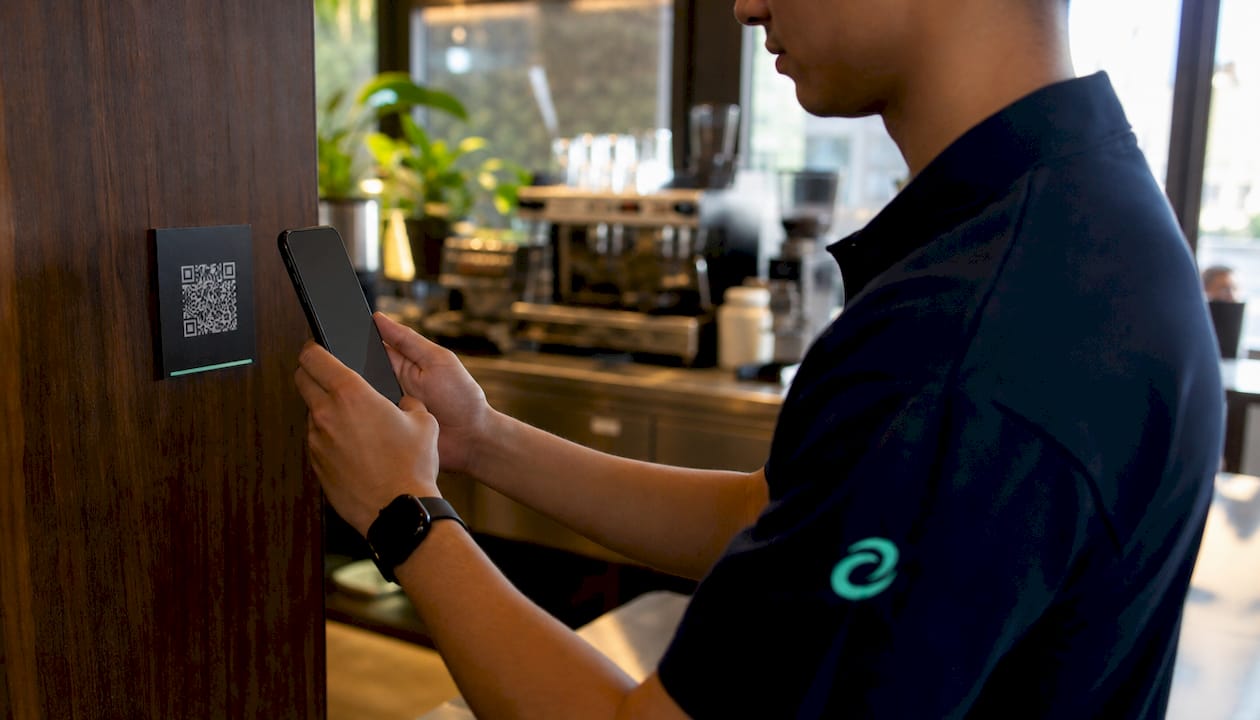
Photo verification adds a second layer. When the system captures a photo at clock-in, any attempt to clock in for a coworker becomes immediately visible. Kloqk includes photo verification as a standard feature at no added cost, which is uncommon among free-tier tools.
Payroll integration is the third pillar. When your time tracking system exports hours directly to payroll, you eliminate manual data entry and the transcription errors that come with it. Every hour worked flows automatically into the pay calculation, including overtime.
- Mobile clock-ins give employees flexibility and give managers live attendance data.
- Geofencing confirms location at every punch, blocking off-site clock-ins.
- QR-code verification ties the clock-in to a specific physical station or entrance.
- Photo capture creates visual proof of who clocked in and when.
- Payroll sync removes manual entry and reduces calculation errors.
- Permanent audit logs record every edit to a time entry, including who made the change and why.
Audit logs that capture edits with timestamps and user IDs are the single most underrated compliance feature. They turn your time records into a legal document that can defend a wage claim in court.
Pro Tip: Set your geofence radius to match your actual store footprint, not just the building address. A radius that is too wide lets employees clock in from the street. A radius that is too tight causes false rejections at the door.
2. Which policies keep retail time records compliant?
Technology alone does not create compliance. A written time tracking policy is the document that defines the rules, and a comprehensive policy covering explicit recording rules and prohibitions is the foundation of any wage claim defense.
Every retail time tracking policy needs these elements:
- Exempt and non-exempt classification. Define which employees are covered by FLSA overtime rules and which are not. Misclassification is one of the fastest paths to a wage claim. The exempt vs. non-exempt distinction determines who must have every minute tracked.
- Single system of record. Designate one platform as the official source of hours. Using two systems creates conflicting records and weakens your legal position.
- Clock-in and clock-out rules. State exactly when employees must punch in and out, including before and after breaks. Vague rules produce inconsistent records.
- Manual break recording. Require employees to punch out and back in for every break rather than relying on automatic deductions. Automated break deductions create inaccurate records when employees miss or shorten breaks, and in states like California that exposure becomes a direct wage liability.
- Overtime authorization. Require manager approval before any employee works beyond their scheduled hours. This gives you cost control and a paper trail.
- Off-the-clock work prohibition. State explicitly that working without clocking in is prohibited and carries documented consequences. This protects both the employee and the business.
Pro Tip: Post your time tracking policy in the break room and include it in onboarding paperwork. A policy employees have never read offers no legal protection.
3. What are the most common time tracking mistakes in retail stores?
Most retail wage compliance problems come from operational habits, not intentional fraud. The most common compliance issues arise from routine practices that quietly accumulate into legal exposure.
- Automatic break deductions. Setting the system to deduct 30 minutes for every shift longer than six hours sounds efficient. The problem is that retail employees frequently skip or cut breaks short during busy periods. The deduction still happens, and the employee is underpaid for time actually worked.
- Hidden compensable hours. Tasks like opening the store, running a closing security check, attending a product training session, or waiting for a manager to unlock the safe all count as work time under FLSA. Not recording these hours is one of the most common and costly compliance gaps in retail.
- Multiple tracking systems. Using a paper sign-in sheet alongside a digital app creates two records that rarely match. When they conflict, you cannot prove which is correct.
- Inconsistent manager overrides. When managers edit time entries without a documented reason, those edits look like manipulation in a wage dispute. Every override needs a note.
- Untrained employees. Employees who do not understand how to log breaks or correct a missed punch will create inaccurate records even with the best technology in place.
The fix for most of these problems is the same: one system, clear rules, and consistent training. Technology handles the recording. Policy handles the rules. Training makes both work.
4. How to implement a new retail time tracking system smoothly
Switching systems mid-operation is where most retail managers lose confidence. The risk is real: a misconfigured system on a live payroll cycle can underpay or overpay an entire team.
- Run parallel systems for one full pay cycle. Keep your existing records running alongside the new system before you cut over completely. Parallel tracking validates the new system against known-good records and catches configuration errors before they hit payroll.
- Communicate changes before they go live. Tell employees what is changing, why it is changing, and exactly how to use the new system. Resistance drops sharply when staff understand the reason behind a change.
- Train on the floor, not just in a meeting. Walk employees through the clock-in process at the actual device or location they will use. Abstract training does not stick in a retail environment.
- Set up real-time overtime alerts immediately. Pre-threshold overtime alerts let managers adjust schedules before an employee crosses into overtime, rather than discovering the overage after the fact. Configure these on day one.
- Assign one point of contact for questions. Designate a manager or HR contact who owns the system during the transition. Confusion about who to ask creates workarounds that undermine the new process.
Pro Tip: Run your parallel cycle during a typical week, not a holiday or sale period. Unusual traffic patterns will skew the comparison and make it harder to spot real discrepancies.
5. How situational factors shape your choice of time tracking features
Not every retail operation needs the same feature set. The right choice depends on your store structure, employee mix, and compliance priorities.
| Store situation | Priority features |
|---|---|
| Single location, small team | Mobile clock-in, basic overtime alerts, payroll export |
| Multi-location operation | Centralized dashboard, multi-location time clock, per-store reporting |
| High part-time or seasonal staff | Flexible scheduling, automatic classification by hours worked |
| Mix of exempt and non-exempt employees | Classification controls, separate tracking rules by employee type |
| High time theft risk | Geofencing, photo verification, audit logs |
| Tight labor budget | Pre-threshold overtime alerts, labor cost reporting by shift |
Multi-location retailers need a centralized view above all else. Checking each store’s records separately creates blind spots and delays. A single dashboard that shows all locations in real time lets you catch overtime exposure or missed punches across the whole operation before payroll runs.
Budget-conscious managers often skip overtime alert features because they appear to be a premium add-on. That is a false economy. A single unplanned overtime shift costs more than a month of software fees at most entry-level pricing tiers. Kloqk includes overtime calculations and alerts at no cost, which removes that trade-off entirely for small retail operations.
Key takeaways
Retail time tracking accuracy depends on combining location-verified clock-ins, written policies with explicit break and overtime rules, and a single integrated system of record that covers every compensable hour.
| Point | Details |
|---|---|
| FLSA recordkeeping is mandatory | Retail employers must retain accurate time records for at least two years. |
| Location verification prevents time theft | Geofencing and QR-code clock-ins confirm actual presence and block buddy punching. |
| Written policies are your legal defense | Explicit rules on breaks, overtime, and off-the-clock work reduce wage claim risk. |
| Parallel testing protects payroll accuracy | Running old and new systems together for one pay cycle catches errors before they cost you. |
| Pre-threshold alerts control labor costs | Overtime alerts before the threshold let managers adjust shifts proactively, not reactively. |
What I have learned from watching retailers get time tracking wrong
Retail managers tend to treat time tracking as a payroll function. That framing is the root of most problems I have seen. When time tracking is just about cutting checks, managers tolerate sloppy records as long as the numbers roughly add up. The compliance exposure builds quietly in the background.
The stores that handle this well treat time tracking as an operational control. They review exceptions daily, not weekly. They investigate every pattern of missed punches or edited entries before it becomes a habit. They train new hires on the clock-in process the same day they train them on the register.
The technology matters less than the discipline around it. A basic mobile clock-in with a clear policy beats a sophisticated platform that nobody follows consistently. That said, features like photo verification and geofencing do remove entire categories of error and fraud that discipline alone cannot prevent. The best setup is both: solid technology and consistent human oversight. Neither replaces the other.
Saad
Kloqk gives retail managers accurate time records at no cost
Retail managers who need location-verified, payroll-ready time records without paying for every feature have one strong option. Kloqk’s employee time tracking platform includes GPS geofencing, photo verification, break tracking, overtime calculations, and payroll exports, all at no cost.

Kloqk works for single-location shops and multi-store operations alike. The retail time clock supports mobile clock-ins, kiosk mode, and QR-code verification out of the box. Audit logs capture every edit automatically, so your records are always defensible. If you manage a team where payroll accuracy and compliance are non-negotiable, Kloqk is built for exactly that.
FAQ
What records must retail employers keep under FLSA?
Retail employers must maintain accurate timekeeping records for at least two years. The employer bears the burden of proof in any wage dispute, so complete records are the primary legal defense.
How do geofencing and QR codes prevent buddy punching?
Both methods tie each clock-in to a confirmed physical location and device, making it impossible to clock in for a coworker remotely. This cuts time theft at the source without requiring manager supervision of every punch.
Why are automatic break deductions risky in retail?
Automatic deductions assume every employee takes a full break every shift. When employees skip or shorten breaks during busy periods, the deduction still applies and the employee is underpaid for time actually worked, creating wage liability.
What counts as compensable work time under FLSA?
Any task the employer requires or allows counts as work time, including store opening duties, closing security checks, mandatory training, and waiting for a manager. Failing to record these hours is a common source of underpayment claims.
How many systems should a retail store use for time tracking?
One. Using multiple systems, such as a paper log alongside a digital app, creates conflicting records that are impossible to reconcile in a wage dispute. Designate a single platform as the official system of record and enforce it consistently.
Recommended
Sources
Every figure on this page traces to one of these. Primary law and government sources are listed first.
Written by
Dana WhitfieldHR Compliance Lead
Dana writes about wage-and-hour law, FLSA overtime, and leave compliance for U.S. small businesses, translating dense regulations into plain steps owners can act on.
Keep Reading
Track Hours the Easy Way
Kloqk is a free time clock that handles punches, breaks, overtime, and payroll-ready reports.
Start free