The Real Role of Hour Tracking in HR for Small Business

Real-time hour tracking is the process of instantly capturing and verifying employee work hours to ensure accurate payroll and prevent time theft. For small business owners, this is not a luxury feature. It is the foundation of sound workforce management. The role of real-time hour tracking in HR covers everything from FLSA compliance to overtime control, and modern tools like HR Cloud, Mekari Talenta, and ZenHR have made these capabilities accessible to businesses of any size. Getting this right from day one protects your payroll budget, your legal standing, and your team’s trust.
What is the role of real-time hour tracking in HR?
Real-time hour tracking, known in HR circles as time and attendance management, records employee work hours the moment they happen. Traditional paper timesheets and manual punch cards create gaps. Employees forget to clock out, managers estimate hours, and payroll ends up wrong. Automated tracking eliminates that guesswork entirely.
The core function is simple: every clock-in and clock-out creates a digital timestamp. That timestamp feeds directly into payroll calculations, including overtime, break deductions, and shift differentials. Cloud-based solutions remove reliance on paper and manual tracking, which is especially critical for hybrid and remote teams. The result is a payroll cycle that runs on verified data, not estimates.
For small businesses, the stakes are high. The Fair Labor Standards Act requires accurate records of hours worked. FLSA liability can extend two years for unintentional payroll errors and three years for willful violations. A digital, tamper-evident audit trail is your primary defense during a labor department audit.
How does real-time hour tracking technology work?
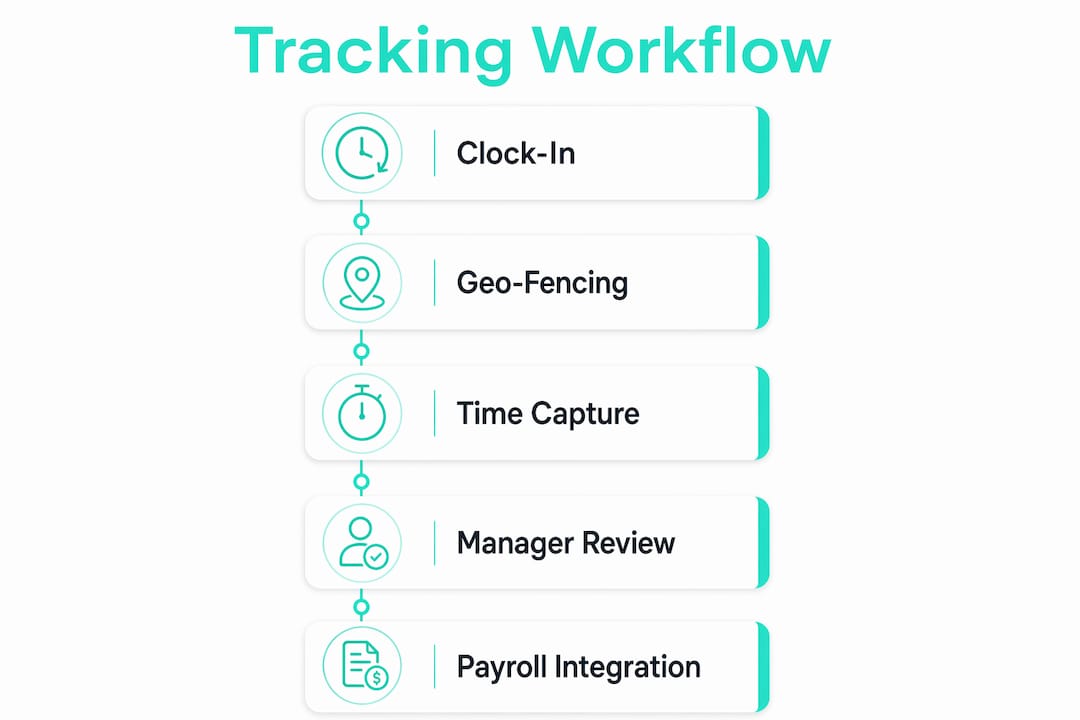
The technology behind HR real-time tracking has advanced well beyond a simple punch clock. Today’s systems combine GPS, biometric verification, and payroll integration into one workflow.
Here is how the key mechanisms work:
- GPS and geo-fencing: Employees clock in only when their device is within a defined geographic boundary. A restaurant manager can set a geo-fence around the building so no one clocks in from the parking lot or from home. GPS and geo-fencing are triggered only at clock-in and clock-out events, not continuously, which protects employee privacy while confirming location.
- Digital timestamping: Every clock event is recorded with a precise time and date. Edits are logged with a reason and a manager’s credentials, creating a full audit trail.
- Biometric and photo verification: Face recognition, fingerprint scanning, and photo capture at clock-in confirm that the right person is clocking in. This directly eliminates buddy punching, where one employee clocks in for another.
- Payroll and HRIS integration: Real-time attendance events push directly to payroll systems, automating overtime calculations and eliminating manual data entry. No polling, no missed punches, no reconciliation headaches.
- AI anomaly detection: Newer platforms use AI to flag unusual patterns, such as repeated early clock-outs or overtime spikes, before they become payroll problems.
Pro Tip: Set your geo-fence radius to match your actual worksite boundary, not just the building address. A radius that is too wide allows off-site clock-ins. A radius that is too tight causes legitimate clock-in failures for employees near the entrance.
Monitoring intervals for location data typically range from 1 to 15 minutes, with most systems capturing location only at key time events. That design keeps the system compliant with employee privacy expectations while still delivering the verification you need.
What are the benefits of real-time hour tracking for small businesses?
The benefits of time tracking go beyond payroll accuracy. They touch compliance, culture, and day-to-day operations.
- Accurate pay every cycle. Automated systems calculate regular hours, overtime, vacation, and sick leave without manual input. Payroll integration leads to efficient payroll cycles and a measurably reduced HR workload.
- Audit-ready records. Every clock event is stored with a tamper-evident log. If a wage dispute or labor audit arises, you have documented proof of every hour worked and every edit made.
- Prevention of time theft. Buddy punching, early clock-ins, and inflated hours cost small businesses real money. GPS verification and photo capture at clock-in shut down the most common forms of time fraud.
- Proactive staffing decisions. Real-time visibility transforms workforce management from reactive to proactive. Managers can see attendance status across all locations instantly and adjust staffing before a shift goes short.
- Employee trust and transparency. Verified records remove ambiguity. Employees know their hours are captured correctly, which reduces pay disputes and builds confidence in the payroll process.
Small businesses that implement real-time tracking report fewer payroll errors, better labor cost control, and higher employee satisfaction. Early integration with onboarding and consistent staff training are the two factors that determine whether adoption succeeds or stalls.
What challenges come with adopting real-time hour tracking?
Adoption is rarely frictionless. The most common obstacles are not technical. They are human.
- Fear of micromanagement. Employees often assume GPS tracking means constant surveillance. The reality is different. Most systems capture location only at clock-in and clock-out, not throughout the shift. Communicating this clearly during rollout reduces resistance significantly.
- Privacy concerns. Managers worry about legal exposure from tracking personal devices. The solution is to use company-provided devices or apps that track only during work hours and only at defined events.
- Device and connectivity gaps. Field crews in construction or landscaping may work in areas with poor cell service. Offline clock-in capability, which queues the timestamp and syncs when connectivity returns, solves this problem.
- Resistance to change. Long-tenured employees accustomed to paper timesheets often push back hardest. Pairing the rollout with a clear explanation of how the system protects their pay, not just monitors their hours, shifts the conversation.
Pro Tip: Frame GPS and photo verification as employee protections, not management tools. Honest employees prefer objective proof of their hours because it ends disputes about forgotten punches and protects them from false accusations.
The misconception that tracking tools hurt morale is widespread but not supported by experience. When employees understand that verified records prevent pay disputes and ensure they are paid for every minute worked, most welcome the change.
How to implement a real-time hour tracking system in your small business
Implementation succeeds when it is treated as a process change, not just a software installation. The table below compares the key decisions you will face when choosing and deploying a system.
| Decision | Field-based teams | Office or retail teams |
|---|---|---|
| Clock-in method | GPS mobile app with geo-fencing | Kiosk tablet or web browser |
| Verification | Photo capture or GPS confirmation | Photo capture or PIN |
| Payroll integration | Direct export to payroll software | Direct export or API connection |
| Offline capability | Required for remote sites | Optional |
| Privacy approach | Location at clock events only | No location tracking needed |
Start tracking from day one of employment. Integrating time tracking into onboarding sets the expectation immediately and avoids the harder conversation of introducing it to an existing team mid-cycle. Choose a solution that fits your business type. A construction crew needs GPS time clock capability and offline support. A retail shop needs a kiosk and shift scheduling integration.
Train both employees and managers. Managers need to understand how to review exceptions, approve edits, and read overtime alerts. Employees need to know exactly how to clock in, what happens if they forget, and how their location data is used. Use real-time data to catch overtime before it happens, not after payroll closes. Set alerts for employees approaching their weekly hour threshold so you can adjust scheduling proactively.
Audit your policies at least twice a year. Labor laws change at the state level frequently, and your tracking system’s rules, such as break deductions and overtime thresholds, need to match current requirements.
Key Takeaways
Real-time hour tracking is the single most effective tool small businesses have for accurate payroll, FLSA compliance, and time theft prevention.
| Point | Details |
|---|---|
| Legal protection is built in | Digital audit trails defend against FLSA claims extending up to three years back. |
| GPS tracks location at events only | Location is captured at clock-in and clock-out, not continuously, protecting employee privacy. |
| Payroll integration removes manual errors | Direct system integration automates overtime and eliminates data entry mistakes. |
| Honest employees prefer verified records | Photo and GPS verification ends pay disputes and reinforces fairness for the whole team. |
| Implementation starts at onboarding | Introducing tracking from day one avoids resistance and sets clear expectations early. |
What I have learned from watching small businesses get this wrong
I have spent years watching small business owners treat time tracking as an afterthought. They install a system after a payroll dispute, after a labor audit, or after they realize a trusted employee has been padding hours for months. By then, the cost is already real.
The businesses that get this right do one thing differently. They treat the tracking system as infrastructure, not oversight. The same way you would not run a restaurant without a POS system, you should not run a team without verified time records. The AI-driven anomaly detection now built into platforms like SAP SuccessFactors HCM is accelerating this shift. It flags buddy punching and overtime manipulation automatically, which means managers spend less time auditing and more time managing.
The privacy debate is mostly settled in practice. Employees who have nothing to hide prefer systems that prove their hours objectively. The ones who resist loudest are often the ones benefiting from loose tracking. That is an uncomfortable truth, but it is consistent with what I have seen across industries from restaurants to field services.
The future of workforce management is mobile-first and GPS-enabled. Remote and hybrid work models have made office-based punch clocks obsolete for a large share of the workforce. Small businesses that adopt mobile tracking now are not just solving today’s payroll problem. They are building the operational foundation for a workforce that works anywhere.
Saad
Kloqk gives small businesses free real-time time tracking
Kloqk is built specifically for small business owners who need accurate time records without paying for features that should come standard. The platform offers free employee time tracking with GPS geofencing, photo verification at clock-in, overtime calculations, and payroll-ready exports at no cost.
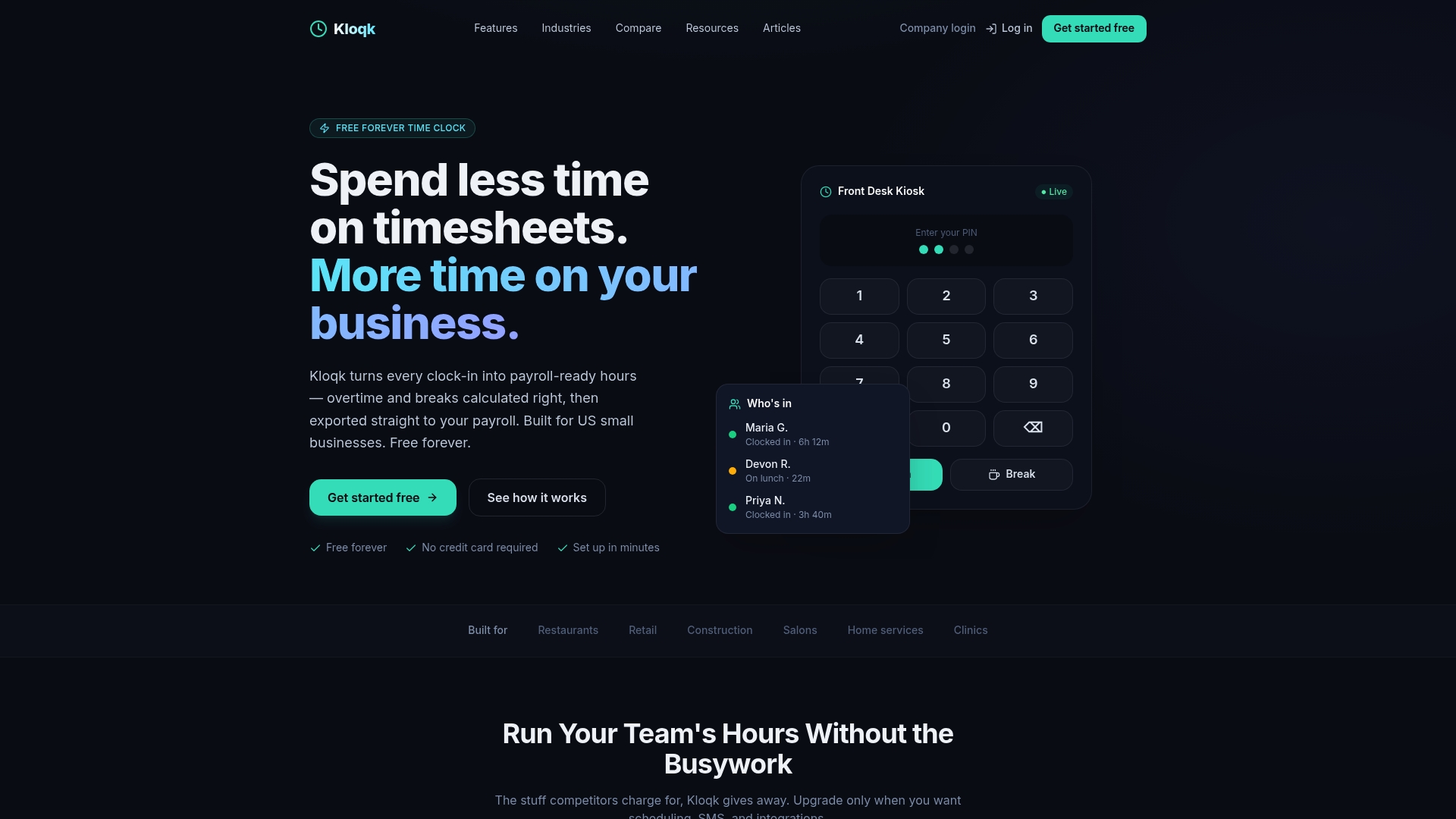
For field crews, restaurant teams, and construction sites, Kloqk’s buddy punching prevention tools create audit-ready records from the first clock-in. Setup takes minutes, not weeks. There are no per-seat fees and no paywalled features. If you manage hourly employees and want payroll to run on verified data instead of estimates, Kloqk is the place to start.
FAQ
What is real-time hour tracking in HR?
Real-time hour tracking in HR is the automated process of recording employee clock-ins and clock-outs the moment they occur, feeding verified data directly into payroll systems. It replaces manual timesheets with digital, tamper-evident records.
How does GPS geo-fencing prevent time theft?
GPS geo-fencing restricts clock-ins to a defined geographic area, so employees can only record time when they are physically at the worksite. Combined with photo verification, it eliminates buddy punching and off-site clock-in fraud.
Is GPS tracking an invasion of employee privacy?
No. Most systems capture location only at clock-in and clock-out events, not continuously throughout the shift. Employees are informed of this during onboarding, and the data is used solely to verify work location.
What happens if an employee forgets to clock out?
Most hour tracking software flags missed punches as exceptions for manager review. The manager can then correct the record with a logged reason, maintaining a complete and accurate audit trail.
How does real-time tracking help with FLSA compliance?
FLSA requires employers to keep accurate records of hours worked. Digital tracking creates a timestamped, tamper-evident log that serves as primary evidence during labor audits, covering liability periods of up to three years for willful violations.
Recommended
Sources
Every figure on this page traces to one of these. Primary law and government sources are listed first.
- 1. blog.zenhr.com
- 2. hrcloud.com
- 3. talenta.co
- 4. rapidhr.com
- 5. sap.com
Written by
Priya NairPeople Operations Writer
Priya focuses on HR and hiring for small teams, onboarding, scheduling people fairly, and the day-to-day of managing hourly staff without an HR department.
Keep Reading
Track Hours the Easy Way
Kloqk is a free time clock that handles punches, breaks, overtime, and payroll-ready reports.
Start free