Why Accurate Hours Matter for Payroll in 2026

Accurate employee hours are the foundation of every correct paycheck, every clean tax filing, and every audit your business survives without penalty. The payroll industry holds an accuracy standard of 98.8%, yet only 80% of payrolls run completely error-free. That gap is where wage claims, IRS penalties, and employee turnover live. Understanding why accurate hours matter for payroll is not a compliance checkbox. It is the difference between a business that runs clean and one that spends weeks fixing preventable mistakes.
Why accurate hours matter for payroll compliance
Accurate timekeeping for payroll means recording every minute an employee works, including overtime, breaks, and off-schedule time, and feeding that data into payroll without distortion. The Fair Labor Standards Act (FLSA) requires employers to maintain daily time records for all non-exempt employees. The DOL Wage and Hour Division enforces those requirements through audits, back wage awards, and civil penalties. Getting hours wrong is not a clerical inconvenience. It is a federal compliance failure.
Starting in 2026, employers must separately report qualified overtime on Form W-2 using Box 12 Code TT. That single regulatory change makes precise overtime tracking more critical than it has ever been. A business that rounds hours loosely or misses overtime thresholds will now face W-2 reporting errors on top of wage violations.

The importance of accurate payroll also shows up in employee trust. Workers notice underpayments faster than employers notice overpayments. A single short paycheck can trigger a formal wage complaint, and a pattern of them invites a DOL investigation.
What errors cause inaccurate payroll hours?
50.61% of payroll professionals identify HR data input errors as the primary cause of payroll inaccuracies. That statistic points directly at the front end of the process, where hours are collected and entered.
The most common sources of timekeeping errors include:
- Unapproved or incomplete timesheets. Employees submit partial records, and payroll runs before a manager reviews them.
- Stale employee data. Pay rates, classifications, or job codes that were never updated after a promotion or transfer.
- Missed punches. An employee forgets to clock out, and the system either defaults to a shift end time or flags an exception that nobody resolves.
- Manual entry mistakes. Transcribing hours from paper timesheets into payroll software introduces rounding errors and typos.
- Off-the-clock work. Under federal law, unauthorized work is still compensable. An employer who knows or should have known an employee worked must pay for that time, regardless of whether it was approved.
Pro Tip: Set up automated alerts for missed punches at the end of every shift. Catching a missing clock-out the same day takes two minutes. Catching it three weeks later during payroll reconciliation takes thirty.
Manual processes compound these problems with every new hire, new state, or regulatory update. Manual compliance effort grows with the complexity of your workforce. A five-person restaurant can manage paper timesheets. A 40-person construction crew across three job sites cannot.
How inaccurate hours affect compliance and financial liability
The financial impact of incorrect hours is direct and measurable. Administrative penalties for incorrect information returns reach $340 per form. Late tax deposit penalties range from 2% to 15% depending on how long the deposit is overdue. A single payroll period with systematic hour errors can generate dozens of incorrect forms simultaneously.
Correcting payroll errors after the fact takes 3 to 5 times longer than preventing them through accurate data input and layered controls. Every hour spent on off-cycle corrections is an hour not spent on the work that grows your business.
The FLSA requires employers to keep payroll records for at least three years. That means every edit to a timesheet, every manual adjustment, and every exception must be documented with a reason and an employee acknowledgment. Timesheet changes without documented reasons increase liability and complicate audit trails. If the DOL audits your records and finds unexplained edits, the burden of proof shifts to you.
Payroll compliance under FLSA covers overtime pay, worker classification, and record maintenance. Back wage awards from DOL enforcement actions can cover two years of underpayments, or three years if the violation is willful. The cost of a single enforcement action routinely exceeds the cost of a year of proper time tracking software.
Employee relations carry their own financial weight. Workers who experience repeated paycheck errors disengage and leave. Replacing an hourly employee costs a business roughly one-third of that employee’s annual wages in recruiting and training. Accurate pay is one of the cheapest retention tools available.
Best practices for ensuring accurate payroll hours
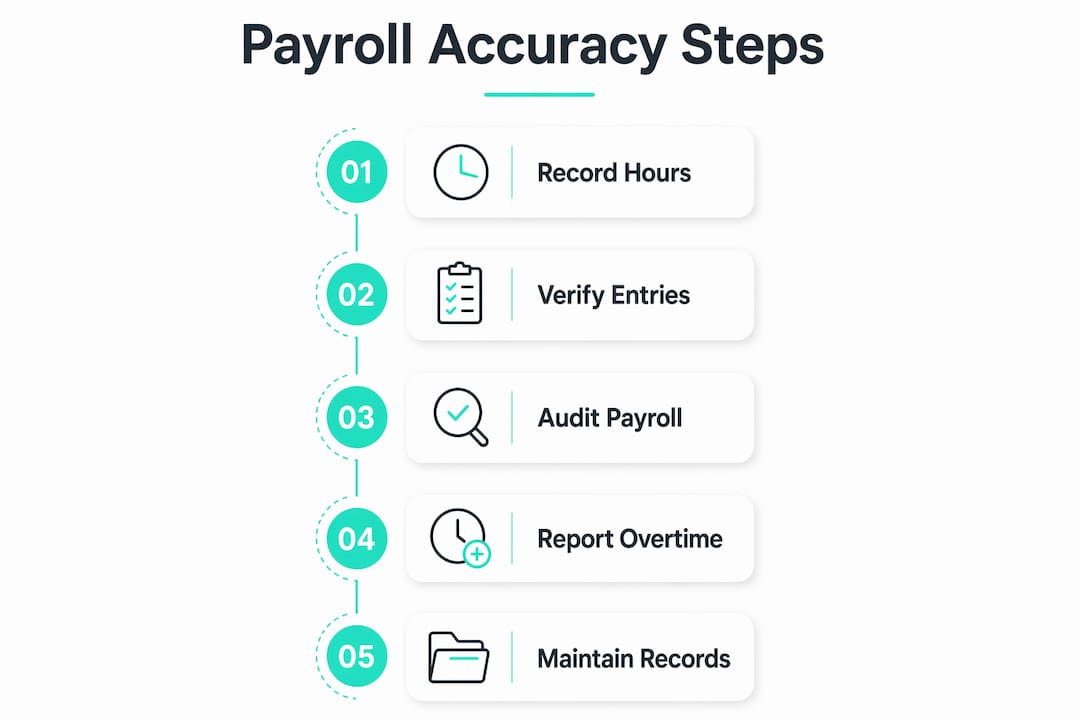
The most reliable approach to accurate timekeeping for payroll uses layered controls rather than a single point of verification. No one step catches every error. Multiple steps together catch nearly all of them.
- Collect time at the source. Use a digital time clock or mobile app so hours are recorded the moment they happen, not reconstructed from memory at week’s end.
- Require manager approval before payroll runs. Consistent managerial approval of digital timesheets is a critical control. Managers who review timesheets daily catch missed punches and unauthorized overtime before they become payroll errors.
- Build an exception workflow. Every missed punch, edited entry, or break adjustment should trigger a documented review. The employee confirms the correction. The manager approves it. The system logs both.
- Audit overtime calculations every pay period. Overtime rules vary by state. California requires daily overtime after eight hours. Federal law requires weekly overtime after 40 hours. Your payroll system must apply the correct rule for each employee’s work location.
- Communicate policies in writing. Employees who understand your timekeeping rules make fewer errors. A one-page policy covering clock-in procedures, break rules, and overtime approval reduces disputes before they start.
Pro Tip: Run a pre-payroll audit report every pay period that flags any timesheet with a missing punch, an edit without a note, or hours that exceed your standard shift length. Resolve every flag before you process.
For job site time tracking in construction or field service, add location verification to your controls. A GPS stamp on every clock-in confirms the employee was on site, which protects you in a wage dispute and prevents time theft.
How technology improves the accuracy of payroll hours
Automated time tracking systems reduce manual entry errors significantly and improve audit trail quality. The benefits of precise time tracking technology go beyond convenience. They change the risk profile of your entire payroll operation.
| Feature | Manual process | Automated system |
|---|---|---|
| Time capture | Employee writes or types hours | Digital clock-in with timestamp |
| Overtime calculation | Payroll staff calculates manually | System applies rules automatically |
| Audit trail | Paper records, edits hard to trace | Every change logged with user and timestamp |
| Exception handling | Errors found during payroll run | Alerts fire at the moment of the exception |
| Compliance updates | Manual policy review required | System updates apply across all employees |
The practical benefits of this shift are significant:
- Missed punches trigger real-time alerts instead of surfacing three weeks later.
- GPS geofencing confirms employees clock in from the correct location, which prevents buddy punching and protects the employer in wage disputes.
- Photo verification at clock-in creates an identity record that holds up in an audit.
- Payroll exports pull directly from verified time data, eliminating the transcription step where most manual errors occur.
Cloud-based time tracking also scales without adding administrative burden. Adding a new employee, a new location, or a new state does not require a new process. The system handles the complexity. Payroll managers handle the exceptions.
Common pitfalls that undermine payroll hour accuracy
Even businesses with good intentions make recurring mistakes that erode accuracy over time. Knowing the patterns helps you avoid them.
- Auto-deducting meal breaks without exception handling. Payroll systems that auto-deduct lunch breaks must provide a way for employees to report interrupted or missed meals. If an employee works through lunch and the system deducts 30 minutes anyway, you have an underpayment.
- Assuming unauthorized work is unpaid. Federal law does not allow employers to refuse pay for work they knew about, even if they did not authorize it. The correct response is discipline, not a paycheck deduction.
- Ignoring small increments of remote work. A remote employee who checks email for 20 minutes before their official start time is working. Those minutes accumulate. Over a year, they can represent a material wage claim.
- Editing timesheets without employee confirmation. Any adjustment to a submitted timesheet should require the employee to acknowledge the change. Without that confirmation, you have a one-sided record that will not hold up under scrutiny.
- Skipping staff training. Payroll managers who understand FLSA requirements catch errors that software misses. Annual training on wage and hour rules is not optional for a team responsible for payroll accuracy.
Pro Tip: Assign one person to track payroll error rates each quarter. Count the number of corrections, their causes, and their dollar value. Patterns in that data will show you exactly where your process breaks down.
Key Takeaways
Accurate employee hours are the single most controllable variable in payroll compliance, and fixing errors after the fact costs 3 to 5 times more than preventing them through layered controls and digital time capture.
| Point | Details |
|---|---|
| Compliance starts with hours | FLSA requires daily time records; errors trigger DOL back wage awards and IRS penalties up to $340 per form. |
| Data input is the top error source | 50.61% of payroll professionals cite HR data input errors as the primary cause of inaccuracies. |
| Manager approval is a critical control | Requiring digital timesheet approval before every payroll run catches most errors before they cost money. |
| Automation changes the risk profile | Automated systems log every change, fire exception alerts in real time, and eliminate manual transcription errors. |
| Unauthorized work is still compensable | Federal law requires paying for all time worked, whether approved or not, making real-time tracking non-negotiable. |
The real cost of “close enough” payroll
I have worked with payroll managers who ran their processes on spreadsheets and paper timesheets for years without a major incident. They called it “close enough.” Then one employee filed a wage complaint, the DOL requested three years of records, and “close enough” turned into a six-figure back wage settlement and months of administrative chaos.
The uncomfortable truth about payroll hour accuracy is that the risk is invisible until it is not. Small errors accumulate quietly. A missed punch here, a rounded hour there, an auto-deducted lunch that was never actually taken. None of these feel urgent in the moment. Together, they build a liability that shows up all at once.
Process architecture matters more than effort. A payroll manager who works hard on a broken process will still produce errors. A payroll manager with a well-designed system of digital capture, manager approval, exception alerts, and documented edits will produce clean payrolls with less effort. The investment in that system is not a cost. It is insurance against the far larger cost of getting it wrong.
The 2026 Form W-2 overtime reporting requirement is a good forcing function. If your overtime tracking is not airtight right now, you have a deadline. Use it.
Saad
Kloqk turns clock-ins into payroll-ready hours
Payroll managers at small businesses should not spend hours reconciling timesheets before every pay run. Kloqk’s free employee time tracking software captures hours automatically, calculates overtime by federal and state rules, and exports payroll-ready data without manual transcription.

Kloqk includes GPS geofencing to confirm employees clock in from the right location, photo verification to prevent buddy punching, and break tracking with exception handling built in. Every edit is logged with a timestamp and reason, giving you the audit trail FLSA requires. The GPS time clock works across multiple locations at no per-seat cost, which makes it practical for restaurants, construction crews, and any business with employees in the field.
FAQ
What is the payroll industry accuracy standard?
The payroll industry holds an accuracy standard of 98.8%, yet only 80% of payrolls run completely error-free. That gap represents significant compliance risk and administrative rework for businesses of all sizes.
What are the IRS penalties for payroll errors?
Administrative penalties for incorrect information returns reach $340 per form, and late tax deposit penalties range from 2% to 15% depending on how long the deposit is overdue. A single payroll period with systematic errors can generate multiple penalties simultaneously.
Does an employer have to pay for unauthorized work?
Yes. Under federal law, employers must pay for all time worked if they knew or should have known the work occurred, regardless of whether it was authorized. The correct response to unauthorized work is a disciplinary action, not a wage deduction.
How long must employers keep payroll records?
The FLSA requires employers to retain payroll records for at least three years. Those records must include daily time entries, any edits made, and the reasons for those edits, to support an audit defense.
How does automated time tracking reduce payroll errors?
Automated systems capture hours at the source with a digital timestamp, fire alerts for missed punches in real time, and apply overtime rules automatically. This eliminates the manual transcription step where most payroll errors originate.
Recommended
Sources
Every figure on this page traces to one of these. Primary law and government sources are listed first.
Written by
Marcus ReyesPayroll & Timekeeping Specialist
Marcus covers payroll accuracy, timesheets, and time tracking, the unglamorous mechanics that keep paychecks correct and audits painless.
Keep Reading
Track Hours the Easy Way
Kloqk is a free time clock that handles punches, breaks, overtime, and payroll-ready reports.
Start free