Why Real-Time Clock-In Monitoring Matters for Small Business

Real-time clock-in monitoring is the process of instantly capturing employee attendance data the moment a worker starts or ends a shift, giving managers live visibility into who is on the clock right now. This approach, formally known as real-time workforce visibility, solves two of the most expensive problems small businesses face: payroll inaccuracies and employee time theft. Without it, you are always reacting to problems that already cost you money. With it, you catch issues before they reach your payroll run.
Why real-time clock-in monitoring matters for operational efficiency
The core argument for real-time monitoring is simple. Organizations that replace retrospective reporting with live workforce visibility improve operational efficiency by 25, 30%. That gain comes from faster decisions, not from working harder.
When you can see attendance data the moment it happens, you stop managing by memory or end-of-week spreadsheets. A manager at a restaurant, for example, can see at 11:00 AM that two servers have not clocked in for the lunch rush. That is a problem they can fix in minutes by calling in a backup. Without live data, they find out at 11:45 AM when the dining room is already backed up.

Real-time monitoring also changes how you allocate labor. Live attendance tracking gives you instant identification of late arrivals, extended breaks, and early departures. Each of those deviations represents a gap between the labor you scheduled and the labor you actually have. Closing that gap in real time keeps your operation running at the level your customers expect.
Key operational benefits include:
- Shift coverage gaps detected and filled before service quality drops
- Overtime alerts triggered before an employee crosses a threshold that changes your labor cost
- Break compliance tracked automatically, which matters for states with mandatory break laws
- Multi-location visibility from a single dashboard, so you are not calling each site to confirm staffing
Pro Tip: Set up automated alerts for any employee who has not clocked in within 10 minutes of their scheduled start time. That single rule eliminates most last-minute staffing surprises.
What problems does real-time attendance tracking actually solve?
Manual time tracking creates three categories of problems: data entry errors, payroll leakage, and deliberate fraud. Real-time systems address all three.
Manual payroll data transfer is a leading cause of administrative errors and payroll leakage. When a manager hand-keys hours from a paper timesheet into a payroll system, every transcription is a chance for a mistake. Multiply that by 15 employees over 26 pay periods and you have hundreds of opportunities for errors that either overpay or underpay your team.
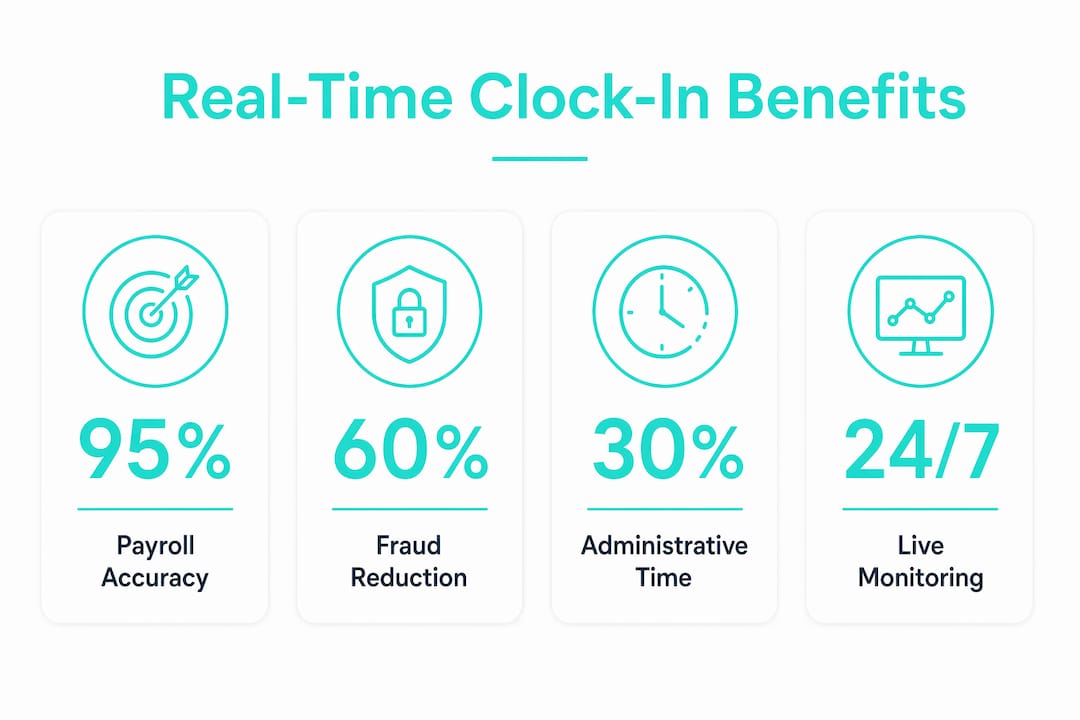
Buddy punching is the most common form of deliberate time fraud in hourly workplaces. One employee clocks in for a coworker who has not arrived yet. In a business with thin margins, like a retail shop or a construction crew, that adds up fast. Photo verification and GPS tracking reduce buddy punching risks by requiring proof of identity and location at the moment of clock-in.
Here is a practical breakdown of the problems real-time monitoring solves:
- Transcription errors from manual data entry are eliminated when clock-in data flows directly into payroll calculations.
- Buddy punching is blocked by photo verification, which requires the clocking-in employee to take a selfie that managers can review.
- Ghost employees on the schedule are caught immediately because the system shows no clock-in activity.
- Unauthorized overtime is flagged before it is worked, not discovered after the paycheck is cut.
- Break violations are logged automatically, protecting you from wage and hour claims under the Fair Labor Standards Act (FLSA).
Pro Tip: Run a 30-day audit comparing your scheduled hours to your actual clocked hours before you implement any new system. The gap you find is your baseline cost of not having real-time visibility.
What features make clock-in monitoring effective for small businesses?
Not every time tracking tool delivers genuine real-time monitoring. The features that separate effective systems from basic time clocks are worth understanding before you commit to a platform.
Employee time tracking software centralizes clock-in and clock-out data, automates payroll calculations, and supports productivity monitoring across your workforce. The key is integration. A system that captures clock-ins but requires manual export to your payroll software still carries the same transcription risk as a paper timesheet.
Live dashboards
A live dashboard shows you the current status of every employee: clocked in, on break, clocked out, or absent. This is the foundation of proactive workforce management. Without it, you are working from yesterday’s data.
Authentication controls
Photo verification requires employees to take a photo at clock-in, which a manager can review to confirm identity. GPS geofencing restricts clock-ins to a defined geographic area, so a construction worker cannot clock in from home before driving to the job site. Together, these two controls close the most common fraud vectors in hourly workplaces.
Automated payroll integration
When clock-in data flows directly into payroll calculations, overtime rules apply automatically, break deductions happen without manual intervention, and your payroll export is ready without anyone touching a spreadsheet. Kloqk includes overtime calculations, break tracking, and payroll exports at no cost, which removes the financial barrier that keeps many small businesses on manual systems.
Mobile and multi-location access
Small business owners rarely sit at a desk all day. Mobile access lets you check staffing from your phone while you are at a vendor meeting or a second location. Multi-location monitoring from a single account is particularly valuable for businesses with two or three sites that share a payroll process.
How to implement real-time clock-in monitoring: best practices
Adopting a real-time system only delivers results if your team uses it consistently. The technology is the easy part. The process is where most small businesses stumble.
Start by establishing a clear clock-in protocol before you launch the system. Every employee needs to know exactly when to clock in, where to do it, and what happens if they forget. Ambiguity in the protocol creates gaps in your data, which defeats the purpose of real-time visibility.
Real-time attendance analytics enable immediate responses to workforce trends and improve shift planning. To get there, you need clean data from day one. That means training every employee and every manager on the system before it goes live, not after.
Best practices for a successful rollout:
- Set up payroll integration first. Confirm that clock-in data flows correctly into your payroll calculations before your first live pay period.
- Train managers on anomaly alerts. A manager who ignores a late clock-in alert defeats the purpose of having one.
- Review attendance reports weekly for the first two months. Patterns in late arrivals or missed clock-outs often point to a scheduling problem, not an employee problem.
- Use GPS geofencing for field teams. For construction crews or delivery drivers, geofencing is the single most effective control you can add. Kloqk’s GPS time clock includes geofencing at no additional cost.
- Audit payroll exports monthly. Compare your automated export to your scheduled hours to catch any configuration errors early.
Automated reporting eliminates manual effort and cuts errors in workforce management. The goal is a system that runs without daily intervention, freeing you to focus on the business rather than the paperwork.
Pro Tip: Assign one manager as the system owner for the first 90 days. That person reviews alerts daily and becomes your internal expert. After 90 days, the process becomes routine and the role becomes lighter.
Key Takeaways
Real-time clock-in monitoring is the most direct way for small businesses to protect payroll accuracy, prevent time theft, and make faster workforce decisions.
| Point | Details |
|---|---|
| Operational efficiency gain | Replacing manual reporting with live data improves efficiency by 25, 30%. |
| Payroll accuracy | Direct integration of clock-in data eliminates transcription errors and payroll leakage. |
| Fraud prevention | Photo verification and GPS geofencing block buddy punching and false clock-ins. |
| Proactive management | Live dashboards let managers fix staffing gaps before they affect operations. |
| Implementation discipline | Clean protocols and manager training determine whether the technology delivers results. |
The real cost of waiting until something goes wrong
Small business owners tend to fix workforce management problems after they surface in a payroll dispute or a staffing crisis. I understand why. When you are running a restaurant or a construction crew, you are solving the problem in front of you, not the one that might appear next Friday.
But without real-time monitoring, businesses stay reactive and lose the ability to make decisions before costs accumulate. The payroll error you discover on payday already happened two weeks ago. The buddy punching you catch during an audit has been running for months. Reactive management does not just cost money. It costs the trust of the employees who are doing the right thing and watching others get away with not doing it.
The businesses I have seen get the most out of real-time monitoring are not the ones with the most sophisticated setups. They are the ones where the owner actually looks at the dashboard every morning. Five minutes of attention to live attendance data is worth more than an hour of end-of-week reconciliation. The technology only works when someone is watching it.
The other thing worth saying plainly: free tools have removed the cost barrier entirely. There is no longer a financial reason to stay on paper timesheets or a basic punch clock. The question is not whether you can afford real-time monitoring. The question is how much the absence of it is costing you right now.
Saad
Kloqk gives small businesses real-time clock-in tools at no cost
Small business owners who want live attendance visibility without paying for it have a direct option in Kloqk.

Kloqk’s free employee time tracking platform captures clock-ins in real time, applies overtime rules automatically, and exports payroll-ready data without manual entry. Photo verification and GPS geofencing are included at no cost, which means the fraud prevention features that enterprise platforms charge for are available to a five-person crew or a 50-person team equally. For small businesses in restaurants, retail, construction, and hospitality, Kloqk turns attendance data into payroll-ready hours without the administrative overhead that makes manual systems so expensive over time.
FAQ
What is real-time clock-in monitoring?
Real-time clock-in monitoring is the live capture of employee attendance data at the moment a worker clocks in or out. It gives managers instant visibility into who is working, who is late, and who has not arrived.
How does real-time monitoring improve payroll accuracy?
Clock-in data flows directly into payroll calculations, removing manual data entry and the transcription errors that cause overpayments and underpayments. Automated payroll integration applies overtime and break rules without manager intervention.
What is buddy punching and how does monitoring prevent it?
Buddy punching is when one employee clocks in on behalf of a coworker who has not arrived. Photo verification and GPS geofencing prevent it by requiring proof of identity and physical location at the moment of clock-in.
How much does real-time clock-in monitoring cost for small businesses?
Cost varies by platform. Kloqk offers real-time clock-in monitoring, GPS geofencing, photo verification, and payroll exports at no cost, with no per-seat fees.
What is the fastest way to implement real-time clock-in monitoring?
Set up payroll integration first, train every manager on alert protocols, and run a parallel period alongside your existing system for the first two weeks to catch any configuration issues before they affect a live payroll run.
Recommended
Sources
Every figure on this page traces to one of these. Primary law and government sources are listed first.
Written by
Marcus ReyesPayroll & Timekeeping Specialist
Marcus covers payroll accuracy, timesheets, and time tracking, the unglamorous mechanics that keep paychecks correct and audits painless.
Keep Reading
Track Hours the Easy Way
Kloqk is a free time clock that handles punches, breaks, overtime, and payroll-ready reports.
Start free