How Payroll Integration Saves HR Time in 2026

Payroll integration is defined as the automated connection between employee time tracking systems and payroll software, eliminating manual data transfer and the errors that come with it. For HR professionals and small business owners, understanding how payroll integration saves HR time is the difference between spending Friday afternoons reconciling timesheets and spending them on work that actually moves the business forward. Businesses that make this switch reduce payroll prep time by over 60% and cut overall HR administrative burden by up to 40%. That is not a marginal improvement. It is a structural change in how HR operates.
How payroll integration reduces manual entry and errors
Manual payroll preparation is one of the most error-prone processes in any small business. HR teams typically re-enter hours from paper timesheets or spreadsheets into a separate payroll system, then cross-check totals, apply overtime rules, and verify deductions by hand. Each step is a chance for a mistake.
Integrated systems remove that chain of manual steps entirely. When an employee clocks in and out, that time data flows directly into the payroll system without anyone retyping it. New hire records, pay rate changes, and leave balances update automatically across both platforms. The result is a single source of truth for every employee record.

The financial cost of skipping integration is concrete. Each manual data entry error costs about $291 to correct. Avoiding just 10 errors per month saves $2,910, which covers the cost of most integration tools outright. For small businesses running payroll biweekly, that math compounds quickly.
Common errors that integration prevents include:
- Transposed hours from handwritten timesheets
- Missed overtime calculations when hours cross the 40-hour weekly threshold
- Duplicate entries when employees appear in both HR and payroll databases
- Stale pay rates applied after a raise was entered in one system but not the other
- Incorrect deductions tied to outdated benefit enrollment records
Pro Tip: Audit your employee records in both your time tracking and payroll systems before activating any integration. Mismatched names, IDs, or pay rates will cause sync errors on the first run. A one-time cleanup before go-live prevents weeks of troubleshooting afterward.
What does the data say about time and cost savings?
The numbers behind payroll automation efficiency are striking, and they hold up across business sizes. Small businesses save an average of $50,000 annually through error elimination and efficiency gains. That figure includes both direct labor cost savings and the cost avoidance from fewer payroll corrections.
The time savings are equally significant. Each HR administrator saves 39 hours per year after integration. That is nearly a full work week returned to strategic tasks. For a team of three HR staff, that is more than 100 hours annually that no longer go to data entry and reconciliation.
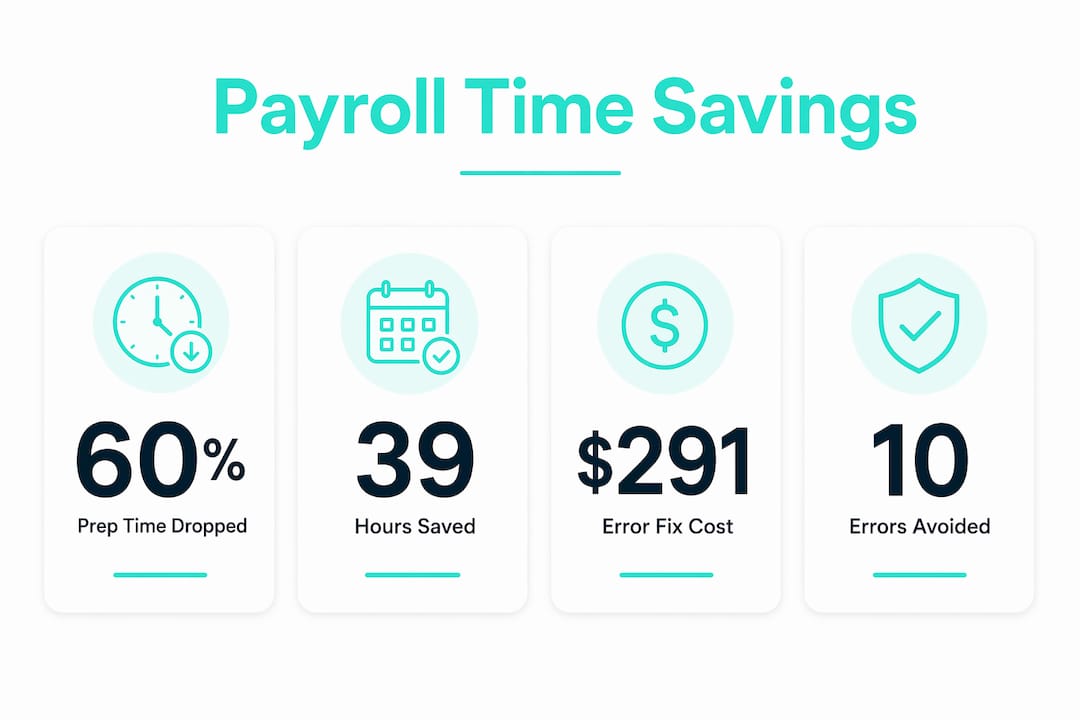
The table below shows how these savings accumulate across a typical payroll schedule.
| Payroll Frequency | Manual Prep Hours (Annual) | Integrated Prep Hours (Annual) | Hours Saved |
|---|---|---|---|
| Weekly | ~104 hrs | ~41 hrs | ~63 hrs |
| Biweekly | ~52 hrs | ~20 hrs | ~32 hrs |
| Semi-monthly | ~48 hrs | ~19 hrs | ~29 hrs |
| Monthly | ~24 hrs | ~9 hrs | ~15 hrs |
Note: Estimates based on industry benchmarks. Actual results vary by team size and system configuration.
Integrated time and payroll systems accelerate payroll processing from days to hours. That compression matters most for businesses running weekly payroll, where a two-day manual process becomes a two-hour automated one. The costs of manual time tracking systems extend beyond labor hours into compliance risk and employee trust, making the case for integration even stronger.
Payroll errors also carry regulatory consequences. Integration supports compliance and reduces the risk of overpayments and penalties. For businesses operating under the Fair Labor Standards Act (FLSA), accurate overtime records are not optional. An integrated system that auto-calculates overtime based on real clock data is a compliance tool as much as a time-saving one.
What are the strategic advantages of integrated payroll for HR?
The benefits of payroll integration go beyond cutting admin hours. Integration shifts the HR function from reactive data management to proactive workforce planning. A unified workforce ecosystem connects HCM, ERP, CRM, payroll, and time systems for real-time data flow across the entire organization. That connectivity gives HR leaders labor cost data they can actually use in budget meetings.
Real-time labor data changes how managers make decisions. When actual hours worked feed directly into financial dashboards, department heads can spot overtime trends before they become budget problems. HR can model the cost of a new hire against current labor spend without waiting for a payroll report to be manually compiled.
Employee experience also improves measurably. Integration with self-service access boosts employee trust and reduces payroll inquiries. When employees can view their own pay stubs, check accrued leave balances, and confirm hours without emailing HR, the volume of routine inquiries drops. That frees HR staff for higher-value conversations. The role of employee self-service timesheets in building that trust is well documented.
“Employees view payroll accuracy as an indicator of employer reliability. When pay is right every time, it signals that the organization is competent and trustworthy. Integration makes that consistency possible at scale.”
Maintaining HR oversight during payroll runs is a concern that stops many teams from committing to full automation. Well-designed integrations include pause and resume controls so HR can freeze data syncing while final pay calculations are reviewed. This addresses the fear of losing manual control without sacrificing the efficiency gains.
Key strategic advantages of integrated payroll include:
- Real-time labor cost visibility for budget forecasting
- Automated compliance tracking for FLSA overtime rules
- Reduced payroll disputes through transparent employee self-service
- Faster onboarding with new hire data flowing directly into payroll
- Consistent pay accuracy that builds employee confidence
Pro Tip: Pause your integration sync the day before payroll closes. Review the final figures manually, then resume the connection after approval. This two-step process gives you the speed of automation and the confidence of a human check on every pay run.
How can small businesses implement payroll integration effectively?
Implementation succeeds or fails based on preparation, not the software itself. Follow these steps to get integration working without disrupting your current payroll cycle.
-
Audit your existing data first. Pull employee records from both your time tracking and payroll systems. Confirm that names, employee IDs, pay rates, and job classifications match exactly. Mismatches cause sync failures that are harder to fix mid-cycle than before launch.
-
Choose systems built to connect. True integration means real-time or scheduled automatic data transfer, not a manual CSV export. Confirm that your time tracking tool offers a direct API connection or a certified integration with your payroll platform before committing.
-
Automate your key HR workflows. New hire onboarding, pay rate changes, and leave accruals should all trigger automatic updates in both systems. Kloqk’s employee onboarding features let new hire data flow directly into payroll records, removing a common source of first-paycheck errors.
-
Use pause and resume controls during pay runs. Preventing mid-run calculation inconsistencies requires freezing data sync before payroll closes. Build this step into your payroll checklist from day one.
-
Train managers, not just HR. Managers who approve timesheets are part of the data chain. If they approve incorrect hours, the integration faithfully passes those errors into payroll. A 30-minute training session on timesheet approval standards pays for itself on the first payroll run.
-
Avoid going live mid-pay period. Start integration at the beginning of a new pay cycle. This gives you a clean baseline and makes it easy to compare integrated results against your previous manual process.
The HR software buyer’s guide for small businesses covers how to evaluate workflow automation features before you sign a contract, which is the step most small business owners skip.
Key Takeaways
Payroll integration reduces HR administrative burden by automating time data transfer, cutting payroll prep time by over 60%, and saving small businesses an average of $50,000 annually through error elimination and efficiency gains.
| Point | Details |
|---|---|
| Prep time drops sharply | Integrated systems cut payroll preparation time by over 60% compared to manual processes. |
| Error costs are real | Each manual payroll error costs $291 to fix; integration eliminates most of these errors at the source. |
| Annual savings add up | Small businesses save an average of $50,000 per year and 39 hours per HR administrator after integration. |
| HR shifts to strategy | Real-time labor data lets HR move from data entry to workforce planning and budget forecasting. |
| Control stays with HR | Pause and resume controls keep HR in charge of final pay calculations without losing automation benefits. |
Why I think most small businesses underestimate this shift
I have watched HR teams at small businesses treat payroll integration as a technology upgrade when it is actually an organizational one. The software change takes a day. The mindset change takes longer.
The teams that get the most out of integration are the ones that redesign their workflows around it, not the ones that bolt it onto their existing process. They stop treating payroll as a monthly fire drill and start treating labor cost data as a planning input. That shift is where the real value lives.
The fear of losing control is the most common reason I see businesses delay. They worry that automation will run payroll without them noticing a problem. That fear is legitimate, and it is also solvable. Pause and resume controls exist precisely for this reason. The goal is not to remove HR from the process. It is to remove the parts of the process that do not require human judgment.
The future of payroll and HR systems is tighter convergence, not looser. Platforms are moving toward unified records where a single employee profile drives time tracking, payroll, benefits, and compliance reporting simultaneously. Small businesses that build integration habits now will adapt to that future far more easily than those still reconciling spreadsheets.
Saad
How Kloqk makes payroll-ready time tracking free
Accurate time data is the foundation of every payroll integration. Without it, even the best payroll software produces wrong results.

Kloqk gives small businesses a free employee time tracking app that turns clock-ins into payroll-ready hours automatically. GPS geofencing confirms employees are on-site when they clock in, and photo verification stops buddy punching before it inflates your labor costs. Overtime calculations and break tracking are built in at no charge. Kloqk exports clean, accurate time data that feeds directly into your payroll process, cutting the manual work that slows HR teams down every pay period. For small businesses in restaurants, construction, and retail, that means accurate pay without the administrative overhead.
FAQ
What is payroll integration?
Payroll integration is the automated connection between time tracking and payroll software that transfers employee hours directly into payroll calculations without manual data entry.
How much time does payroll integration save HR teams?
Businesses with integrated systems reduce payroll prep time by over 60%, and each HR administrator saves approximately 39 hours per year on administrative payroll tasks.
What does a payroll error cost to fix?
Each manual payroll error costs about $291 to correct. Avoiding 10 errors per month saves $2,910, which typically exceeds the cost of integration tools.
Does payroll integration remove HR control over pay runs?
No. Well-designed systems include pause and resume controls that let HR freeze data syncing during final pay review, keeping human oversight on every payroll run.
Can small businesses afford payroll integration?
Small businesses save an average of $50,000 annually through integration. Free tools like Kloqk eliminate the upfront cost barrier entirely for time tracking and payroll export.
Recommended
Sources
Every figure on this page traces to one of these. Primary law and government sources are listed first.
- 1. softwaresuggest.com
- 2. allmyhr.com
- 3. peoadv.com
- 4. ukg.com
- 5. ciphr.com
Written by
Marcus ReyesPayroll & Timekeeping Specialist
Marcus covers payroll accuracy, timesheets, and time tracking, the unglamorous mechanics that keep paychecks correct and audits painless.
Keep Reading
Track Hours the Easy Way
Kloqk is a free time clock that handles punches, breaks, overtime, and payroll-ready reports.
Start free