Overtime Automation Cost Savings for Business Owners

Overtime automation cost savings are defined as the measurable reduction in labor expenses achieved when software replaces manual scheduling, time tracking, and payroll calculations. The role of overtime automation cost savings extends well beyond cutting a few extra hours. Businesses using AI scheduling reduce overtime costs by 20, 30% through better demand prediction and shift coverage. For a 30-person team spending $100,000 annually on overtime, a 23% reduction equals $23,000 in recovered payroll budget. That figure does not include the administrative time saved, which runs 30, 50% per week for scheduling and payroll teams. Business owners in restaurants, construction, retail, and healthcare all face the same core problem: overtime costs grow quietly until they become a budget crisis.
How does overtime automation reduce labor costs?
Automated scheduling is the primary driver of automation cost reduction. Traditional scheduling relies on managers guessing demand, which leads to overstaffing on slow days and understaffing on busy ones. Both errors push overtime hours up. AI scheduling tools analyze historical sales data, foot traffic patterns, and seasonal trends to build shifts that match actual demand. The result is fewer unplanned overtime hours before they appear on a timesheet.

The second mechanism is payroll accuracy. Manual overtime pay calculations consume hours and are prone to errors. Automation completes those calculations in minutes and applies the correct federal and state multipliers automatically. That matters because a single miscalculation on overtime pay can trigger a Department of Labor audit, back-pay orders, and civil penalties.
Here is where the savings compound:
- Scheduling accuracy: AI demand forecasting cuts unplanned overtime at the source, before hours are worked.
- Payroll error elimination: Automated systems reduce payroll errors from a 2, 5% error rate down to below 0.5%, removing the cost of corrections and compliance penalties.
- Compliance enforcement: Real-time alerts flag when an employee approaches the 40-hour weekly threshold under the Fair Labor Standards Act (FLSA), giving managers time to adjust before overtime is triggered.
- Turnover reduction: AI scheduling improves shift fairness and reduces employee burnout, cutting turnover by 16%. Replacing a single hourly worker costs an average of several thousand dollars in recruiting and training.
Pro Tip: Set your overtime alert threshold at 37 hours, not 40. That three-hour buffer gives managers enough time to reassign shifts before FLSA overtime kicks in.
What are the operational savings beyond direct wages?
The impact of overtime automation reaches well past the payroll line. HR teams and payroll administrators spend significant time each week manually cross-referencing timesheets, correcting punch errors, and reconciling scheduling conflicts. Automation eliminates most of that work. Automation programs cut operational costs 15, 30% within 3, 6 months, with small and midsize businesses seeing ROI in as few as 60, 120 days.
The administrative savings show up in four specific areas:
- Scheduling time: Managers reclaim hours previously spent building and adjusting shift schedules manually. That time redirects to floor supervision, customer service, or sales.
- Payroll processing: Automated time-to-payroll exports remove the need for manual data entry. Payroll errors from manual timesheets generate disputes, corrections, and sometimes legal exposure. Automation closes that gap.
- Compliance risk: Organizations that automate payroll report 35, 50% cost reductions within 18 months, driven largely by error elimination and consistent compliance with labor law changes.
- Employee morale: Fewer paycheck errors mean fewer disputes. Fewer disputes mean lower voluntary turnover. Lower turnover means lower replacement costs, which is a real dollar figure that belongs in any ROI calculation.
A restaurant owner running 25 employees, for example, might spend 6, 8 hours per week on manual scheduling and payroll reconciliation. Automating those processes frees that time for revenue-generating work. At a conservative manager hourly rate, that alone justifies the cost of most entry-level automation tools.
How do you calculate ROI on overtime automation?
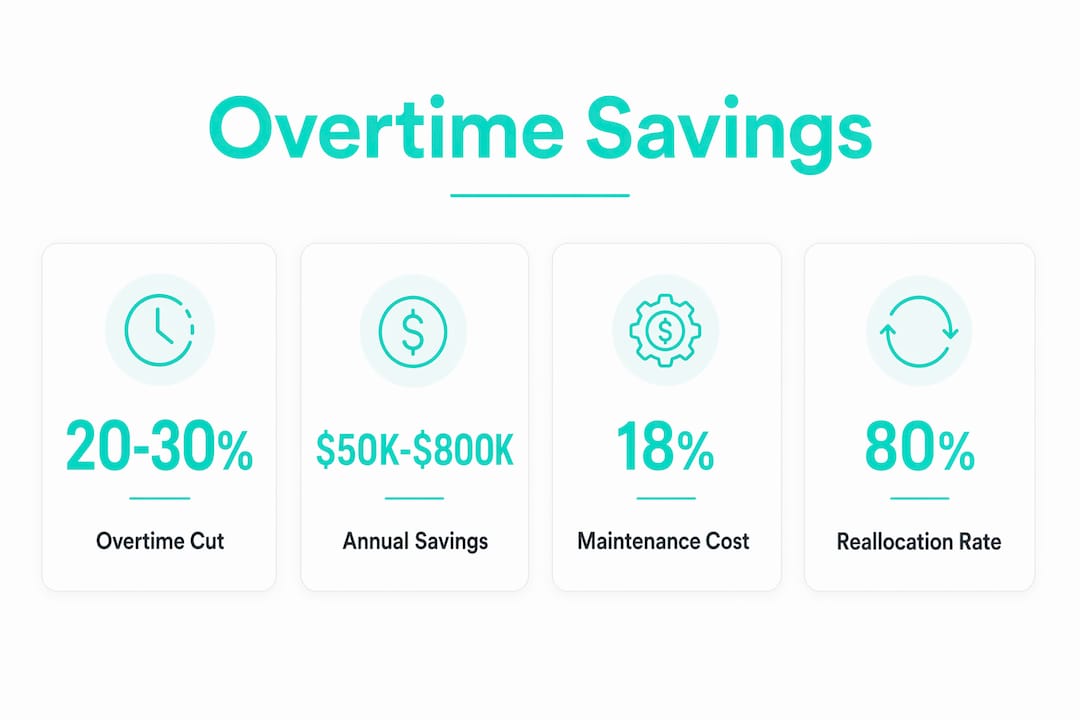
Well-scoped automation projects pay back in 4, 12 months and save $50,000$800,000 annually for midsize businesses. Those numbers come from three sources: hours saved, errors reduced, and error cost avoidance. Each category requires a different measurement approach.
Hard savings vs. cost avoidance
Hard savings are direct reductions in cash outflow. Cutting $23,000 in overtime wages is a hard saving. Cost avoidance is different. Preventing the need to hire a new employee because automation handles workload growth is cost avoidance, not a hard saving. Both are valid, but cost avoidance should be tracked separately with confidence factors of 50, 70%. Mixing the two inflates ROI projections and creates budget planning problems.
The reallocation factor
Time saved only creates ROI when it gets reallocated to higher-value work. An 80% reallocation factor is the realistic standard for projections. That means if automation saves 10 hours per week, plan for 8 of those hours to generate measurable value. The other 2 hours absorb transition time, exceptions, and workflow gaps. Ignoring this factor is the most common reason automation ROI projections miss their targets.
Ongoing maintenance costs
Ongoing maintenance costs run approximately 18% of the initial build cost per year. A system that costs $10,000 to implement requires roughly $1,800 per year to maintain effectively. Skipping maintenance leads to outdated rules, compliance gaps, and degraded accuracy. Include that figure in every payback calculation from day one.
Pro Tip: Build a simple ROI tracker in a spreadsheet before you launch any automation tool. Log baseline overtime costs, error rates, and admin hours in month one. Compare monthly for the first year. Without a baseline, you cannot prove the savings are real.
What steps make overtime automation work in practice?
Effective implementation follows a clear sequence. Skipping steps early creates the hidden workflow exceptions that reduce real-world savings by 20, 40% compared to initial estimates.
- Audit your current state first. Run a time management audit to document where overtime hours originate, which roles generate the most, and what manual processes consume the most admin time. You cannot fix what you have not measured.
- Choose tools that connect to your existing payroll system. Automation that requires manual data export defeats its own purpose. Look for direct integrations with your payroll provider so clock-in data flows to payroll without human intervention.
- Integrate AI demand forecasting for scheduling. AI-powered scheduling uses historical data to predict staffing needs by day, shift, and location. That prediction is what prevents overtime from being scheduled in the first place.
- Set real-time compliance rules. Configure your system to enforce FLSA thresholds, state-specific overtime laws, and break requirements automatically. Real-time enforcement stops violations before they happen rather than catching them in a payroll audit.
- Train managers on exception handling. Automation handles the routine. Managers need to know how to handle the exceptions the system flags. Without training, exceptions get resolved manually and inconsistently, which erodes the savings.
- Monitor and adjust monthly. Review overtime reports, error rates, and scheduling efficiency every month for the first six months. Automation rules need tuning as your business changes.
The businesses that see the strongest savings from automation are the ones that treat it as an ongoing process, not a one-time installation.
Key Takeaways
Overtime automation delivers its strongest cost savings when businesses combine accurate scheduling, error-free payroll processing, and consistent compliance enforcement from the start.
| Point | Details |
|---|---|
| AI scheduling cuts overtime at the source | Demand-based scheduling reduces overtime costs by 20, 30% before hours are ever worked. |
| Payroll error reduction compounds savings | Dropping error rates from 2, 5% to below 0.5% eliminates back-pay costs and compliance penalties. |
| ROI arrives faster than most expect | Well-scoped projects pay back in 4, 12 months, with SMBs often seeing returns in 60, 120 days. |
| Track hard savings and cost avoidance separately | Mixing the two overstates ROI; apply a 50, 70% confidence factor to cost avoidance figures. |
| Maintenance budgets protect long-term returns | Budget approximately 18% of initial build cost per year to keep automation accurate and compliant. |
The reallocation problem nobody talks about
The most underestimated factor in overtime automation ROI is not the technology. It is what happens to the time you save. I have seen business owners invest in solid automation tools, watch their scheduling and payroll admin time drop by 40%, and then wonder six months later why their bottom line did not move as much as the projections promised. The answer is almost always the reallocation factor.
Saved time does not automatically become profit. It becomes profit only when it gets redirected to something that generates revenue or prevents a real cost. If a manager saves five hours a week on scheduling but spends those hours in unstructured meetings, the ROI evaporates. The 80% reallocation standard exists for exactly this reason. Plan for it deliberately, not optimistically.
The second thing I would push back on is the instinct to skip the baseline measurement step. Business owners are busy, and documenting current overtime costs and error rates before launching a new tool feels like extra work. It is not extra work. It is the only way to know whether the tool is actually performing. Without a baseline, you are flying blind on one of your largest labor cost levers.
Identifying overtime manipulation in staff is also easier with automation in place. Systems that log clock-ins with photo verification and GPS geofencing create an audit trail that manual timesheets simply cannot match. That audit trail is both a compliance asset and a cost control tool.
Saad
Kloqk makes overtime cost control straightforward
Kloqk is built for small business owners who need accurate overtime tracking without paying for it. The platform handles overtime calculations, break tracking, and payroll exports at no cost, with GPS geofencing and photo verification included to prevent time theft before it inflates your labor bill.

Kloqk’s employee time tracking software connects clock-in data directly to payroll-ready exports, removing the manual steps that generate errors and compliance risk. Overtime thresholds are enforced automatically, so managers get alerts before hours cross into premium pay territory. For business owners who want to see exactly where overtime costs originate and stop them at the source, Kloqk provides the tools without the per-seat fees that make most platforms expensive at scale.
FAQ
What is the role of overtime automation in cost savings?
Overtime automation reduces labor costs by replacing manual scheduling and payroll calculations with AI-driven tools that prevent excess hours before they occur and eliminate payroll errors that trigger back-pay and penalties.
How much can a business save with overtime automation?
Businesses using AI scheduling reduce overtime costs by 20, 30%, and well-scoped automation projects save $50,000$800,000 annually for midsize businesses, with payback periods of 4, 12 months.
What is the difference between hard savings and cost avoidance in automation ROI?
Hard savings are direct reductions in cash outflow, such as lower overtime wages. Cost avoidance prevents future spending, such as avoiding a new hire, and should be tracked separately with a 50, 70% confidence factor.
How do you prevent overtime automation ROI from being overstated?
Apply an 80% reallocation factor to time saved, budget 18% of initial build cost annually for maintenance, and track hard savings separately from cost avoidance to keep projections realistic.
Does overtime automation help with labor law compliance?
Automated systems enforce FLSA thresholds and state-specific overtime rules in real time, reducing the risk of compliance violations, audits, and the back-pay orders that follow payroll errors.
Recommended
Sources
Every figure on this page traces to one of these. Primary law and government sources are listed first.
- 1. logiclinelabs.com
- 2. getontop.com
- 3. helperfy.ai
- 4. bnxt.ai
- 5. techsy.io
- 6. ecosire.com
Written by
Dana WhitfieldHR Compliance Lead
Dana writes about wage-and-hour law, FLSA overtime, and leave compliance for U.S. small businesses, translating dense regulations into plain steps owners can act on.
Keep Reading
Track Hours the Easy Way
Kloqk is a free time clock that handles punches, breaks, overtime, and payroll-ready reports.
Start free