Employee scheduling that flows into your time clock
Plan shifts, share the schedule, and compare it to the hours your team actually works.
Start free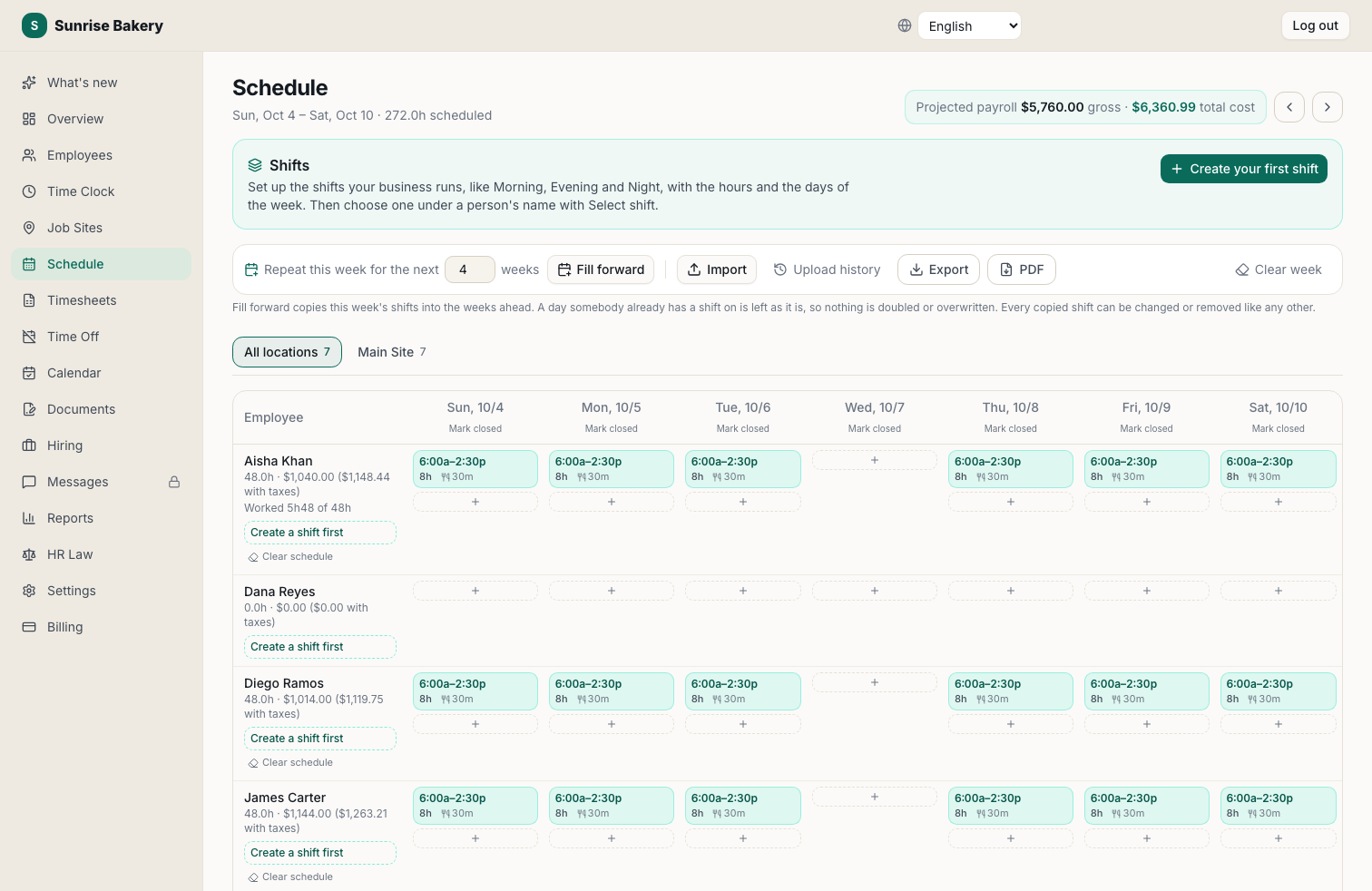
Shifts with a Name
Set up Morning, Evening or Night once, with its own hours on each day, then put people on it. Give each person a default shift.
Copy Any Week
Fill the weeks ahead from this one, or copy any past week. Nothing already scheduled is doubled or overwritten.
Scheduled vs. Actual
See hours worked against hours scheduled, per person, so you catch no-shows and overtime before payroll.
Live Labor Cost
Projected payroll updates as you schedule, so you see the week's cost before it happens.
Print It or Import It
Print the week for the break room, or import a schedule you already keep in a spreadsheet.
Holidays and Closed Days
Mark days you're closed and see holidays on the schedule, from the same office calendar the team sees.
Frequently asked questions
Does Kloqk do scheduling and time tracking?
Yes. Scheduling and the time clock are one system, so you can compare planned shifts to actual hours. Both are free for unlimited employees at one location.
Can I copy last week's schedule?
Yes. Copy any week into another, or repeat this week for the next few weeks. A day someone already has a shift on is left as it is.
Can employees see their schedule?
Yes, in their self-service portal on any phone, alongside their hours and time off. Employee logins are free on every plan.
Explore more
What employee scheduling software actually does
It builds the schedule, publishes it where staff can see it, and records who agreed to what. The part that separates useful software from a shared spreadsheet is what happens next: comparing the schedule you published against the hours that were actually worked, and showing the gap in money rather than in hours.
A schedule that cannot be compared to the clock tells you what you intended. It does not tell you that Tuesday ran three hours over, that somebody stayed past their shift every night this week, or that your labor cost drifted four points above target while you were busy. That comparison is the whole return on scheduling software, and it only exists when the schedule and the time clock are the same system.
Scheduling by industry
The mechanics are the same everywhere and the constraints are not. These are the patterns that actually differ, and the pages that go into each in more detail.
Restaurants
Demand moves by the hour and by the weather, so the schedule is really a forecast. The number that matters is labor as a percentage of sales, and it is decided when you publish the schedule rather than when the shift ends. Split shifts, tipped roles on a different wage basis, and last-minute call-outs all make the actual hours diverge from the planned ones, which is why the schedule needs to sit beside the clock.
Retail
Coverage has to match footfall, and footfall is seasonal. The recurring failure is scheduling to a headcount rather than to the hours the doors are open, which leaves the store thin at changeover and overstaffed mid-afternoon. Several cities also apply predictive-scheduling ordinances to retail specifically, with premium pay owed for late changes.
Construction
Crews move between sites, so the schedule is about who is where rather than who is on. A foreman writing hours on a sheet at the end of the week is producing a reconstruction, and it is the first thing to fall apart in a wage dispute. Scheduling by job site, then confirming attendance at the site, is what makes the record hold.
Healthcare and clinics
Coverage is not optional: a shift that goes unfilled is a clinical problem, not just a staffing one. Rotations run across nights and weekends, differentials apply to unsociable hours, and the same person often holds more than one rate, which means overtime has to be calculated on a blended regular rate rather than whichever rate they were on at hour 41.
Manufacturing and warehouses
Fixed rotations across shifts, often with a pattern like 2-2-3 that alternates short and long weeks. The long week can cross 40 hours and trigger overtime even though the fortnightly average looks reasonable, so the schedule and the overtime rules have to be read together before the pattern is set rather than after.
Multiple locations
The hard part is not building each schedule, it is seeing them together: who is shared between sites, which location is over its hours, and whether somebody has been rostered at two places at once. Wage rules can differ across a city boundary too, so identical shifts at two sites can carry different minimums.
How to build a schedule that survives the week
Start from demand, not from people. Work out the coverage each part of each day needs, then fill it, then check the total against your labor budget before you publish. Publishing first and adjusting afterwards is what produces the last-minute changes staff resent, and it is also what breaches predictive-scheduling rules where they apply.
Publish at least two weeks ahead. In Seattle, San Francisco, New York City, Philadelphia, Chicago and Oregon, advance notice is a legal requirement for covered employers and late changes can carry premium pay. Everywhere else it is simply the point at which people can arrange childcare, and turnover falls accordingly.
Then watch the overtime line as you build. Overtime is owed on hours past 40 in a workweek, so a pattern that averages 40 across two weeks can still owe a premium on the long week. Overtime laws by state covers the states that add a daily threshold on top, where a long day triggers the premium regardless of the weekly total.
What it costs
Most scheduling products price per employee per month, commonly $3 to $8, often with a platform fee on top. That per-seat element is what makes scheduling expensive to grow into: the price rises exactly as you hire.
Kloqk puts scheduling on the Free plan, for unlimited employees at one location. The time clock underneath it is free too, which is the part that matters for the comparison: the schedule sits on top of an accurate record rather than being a second product bought at the same time. A second location is Pro at $29 per location.
If you are weighing it against what you use now, the comparison pages set out where each product charges, and the free time clock covers what you get without paying anything.
Questions people ask about this
What is the best free employee scheduling software?
Free scheduling almost always means a headcount cap or a missing piece such as shift swapping or labor costing. Judge it on whether the schedule connects to the clock: a schedule that cannot be compared to the hours actually worked tells you what you intended, not what happened. Kloqk's scheduling is free for unlimited employees at one location, and so is the time clock underneath it.
How do I make a work schedule for employees?
Start from demand rather than from people. Work out the coverage each part of each day needs, then fill it, then check the result against your labor budget before publishing. Publishing first and adjusting afterwards is what produces the last-minute changes staff resent, and in a growing number of cities it also breaches predictive-scheduling ordinances.
What is a 2-2-3 schedule?
A 2-2-3, sometimes called a Panama schedule, is a rotation of two days on, two off, three on, then the pattern inverts the following week. It gives continuous coverage with two crews and produces alternating short and long weeks, which is why it needs care: the long week can cross 40 hours and trigger overtime even though the average across the two weeks looks reasonable.
How far in advance should I post schedules?
Two weeks is the practical standard, and in some cities it is the legal one. Predictive-scheduling ordinances in places such as Seattle, San Francisco, New York City, Philadelphia and Oregon require advance notice and can require premium pay for late changes. Even where no ordinance applies, two weeks is the point at which staff can plan and turnover falls.
Still deciding? Try the free calculators or read the wage-and-hour guides for your state.