What Does Payroll-Ready Hours Mean for Small Businesses

Payroll-ready hours are defined as employee time data that is complete, approved, and stable enough for payroll processing without requiring last-minute corrections. Understanding what does payroll-ready hours mean is the difference between a smooth pay run and a chaotic scramble to fix errors before the deadline. The concept goes beyond simply collecting clock-in and clock-out times. True payroll readiness means every hour has been verified, classified, and approved so your payroll team processes pay rather than chases down missing data.
What does payroll-ready hours mean in practice?
Payroll-ready is a defined control threshold where inputs are approved, stable, and interpretable enough to allow true review rather than exception triage. That distinction matters enormously for small business managers. When hours reach payroll in a half-finished state, your payroll function becomes a cleanup crew instead of a processing function.
The meaning of payroll-ready hours comes down to six specific conditions being true at the same time:
- Complete inputs: Every employee’s pay-impacting data is present with no missing shifts, unresolved gaps, or pending edits.
- Verified approvals: Managers have signed off on timesheets. Submitted entries alone do not count as approved.
- Resolved exceptions: Overtime, early clock-outs, missed breaks, and unauthorized hours have been reviewed and classified.
- Stable employee population: No last-minute new hires or terminations are waiting to be added or removed from the pay run.
- Clear pay treatment: Each hour type, whether regular, overtime, or paid break, carries an unambiguous payroll classification.
- Auditable records: Every edit or adjustment has a documented reason so the data can withstand a compliance review.
Pro Tip: Set a hard internal deadline for manager approvals at least two business days before your payroll submission date. This buffer gives you time to catch exceptions without rushing.
A payroll cycle that meets all six conditions lets your payroll processor focus on accuracy checks rather than firefighting. That is the practical meaning of payroll readiness for a small business.

Common misconceptions about payroll-ready hours
The most damaging misconception is that submitted hours equal ready hours. Submitting time entries alone does not guarantee payroll readiness because missing approvals or unresolved exceptions still require manual fixes during review. A restaurant manager who exports a week of clock-in data and sends it straight to payroll has not achieved readiness. They have simply moved an incomplete dataset one step closer to a pay error.
Several other false assumptions trip up small business owners regularly:
- “If it came out of my time tracking system, it’s ready.” Exporting data from a digital tool does not mean the data has been reconciled. Finance teams should not perform cleanup during payroll review if true readiness has been achieved. A raw export is a starting point, not a finished product.
- “Breaks don’t need special handling.” Meal breaks are unpaid only when employees are completely relieved of duties. If a worker answers calls or handles tasks during a 30-minute break, that time may be payable under federal labor standards.
- “Travel time doesn’t count.” Ordinary commuting is unpaid, but travel between job sites during the workday counts as payable hours. Construction crews moving between sites mid-shift are a classic example where this gets missed.
- “Training time is off the clock.” Mandatory training sessions are generally payable. Skipping this classification creates both a payroll error and a wage compliance risk.
Late-stage manual cleanup compounds every one of these errors. When managers fix problems during the payroll run itself, they work under time pressure and without full context. That combination produces mistakes. The better path is resolving every exception before the data ever reaches payroll review. Kloqk’s guide on miscalculated employee hours covers how these errors compound over time.
How to calculate and validate payroll-ready hours
Calculating payroll-ready hours requires more than adding up clock-in and clock-out times. Accurately calculating payroll hours means categorizing payable time into scheduled work, breaks, training, travel, and exception edits before any totals are finalized. Each category carries its own pay treatment, and mixing them up creates both payroll errors and compliance exposure.
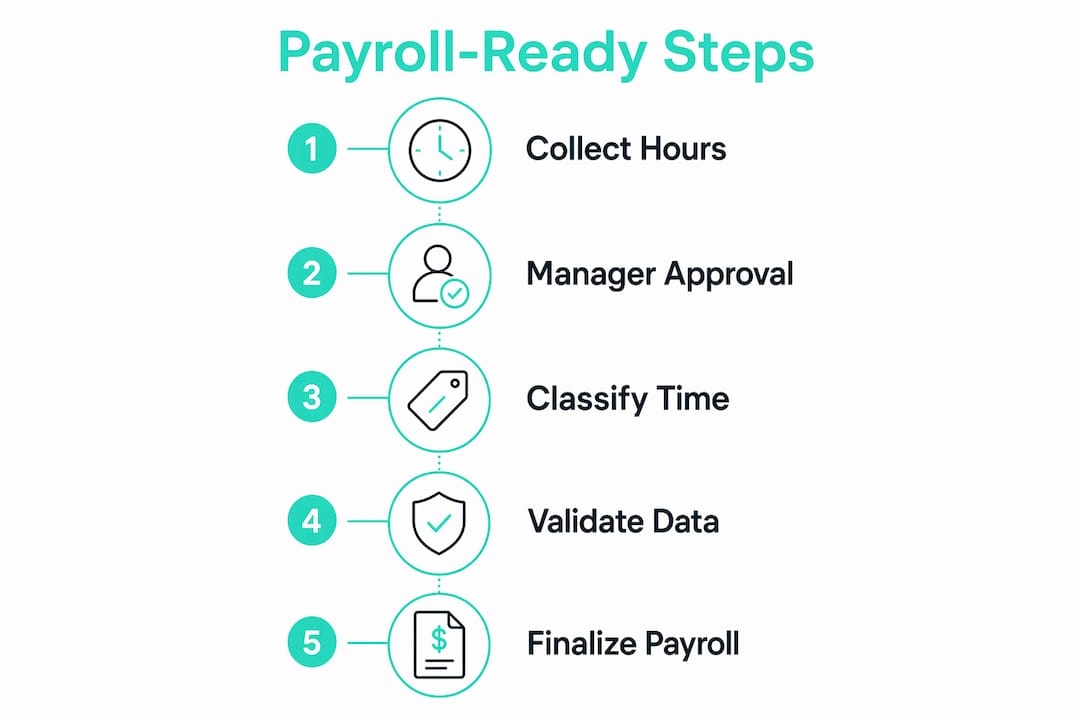
Follow these steps to validate hours before submitting them for payroll:
- Collect all raw time data. Pull clock-in and clock-out records for every employee in the pay period. Flag any missing punches immediately rather than estimating.
- Categorize each time block. Sort hours into regular time, overtime, paid breaks, unpaid breaks, training, and inter-site travel. Do not lump everything into a single “hours worked” column.
- Apply your overtime rules. Under the Fair Labor Standards Act (FLSA), non-exempt employees earn overtime for hours worked beyond 40 in a workweek. Some states set a daily overtime threshold as well. Confirm which rule applies to each employee.
- Resolve every exception. Review early departures, late arrivals, missed clock-outs, and any edits made after the fact. Each exception needs a manager note explaining the adjustment.
- Run a completeness check. Confirm that every scheduled employee has a record for every scheduled shift. A missing record is not a zero-hours day until a manager confirms it.
- Get final manager approval. The approving manager signs off on the complete, categorized dataset. This approval is the last gate before the data becomes payroll-ready.
Pro Tip: Build a simple spreadsheet checklist that mirrors these six steps. Run it every pay period before submitting hours. The repetition builds a habit that catches errors before they reach payroll.
Waiting time and on-call time also count as payable work when employees are restricted or required to remain available for the employer’s benefit. A delivery driver waiting at a warehouse for a load assignment is working, not resting. Classify that time correctly from the start.
Best practices for payroll-ready hours workflows
Building a reliable payroll-ready process means treating data quality as an ongoing discipline, not a last-minute task. Payroll readiness is primarily a process discipline requiring early operational focus rather than fixes during payroll runs. Small businesses that build the right habits upstream spend far less time correcting errors downstream.
These practices create a solid foundation:
- Treat onboarding as a data control event. Validating employee master data including tax status, bank details, and pay classification before the first pay run prevents errors that are difficult to reverse. A new hire whose pay rate is entered incorrectly on day one creates a correction chain that can take months to resolve.
- Enforce a strict cut-off timeline. A structured schedule such as collecting data by day seven before payroll, validating by day five, and completing approvals by day three keeps every step on track. Strict timelines for data collection and validation reduce rework and prevent last-minute conflicts.
- Use digital approval workflows. Paper timesheets and email approvals create gaps in the audit trail. Digital tools that require manager sign-off before data moves to payroll build accountability into the process itself.
- Create a communication protocol between operations and payroll. Exceptions such as a shift swap, an emergency early departure, or an unscheduled overtime hour should be reported to payroll within 24 hours of occurring. Waiting until the end of the pay period guarantees a pile of unresolved items.
- Conduct a pre-payroll audit. Before submitting any data, run a final check against your scheduled headcount. Every active employee should have a complete, approved record. Any gap needs an explanation, not an assumption.
An HR time management audit is a practical way to evaluate whether your current workflow actually produces payroll-ready data or just moves incomplete data faster. Small businesses in restaurants and construction benefit most from this kind of structured review because their workforces are mobile, shift-based, and prone to the exact exceptions that derail payroll readiness.
Key Takeaways
Payroll-ready hours require complete, approved, and classified time data that is stable before payroll review begins, not after.
| Point | Details |
|---|---|
| Definition of payroll-ready | Hours are payroll-ready when inputs are complete, approved, and all exceptions are resolved before review. |
| Submission is not readiness | Submitted timesheets without manager approval and exception resolution are not payroll-ready. |
| Categorize all time types | Regular hours, overtime, breaks, training, and travel each need separate classification before payroll totals are calculated. |
| Cut-off timelines matter | A structured collection and approval schedule prevents last-minute errors and rushed payroll runs. |
| Onboarding sets the baseline | Validating employee master data before the first pay run prevents cascading errors in every future cycle. |
Why payroll readiness changed how I think about time tracking
Most managers I talk to treat payroll as the finish line. They think the hard work is done once hours are collected. The real finish line is earlier than that.
The businesses that run clean payroll cycles every time share one habit: they treat the approval and classification of hours as an operational responsibility, not a payroll department problem. When a shift manager in a restaurant signs off on timesheets the morning after each shift rather than at the end of the week, exceptions get caught while the context is still fresh. That single habit eliminates the majority of payroll errors I see in small businesses.
The uncomfortable truth is that most payroll errors are not payroll errors at all. They are data quality failures that happen days before payroll runs. Fixing them during the payroll cycle is expensive in time, trust, and accuracy. Fixing them at the source costs almost nothing.
Investing in accurate payroll hours upstream is not about adding more process. It is about moving the right decisions to the right moment. Managers who own their data before it reaches payroll build teams that trust their paychecks. That trust is worth more than any time saved by skipping approvals.
Saad
How Kloqk helps small businesses produce payroll-ready hours
Getting hours to a payroll-ready state takes the right tools as much as the right habits.

Kloqk’s free employee time tracking software is built specifically for small businesses that need clean, approved hours without a complicated setup. The platform captures clock-ins with photo verification, applies GPS geofencing to confirm location, and routes timesheets through manager approval before any data moves to payroll. Overtime calculations and break tracking happen automatically, so you are not manually categorizing time types at the end of every pay period. Kloqk also supports GPS-verified clock-ins for field teams and multi-site crews, the exact scenarios where payroll exceptions pile up fastest. The result is a payroll export that is ready to process, not ready to fix.
FAQ
What does payroll-ready hours mean?
Payroll-ready hours are employee time records that are complete, approved by a manager, and free of unresolved exceptions, making them immediately usable for payroll processing without additional corrections.
What is the difference between submitted hours and payroll-ready hours?
Submitted hours are raw time entries that may still lack manager approval or have unresolved exceptions. Payroll-ready hours have passed through approval and classification, confirming they are accurate and stable for processing.
How do I calculate payroll hours correctly?
Categorize all time into regular hours, overtime, paid breaks, unpaid breaks, training, and travel, then apply FLSA overtime rules and get manager sign-off before submitting totals to payroll.
Why does payroll readiness matter for small businesses?
Payroll errors caused by incomplete or unapproved data create compliance risks, employee distrust, and administrative rework. Achieving payroll readiness before the review window eliminates most of those problems at the source.
When should manager approvals happen in the payroll cycle?
Manager approvals should be completed at least two to three business days before the payroll submission deadline, giving time to resolve any exceptions without rushing the final review.
Recommended
Sources
Every figure on this page traces to one of these. Primary law and government sources are listed first.
Written by
Marcus ReyesPayroll & Timekeeping Specialist
Marcus covers payroll accuracy, timesheets, and time tracking, the unglamorous mechanics that keep paychecks correct and audits painless.
Keep Reading
Track Hours the Easy Way
Kloqk is a free time clock that handles punches, breaks, overtime, and payroll-ready reports.
Start free