Scale Time Tracking for Real Business Growth

Scaling business growth through time tracking is defined as the deliberate process of turning employee hours into operational data that drives resource allocation, margin protection, and revenue decisions. Most small business owners treat time tracking as a payroll chore. The fastest-growing businesses treat it as a strategic growth tool that identifies where money is being made, where it is being lost, and where to invest next. To scale time tracking for business growth, you need the right infrastructure, a clear implementation plan, and metrics that tell you when the system is working.
What does it take to scale time tracking for business growth?
Scaling time tracking for business growth requires three foundational elements: cloud-based data access, automation that replaces manual entry, and integration with your financial systems. Without these, you are collecting hours but not insight. A 12, 36 month growth plan built around operational execution specifically calls out replacing manual time tracking with automated systems as a core requirement. That timeline matters because behavior change, system integration, and reporting refinement all take time to bed in.

The features that separate basic tools from growth-ready platforms
Not all time tracking tools are built for scale. Entry-level apps record hours and stop there. Growth-ready platforms connect those hours to billing, payroll, and project budgets in real time. The table below shows the feature categories that matter most when you are choosing a system to support business growth.
| Feature category | Why it matters for growth |
|---|---|
| Automated clock-in and clock-out | Removes manual entry errors and reduces admin time |
| Real-time reporting dashboards | Lets you catch margin loss before the month closes |
| Payroll and billing integration | Speeds up invoicing and reduces disputes |
| GPS geofencing and photo verification | Prevents time theft across multiple locations |
| Multi-location support | Supports expansion without adding administrative headcount |
| Compliance tracking | Keeps you aligned with federal and state labor laws |
Workforce readiness is just as important as the technology itself. Your team needs to understand why the system exists and how it benefits them, not just how to use it. Cloud-based time tracking gives managers real-time visibility from any device, which removes the bottleneck of waiting for paper timesheets or end-of-week reports.
Pro Tip: Before selecting a platform, map out every system it needs to connect with, including your payroll provider, accounting software, and project management tool. A platform that cannot integrate with your existing stack will create more admin work, not less.
How do you implement a scalable time tracking system step by step?
Implementation is where most small businesses stall. They choose a tool, set it up loosely, and then wonder why adoption is low and data is unreliable. A structured rollout prevents that outcome.
-
Audit your current process. Document exactly how hours are being captured today. Identify where errors occur, where time is lost, and which roles are hardest to track. This baseline tells you what the new system needs to fix.
-
Choose a platform built for your size and growth stage. A restaurant with 15 employees has different needs than a construction company managing crews across three job sites. Match the tool to your actual workflow. Free time tracking tools built for small businesses often include the core features you need without the enterprise price tag.
-
Set clear time tracking policies before launch. Define when employees clock in and out, how breaks are recorded, and what happens when someone forgets to clock in. Written policies reduce disputes and improve data quality from day one.
-
Train your team with context, not just instructions. Show employees how accurate time data connects to fair pay and business health. Automated clock-in systems can reduce administrative overhead by up to 80% and improve billing accuracy by up to 20%. Share those numbers with your team so they understand the stakes.
-
Integrate with payroll and accounting on day one. Do not run parallel systems. Connect your time tracking platform to your General Ledger from the start so that real-time budget versus actual data flows automatically. This is what accelerates month-end close by 3, 5 days and prevents delayed margin loss.
-
Review and refine after 30 days. Pull your first month of data and look for patterns. Are certain roles consistently over budget? Are job sites running longer than estimated? Use that data to adjust staffing, pricing, or project scopes.
Pro Tip: Assign a single internal owner for the time tracking rollout. This person handles questions, monitors adoption, and escalates issues. Without a named owner, accountability diffuses and the system quietly degrades.
What challenges come up when scaling time tracking systems?
Scaling any operational system surfaces friction. Time tracking is no exception. Knowing the common obstacles in advance lets you address them before they derail your growth plan.
-
User resistance. Employees often see new tracking systems as surveillance. Address this directly in your rollout by explaining how accurate hours protect their pay and reduce payroll disputes. Accurate timesheets reduce workplace conflicts and build trust between managers and teams.
-
Data accuracy problems. Manual corrections, forgotten clock-outs, and buddy punching all corrupt your data. GPS geofencing and photo verification at clock-in eliminate the most common sources of error without requiring manager intervention.
-
Integration hurdles. Connecting a new time tracking platform to legacy payroll or accounting software can require custom configuration. Plan for a two-week integration window and test data flows before going live with the full team.
-
Reporting overload. Too many dashboards and too many metrics cause managers to stop looking at the data entirely. Start with three core reports: total hours by role, budget versus actual by project, and overtime alerts. Add complexity only after those three are being used consistently.
-
Inconsistent policy enforcement. If managers apply time tracking rules differently across departments or locations, your data becomes unreliable. Standardize policies in writing and review them quarterly.
Pro Tip: Run a phased rollout. Start with one department or one job site, fix the problems you find, and then expand. A phased approach reduces disruption and gives you a working model to show skeptical employees.
How do you measure whether time tracking is actually driving growth?
Measurement turns time tracking from an administrative function into a growth engine. Growth strategy is a deliberate analytical process, not a set of revenue targets. The metrics below tell you whether your time tracking system is delivering on its promise.
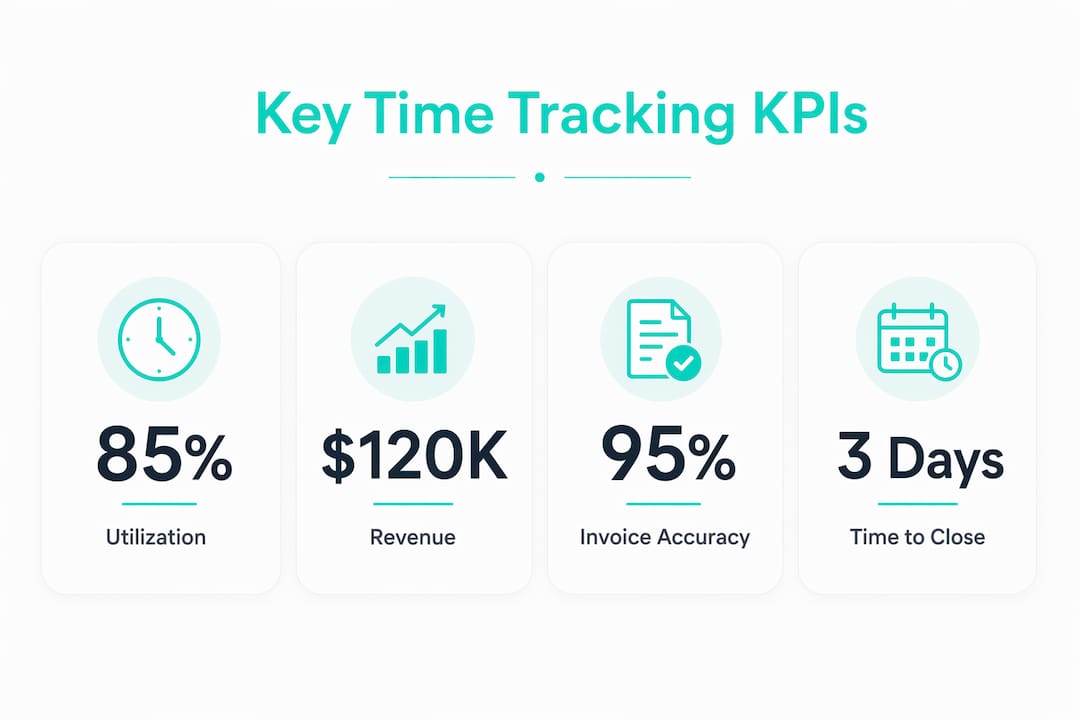
| KPI | What it measures | Target benchmark |
|---|---|---|
| Utilization rate | Billable hours as a percentage of total hours worked | 70, 80% for service businesses |
| Invoice accuracy | Percentage of invoices issued without corrections | 95% or higher |
| Margin per project | Revenue minus labor cost per job or engagement | Positive and improving quarter over quarter |
| Time-to-close financials | Days from month-end to closed books | 3, 5 days faster after integration |
| Overtime rate | Overtime hours as a percentage of total hours | Below your industry average |
Real-time dashboards make these metrics actionable. Tracking KPIs like utilization and margin gives you the data to make resource decisions before problems compound. If utilization drops below 70%, you have a staffing or scheduling problem. If invoice accuracy falls below 95%, your time data has a quality issue upstream.
The fastest-scaling businesses catch margin loss at the moment it happens. Real-time budget tracking integrated with accounting prevents the scenario where you finish a project, close the books, and discover you lost money three weeks after the fact. That kind of delayed visibility is what keeps small businesses from growing. Fixing it is what creates the capacity to take on more work.
Pro Tip: Review your utilization rate weekly, not monthly. A weekly review gives you time to reassign staff or adjust project scope before the margin damage is done.
Key Takeaways
Treating time tracking as a growth system, not a payroll task, is the single most effective shift a small business owner can make to protect margins and fund expansion.
| Point | Details |
|---|---|
| Time tracking is a growth tool | Real-time hour data drives resource allocation, margin visibility, and billing accuracy. |
| Automation cuts admin by up to 80% | Automated clock-in systems reduce errors and free managers to focus on growth decisions. |
| Integration is non-negotiable | Connecting time tracking to payroll and accounting accelerates month-end close by 3, 5 days. |
| Phased rollouts reduce failure risk | Starting with one team or location lets you fix problems before scaling company-wide. |
| KPIs turn data into decisions | Tracking utilization, margin, and invoice accuracy tells you exactly where growth is stalling. |
Time tracking changed how I think about running a business
I used to think time tracking was something you did to keep payroll honest. That was the wrong frame entirely. The moment I started treating hour data as financial data, everything shifted. I could see which projects were profitable before the invoice went out. I could see which employees were being underutilized and which were burning out. That visibility is not a nice-to-have. It is the difference between reacting to problems and preventing them.
The cultural piece is harder than the technology. Getting a team to clock in consistently, accurately, and without resentment requires leadership to model the behavior and explain the “why” clearly. I have seen businesses invest in excellent platforms and get mediocre data because the rollout was treated as an IT project instead of a people project. The technology is the easy part.
What I find most underrated is the compounding effect. Better time data leads to better invoices. Better invoices lead to faster payment. Faster payment leads to better cash flow. Better cash flow funds the next hire or the next location. None of that chain works if the first link, accurate time capture, is broken. Time management tools that connect hours to profit are not overhead. They are infrastructure.
Saad
How Kloqk helps small businesses grow through better time tracking
Small businesses that want to scale without adding administrative headcount need a time tracking system that works from day one, costs nothing to start, and grows with the operation.

Kloqk is built exactly for that. It offers free employee time tracking with overtime calculations, break tracking, and payroll-ready exports at no cost. GPS geofencing and photo verification at clock-in prevent time theft across multiple locations without requiring a manager to be on-site. For businesses managing remote or field teams, Kloqk’s GPS time clock gives you real-time location data tied directly to each clock-in. There are no per-seat fees, which means your cost stays flat as your team grows. That is the kind of infrastructure that makes scaling practical, not just possible.
FAQ
What is the best way to scale time tracking for business growth?
The most effective approach combines automated clock-in systems, real-time reporting, and direct integration with payroll and accounting. This setup eliminates manual errors and gives you the margin visibility needed to make growth decisions.
How does time tracking improve business growth?
Time tracking converts labor hours into financial data, showing you which projects are profitable, where overtime is eroding margin, and how to allocate staff more effectively. Growth leaders use technology like automated time tracking to identify inefficiencies that bleed margin.
What KPIs should I track to measure time tracking impact?
Track utilization rate, invoice accuracy, margin per project, and time-to-close financials. These four metrics tell you whether your time tracking system is improving operational efficiency and supporting growth.
How long does it take to implement a scalable time tracking system?
A structured rollout typically takes 4, 8 weeks from tool selection to full team adoption. A phased approach, starting with one department or location, reduces disruption and produces cleaner data faster.
Is free time tracking software good enough for a growing business?
Free platforms like Kloqk include GPS geofencing, photo verification, overtime calculations, and payroll exports at no cost. For most small businesses, these features cover everything needed to track hours accurately and scale without adding admin overhead.
Recommended
Sources
Every figure on this page traces to one of these. Primary law and government sources are listed first.
- 1. bda-global.org
- 2. workday.com
- 3. bigtime.net
- 4. mckinsey.com
Written by
Priya NairPeople Operations Writer
Priya focuses on HR and hiring for small teams, onboarding, scheduling people fairly, and the day-to-day of managing hourly staff without an HR department.
Keep Reading
Track Hours the Easy Way
Kloqk is a free time clock that handles punches, breaks, overtime, and payroll-ready reports.
Start free