Avoid Payroll Errors: Attendance vs Time Tracking for Small Businesses

Attendance tracking answers “was this person here, and for how long?” Time tracking answers “what did they do with those hours?” If you run payroll off hourly clock-ins, you need attendance. If you bill clients or cost out projects, you need time tracking on top of it. Most restaurants, retail shops, and construction crews only need the first one. Kloqk covers that baseline for free, which makes it a reasonable place to start before deciding whether you need more.
TL;DR:
- Most small businesses only need basic attendance tracking, which Kloqk provides for free, including overtime calculations, break management, and payroll-ready exports.
- Using a time tracker instead of attendance logs can cause payroll errors, client billing disputes, and compliance issues during audits.
- Businesses that pay hourly primarily require attendance systems, while those billing clients by the hour need detailed time tracking, unless they require both and must reconcile data regularly.
- Choosing tools with exports matching existing payroll and accounting reports prevents time-consuming data reformatting and reduces payroll errors.
- Implementing these systems correctly involves piloting with one team, configuring pay rules beforehand, and ensuring data reconciliation to avoid discrepancies and legal risks.
Table of Contents
- Attendance Vs Time Tracking: What Each One Actually Means
- Why Getting This Wrong Costs You Real Money
- Do You Need Attendance, Time Tracking, or Both?
- The Features Checklist Worth Printing Out
- Rolling It Out Without Breaking Payroll
- Where Kloqk Fits Into This Checklist
- Privacy and Compliance Rules You Can’t Skip
- Does Tracking Hours Actually Change How People Work?
- Common Roadblocks When You Actually Implement This
- The Buying Mistake That Costs the Most
- Making the Data Actually Move With Your Other Systems
- What I’d Actually Do If I Were Setting This Up
- Try the Free Route Before You Commit to Anything
- Where This Guide Pulled Its Facts
- Sources
- FAQ
Attendance Vs Time Tracking: What Each One Actually Means
Vendors muddy this constantly, so start with what the systems produce rather than what the marketing page calls them.
Time and attendance records presence: when someone clocked in, when they clocked out, when they took a break, and whether they showed up at all. The output is a register, a straightforward log tied to a schedule, and it exists to feed payroll, scheduling, and compliance records.
Time tracking records activity: which task, which client, which project a person worked on during those hours. The output is a timesheet broken into line items, not a single daily total, and it exists to support billing and project costing.
Here is the practical test: pull a report from the tool. If it shows a list of employees with total hours per day, that is attendance. If it shows hours broken down by project or client code, that is time tracking. A Job&Talent breakdown makes the same point: judge the tool by its export, not its name. Plenty of software calls itself a “time tracker” while producing nothing but a presence log, and vice versa.
Why Getting This Wrong Costs You Real Money
Mixing up the two systems doesn’t just create confusion. It creates payroll errors.
Attendance data drives the numbers that determine a paycheck: regular hours, overtime thresholds, unpaid break deductions, and the records you’re required to retain under the FLSA. Time-tracking data drives a different set of numbers: billable hours, utilization rates, project margins. When a business tries to run payroll off task timers instead of clock records, or bills clients off a rough attendance log instead of itemized time, the two data sets stop lining up.
The typical fallout looks like this:
- Overtime miscalculated because task timers don’t capture unpaid breaks correctly
- Client billing disputes because attendance logs don’t show which project consumed the hours
- Missing records during a wage audit because the “time tracker” in use never generated a proper register
- Payroll run twice: once from the software, once by hand, because nobody trusted the export
Reconciling task-level time back to attended hours before payroll runs is not optional once you’re using both systems. Skip it, and errors compound every pay period.
Do You Need Attendance, Time Tracking, or Both?
Run through this before buying anything:
- Do you pay hourly wages and need accurate overtime and break records? You need attendance tracking. This covers most restaurants, retail stores, salons, and clinics.
- Do you bill clients by the hour or need to track project profitability? You need time tracking. This covers consultancies, agencies, law firms, and freelance-heavy shops.
- Do you do both, hourly payroll and client billing? You need both systems, reconciled against each other before every pay run.
- Do you have safety, insurance, or return-to-office requirements tied to physical presence? Attendance with geofencing or photo verification usually matters more here than task-level detail.
By industry, the pattern holds fairly consistently. Restaurants, retail, and construction crews lean almost entirely on attendance: hours worked, breaks taken, overtime triggered. Consultancies, marketing agencies, and law firms lean on time tracking because their revenue depends on billable hours, not just presence. A construction company that also bills time-and-materials to clients needs both, matching task hours against clocked hours before anyone gets paid.
The Features Checklist Worth Printing Out
Before signing up for anything, check the tool against what your specific need actually requires.
Attendance essentials:
- A clock-in method that resists buddy punching, whether that’s a mobile app, kiosk, or biometric device, since modern systems increasingly build in geofencing and photo capture for exactly this reason
- Automated overtime and break-rule calculations that match your state’s labor law
- A one-click payroll export, not a spreadsheet you have to reformat
- An audit trail that shows edits, approvals, and who made them
Time-tracking essentials:
- Project or client codes attached to every logged hour
- Timers plus manual entry, because not every task gets started with a stopwatch
- An approval workflow before hours become an invoice
- A billing export your accounting software can actually read
Pro Tip: Don’t buy the tool with the longest feature list. Buy the one whose default export matches the report you already hand to your payroll processor or your bookkeeper. If you have to reformat the export every week, you bought the wrong tool.
Rolling It Out Without Breaking Payroll
A messy rollout causes more damage than the old spreadsheet ever did. Follow a sequence instead of flipping a switch company-wide.
- Pick your priority first. Decide whether payroll accuracy or project billing is the more urgent problem, and choose the matching system.
- Pilot with one team. Run the new system alongside your old process for a single location or shift before rolling it out everywhere.
- Configure pay rules before go-live. Set overtime thresholds, break deductions, and rounding rules to match your state, not the software’s default.
- Train staff on the clock-in method itself. Confusion at the punch clock is the single biggest source of early errors.
- Reconcile the first two pay runs by hand. Compare the new export against what you would have calculated manually, and fix discrepancies before trusting the system unsupervised.
- Iterate. Adjust rounding rules, approval steps, or reporting once you see real data, not assumptions.
If you’re running both systems, this is also where you match total task hours against total clocked hours for each employee, every pay period, until the two numbers agree without manual intervention. Piloting first and reconciling manually is the lowest-risk way to catch configuration mistakes before they show up on a paycheck.
Where Kloqk Fits Into This Checklist
Run Kloqk against the attendance checklist above and it covers the core of it at no cost: overtime calculations, break tracking, and payroll-ready exports built in rather than sold as an add-on. Photo verification and GPS geofencing address the buddy-punching problem directly, which matters more than most owners expect until they’ve dealt with it once.
For the hourly-heavy industries this guide keeps returning to, restaurants, construction crews, retail floors, Kloqk’s free tier maps closely to what those businesses actually need: presence, not project billing. That’s the mistake to avoid: paying for task-level time tracking when a clean attendance register was the whole job.
Privacy and Compliance Rules You Can’t Skip
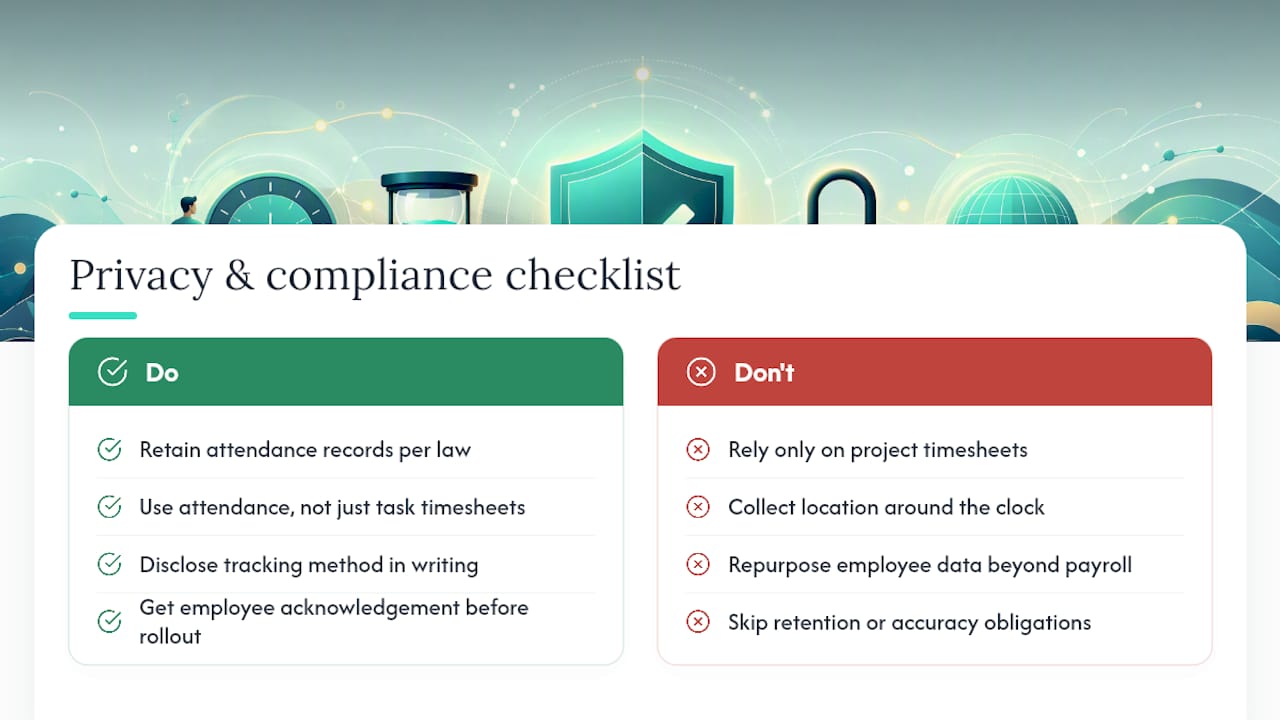
Attendance and time-tracking data are employment records, which means they carry legal weight beyond simple bookkeeping.
Under the FLSA, employers must retain payroll records, including hours worked, for a set retention period, and those records need to be accurate enough to survive a wage-and-hour audit. That obligation falls on the attendance side of your system, not the project timesheet, so if your only record of hours is a task tracker with gaps on unpaid breaks, you have a compliance problem waiting to surface.
Location tracking adds another layer. GPS geofencing and photo verification cut down on time theft, but they also collect data about where an employee physically was during work hours. Best practice is straightforward: disclose the tracking method in writing, get acknowledgment before rollout, and only collect location data during clocked-in shifts, not around the clock. Several states have specific notice requirements for biometric or location data, so check your state’s rules before enabling either feature.
Data retention policies matter just as much as collection policies. Keep attendance records for the period your state and federal law require, restrict access to HR and payroll staff, and avoid using time-tracking software that repurposes employee data for anything beyond payroll and project costing. The goal is a system that protects the business during an audit without turning into a surveillance tool that damages trust on the floor.
Does Tracking Hours Actually Change How People Work?
Employees notice the difference between a system that logs presence and one that scrutinizes every minute, and they respond to each one differently.
Attendance tracking, done well, tends to fade into the background. Clock in, clock out, get paid accurately, no friction. Employees generally accept it as a normal part of hourly work, especially when it fixes a real problem like chronically wrong paychecks. Where attendance tracking backfires is when it’s implemented punitively, treating every late clock-in as a disciplinary event rather than a scheduling conversation.
Time tracking carries more friction because it asks people to categorize their own work, which interrupts the work itself. A consultant stopping mid-task to log which project bucket the last twenty minutes belonged to is a real productivity cost, even a small one, repeated dozens of times a day. Teams that adopt time tracking successfully usually simplify the categories to the point where logging takes seconds, not minutes.
The engagement risk in both cases comes from the same source: opacity. Employees who don’t understand why they’re being tracked, what happens to the data, or how it affects their pay tend to disengage or find workarounds. Employees who see a direct, transparent link between the tracking and their paycheck accuracy generally don’t mind it. The fix isn’t less tracking. It’s clearer communication about what’s being tracked and why.
Common Roadblocks When You Actually Implement This
The gap between choosing a system and running it smoothly is where most small businesses lose time.
Resistance to change shows up first. Employees used to paper timesheets or a punch clock they’ve used for a decade will push back on a new app, especially if it requires a smartphone they’d rather not use for work. The fix is a short, mandatory training session at rollout, not a tutorial link nobody opens.
Configuration mismatches come next. Overtime rules, break deduction rules, and rounding rules vary by state, and software defaults rarely match your state’s requirements out of the box. Businesses that skip this step often discover the error only when an employee disputes a paycheck.
Connectivity gaps hit field-based industries hardest. A construction crew clocking in from a job site with poor signal needs offline capability that syncs later, not a system that fails silently when the connection drops.
Data reconciliation becomes the recurring headache for anyone running both attendance and time tracking. Without a fixed weekly process for matching task hours to clocked hours, small discrepancies pile up until nobody trusts either number.
The solutions are less about better technology and more about better process: a real pilot period, a written policy on rounding and breaks, offline-capable tools for mobile teams, and a standing weekly reconciliation step until the two data sets consistently agree.
The Buying Mistake That Costs the Most
The single most expensive mistake in this category is buying the wrong tool and then forcing it to do the other job.
It happens in both directions. A consultancy buys a basic attendance clock because it’s cheap, then tries to bill clients off a daily total that has no project breakdown, guessing at hours after the fact. A restaurant buys a full project-based time-tracking platform because a salesperson pitched it as “comprehensive,” then pays for task codes and client billing fields nobody on the floor will ever use.
Both mistakes share a root cause: buying based on the software’s feature list instead of the report you actually need at the end of the pay period. If your end goal is a clean payroll export with overtime and breaks calculated correctly, buying a project-costing platform and bending it into an attendance tool means fighting the software’s design every single week.
The fix is the same test from earlier in this guide: know your required output before you shop. If you need a presence register, buy attendance software and stop there. If you need itemized, billable hours, buy time-tracking software built for that purpose. Businesses that need both should buy each tool for what it does best rather than hunting for one platform that does both adequately.
Making the Data Actually Move With Your Other Systems
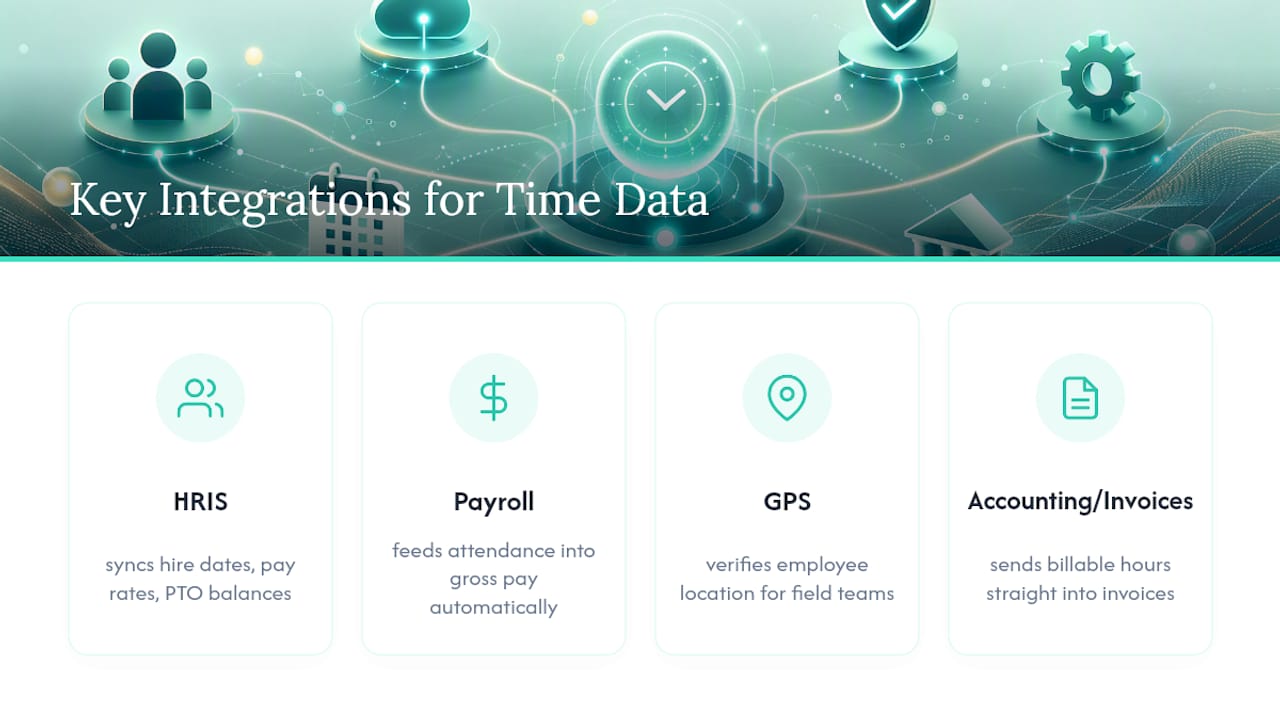
Attendance and time-tracking data are only useful if they reach the systems that depend on them. Standing between a clock-in and a paycheck manually, retyping hours into a spreadsheet, is where most small-business payroll errors originate.
The two integrations that matter most are HRIS and accounting or payroll software. A direct connection to your payroll provider turns attendance data into gross pay without manual entry, cutting out the retyping step where transposition errors happen. An HRIS integration keeps employee records, like hire dates, pay rates, and PTO balances, in sync with the time data, so a rate change in one system doesn’t get missed in the other.
For field-based teams, a GPS tracking partner integration adds a layer of location verification on top of attendance, useful for construction crews or delivery teams where confirming an employee was actually at the job site matters as much as confirming they clocked in. Time-tracking software aimed at agencies or consultancies should connect to whatever accounting platform generates client invoices, so billable hours flow straight into an invoice rather than getting copied by hand.
Before choosing either system, ask what it connects to natively, not just what it claims to support. A tool that requires a CSV export and manual import into your accounting software isn’t really integrated, it’s just saving you one extra column to type. The businesses reconciling payroll fastest are almost always the ones whose clock-in data reaches their payroll processor without a human touching it in between.
What I’d Actually Do If I Were Setting This Up
Start with attendance. It covers payroll and compliance for most hourly workforces, and it’s the system with the bigger legal downside if you get it wrong. Add time tracking only when billing or project costing genuinely requires it, not because a sales page made it sound comprehensive. Pilot with one team, reconcile the first few pay runs by hand, and trial a free time clock like Kloqk before committing to anything paid.
Saad
Try the Free Route Before You Commit to Anything
You don’t need a budget line to find out whether attendance software fixes your payroll headaches. Kloqk’s core plan is free: overtime calculations, break tracking, and payroll-ready exports built in, not sold separately the way some competitors structure their pricing.

Run a pilot with a single location or shift before touching anything company wide. Turn on photo verification and GPS geofencing if buddy punching or job-site verification is part of your problem, then compare the export against what you calculate manually for two pay periods. If the numbers match without you touching a spreadsheet, you’ve found your attendance system. Check out the employee time tracking features page to see what’s included in the free tier and start your pilot this week.
Where This Guide Pulled Its Facts
- SHRM’s attendance toolkit backs the policy and documentation practices referenced in implementation.
- ERP Research’s glossary entry supports the core definition of time and attendance as a payroll and compliance record.
- FirstHR’s small business guide informs the pilot-and-reconcile approach and the point that small employers often just need accurate hours.
- Wikipedia’s time and attendance overview supports the clock-in method and geofencing details in the features checklist.
Sources
- Managing employee attendance SHRM toolkit
- What is Time and Attendance? ERP Glossary | ERP Research
- Time and Attendance: A Small Business Guide | FirstHR
FAQ
What Is Time and Attendance Tracking?
Time and attendance tracking is the recording of when an employee clocks in, clocks out, and takes breaks, producing a presence register used mainly for payroll and compliance.
Is Time and Attendance Part of HR?
Yes. Attendance policy, documentation, and enforcement typically fall under HR’s responsibility, and SHRM’s toolkit treats it as a core HR function alongside payroll and compliance.
How Do I Track My Employees’ Time and Attendance?
Use a clock-in method such as a mobile app, kiosk, or biometric device that exports directly to payroll, ideally with photo verification or geofencing to prevent buddy punching. A free tool like Kloqk handles this without requiring a paid plan to start.
What Is the Best Time and Attendance Tracking Software?
The best option depends on what you need: a straightforward attendance system with automated overtime and break rules for hourly payroll, or a time-tracking platform with project codes if you bill clients. Kloqk covers the attendance side free, including overtime calculations and payroll exports, making it a practical starting point for hourly-staffed businesses.
Recommended
Sources
Every figure on this page traces to one of these. Primary law and government sources are listed first.
- 1. SHRMprimary
- 2. erpresearch.com
- 3. attenditai.com
- 4. jobandtalent.com
- 5. en.wikipedia.org
- 6. firsthr.app
Written by
Marcus ReyesPayroll & Timekeeping Specialist
Marcus covers payroll accuracy, timesheets, and time tracking, the unglamorous mechanics that keep paychecks correct and audits painless.
Keep Reading
Track Hours the Easy Way
Kloqk is a free time clock that handles punches, breaks, overtime, and payroll-ready reports.
Start free