7 Signs Your Time Tracking Wastes Money (and How to Fix It)

If your team logs hours inconsistently, rounds to the nearest hour, or backdates entries on Friday afternoon, your time tracking is almost certainly costing you money. The three most reliable warning signs are: a high percentage of unassigned or uncategorized hours, chronic retroactive entry, and persistent unexplained overtime. Start today by pulling last week’s timesheets and counting how many entries were logged more than 24 hours after the work happened. If that number is notably high, you have a leak worth fixing.
Here is a quick scan of the signs covered below:
- Employees log hours inconsistently or not at all
- Entries are rounded to the nearest hour (or half-hour)
- Most time is entered retroactively, not in real time
- A large share of hours sits unassigned to any project or client
- Overtime appears regularly with no clear cause
- Your tool has no payroll export or integration
- Entries are duplicated or manually corrected each pay period
- Hyper-granular tracking requirements slow everyone down
- No one reviews time reports until payroll is due
- Buddy punching or off-site clock-ins go unverified
Table of Contents
- Why bad time tracking converts directly into lost dollars
- The signs your time tracking is wasting money, ranked by how often they hurt small businesses
- Practical fixes that stop the leak this month
- Key Takeaways
- The real reason most time tracking fails small businesses
- Kloqk stops the leaks your current system is missing
- Further reading and authoritative sources
Why bad time tracking converts directly into lost dollars
The financial damage from poor timesheets is not abstract. Every hour that goes unlogged, miscategorized, or rounded away is either a billing error, a payroll mistake, or a capacity planning blind spot. Research and white papers on time capture accuracy consistently frame this as a direct profitability problem for service firms: unbilled hours never get invoiced, overbilled hours trigger client disputes, and wrong data in your project history means your next bid will be priced on fiction.
The time value of money concept applies here more literally than most managers realize. An hour of billable work recovered today is worth more than the same hour recovered six months from now, because you can reinvest it immediately. Multiply that across a team of ten over a year, and the compounding effect of small daily inaccuracies becomes a serious number.
The main leak points look like this:
- Admin overhead: Someone on your team spends hours each week chasing, correcting, and reconciling timesheets. That time has a real cost, as Kloqk’s breakdown of manual timesheet costs makes clear.
For small businesses with thin margins, any one of these is painful. All five running simultaneously is a slow bleed that rarely shows up as a single line item, which is exactly why it persists.
The signs your time tracking is wasting money, ranked by how often they hurt small businesses
1. Employees log hours inconsistently or skip days entirely
Some team members log every day; others catch up on Friday. The result is a dataset that looks complete but is not. Inconsistent logging is the single most common source of broken time tracking systems and produces billing gaps that compound weekly.
How to detect it: Sort your last two weeks of entries by employee. Flag anyone with more than two days missing or with all entries on a single day.
Quick fix: Set a daily 5:00 PM reminder (push notification or Slack message) that prompts the team to confirm their hours before they log off. Takes 30 seconds to configure.
2. Hours are rounded to the nearest hour or half-hour
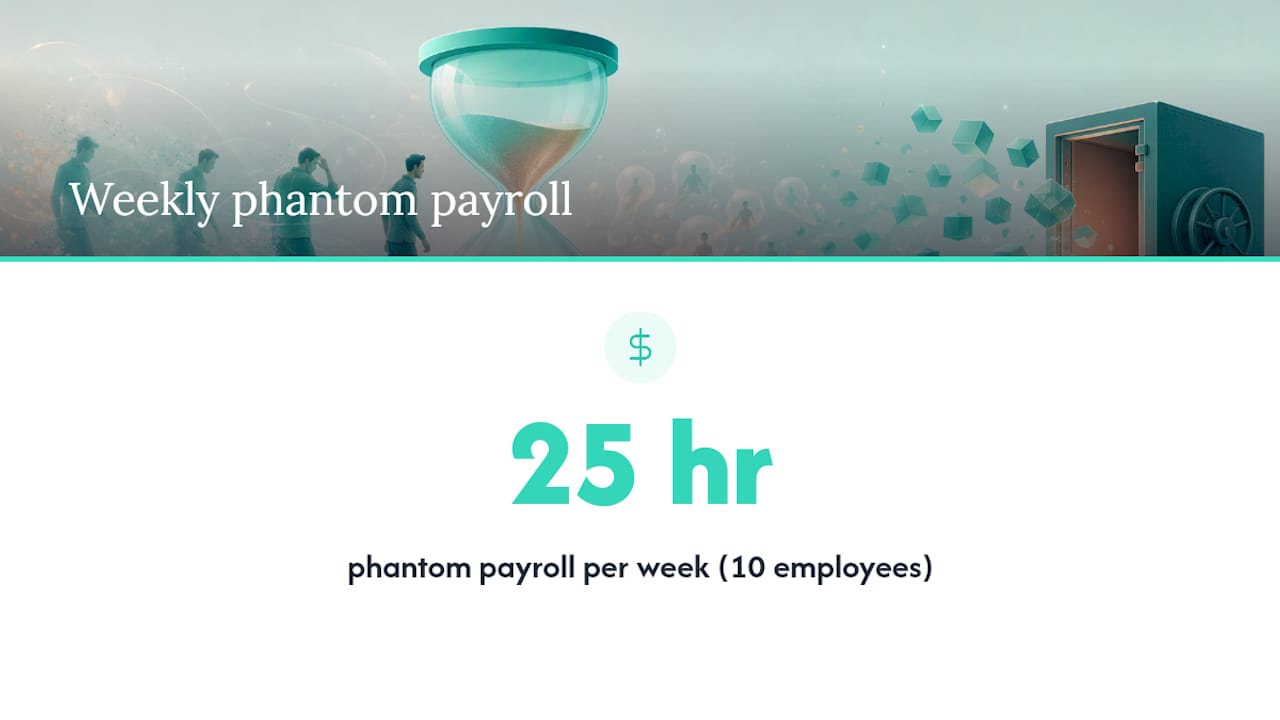
Rounding feels harmless. It is not. If ten employees each round up by 15 minutes twice a day, that is 25 hours of phantom payroll per week across the team. Multiply by your average hourly rate and the number gets uncomfortable fast.
How to detect it: Export a week of raw clock data and check the distribution of entry end-times. If a substantial share land exactly on the hour or half-hour, rounding is happening.
Quick fix: Switch to a clock-in/clock-out system that records exact minutes. Payroll software can apply any legally required rounding rule after the fact, so you keep the accurate record and stay compliant.
3. Most entries are logged retroactively, not in real time
Retroactive entry is the single biggest accuracy killer in small-business time tracking. Memory degrades fast: research on manual entry error rates suggests inaccuracies are common and significant when entries are made hours or days after the work. When someone reconstructs Tuesday from memory on Thursday, they are guessing.
How to detect it: Check your system’s entry timestamps versus the work timestamps. Any entry created more than 24 hours after the logged period is retroactive. A rate above 10% is a red flag worth acting on.
Quick fix: Require clock-in at the start of a shift and clock-out at the end. If your team works remotely, a mobile punch-in takes under five seconds and eliminates the reconstruction problem entirely.
4. A large share of hours sits unassigned to any project or client
Unassigned hours are hours you cannot bill, cannot cost to a project, and cannot use for capacity planning. They are the time-tracking equivalent of cash left on the counter.
How to detect it: Run a report filtered to “no project” or “uncategorized.” If a notable share of total logged hours fall into that bucket, you have a structural problem, not a one-off oversight.
Quick fix: Remove the option to clock in without selecting a project or client. If your tool does not support required fields, that is a tool problem (see Sign 10).
5. Overtime appears regularly but no one can explain it
Unexplained overtime is either a scheduling failure, a time theft problem, or a data entry error. All three cost money. Under the Fair Labor Standards Act, non-exempt employees must be paid 1.5x for hours over 40 per week, so unverified overtime is also a compliance exposure.
How to detect it: Pull a 30-day overtime report and flag any employee whose overtime hours notably exceed their regular hours without a corresponding approved project or event.
Quick fix: Require manager approval for any shift that would push an employee past 40 hours. Most time tracking tools can flag this automatically before the overtime is worked, not after.
6. Buddy punching and off-site clock-ins go unverified
One employee clocking in for another is a direct payroll loss. It is also surprisingly common in hourly-staffed businesses like restaurants, retail, and construction. Time theft in its various forms, including buddy punching, early clock-ins, and extended breaks, adds up to real payroll overpayments that are nearly invisible without the right controls.
How to detect it: Compare clock-in locations against scheduled shift locations. If your tool has no location data, you cannot detect this at all.
Quick fix: Require photo verification at clock-in or enable GPS geofencing so punches outside the job site are flagged automatically. This is a feature, not a policy, so it requires a tool that supports it.
7. Time reports are only reviewed at payroll time
Reviewing time data once every two weeks means errors compound for 14 days before anyone catches them. By then, correcting them requires chasing employees for details they have long forgotten.
How to detect it: Ask yourself honestly: when did you last look at a time report outside of payroll week? If the answer is “never,” this sign applies.
Quick fix: Block 15 minutes every Wednesday to scan the current week’s entries for gaps, anomalies, and unassigned hours. Catching a problem on Wednesday costs five minutes to fix. Catching it on payday costs an hour.
8. Hyper-granular tracking requirements slow your team down
Requiring employees to log time in 6-minute increments across 40 project subcategories does not produce better data. It produces resentment and fabricated entries. Research on micromanagement and time tracking shows that overly granular requirements reduce morale and often yield lower-quality data than simpler category-based approaches, because staff start gaming the system rather than using it honestly.
How to detect it: If your team complains that logging takes longer than 10 minutes a day, or if you see entries that look suspiciously uniform (e.g., always exactly 2 hours on “Admin”), granularity is the problem.
Quick fix: Reduce your category list to four to six high-level buckets. For knowledge workers, a four-bucket approach (deep work, meetings, admin, client-facing) captures what you actually need without the overhead.
Pro Tip: For developers or consultants, use four high-level categories: deep work, collaboration, admin, and client delivery. This approach, backed by research on knowledge-worker productivity, captures the data you need for billing and capacity planning without the micromanagement overhead that drives people to stop logging accurately.
9. Timesheets are corrected manually every pay period
If your payroll process includes a step where someone manually adjusts timesheet data before exporting it, that step is both a cost and a risk. Every manual correction is a potential error, and the time spent making corrections is admin overhead that scales with team size.
How to detect it: Count how many timesheet corrections your payroll admin makes per pay period. More than two or three per employee is a sign the upstream data is structurally unreliable.
Quick fix: Trace each correction back to its source. Most will cluster around a small number of employees or a single data entry pattern. Fix the pattern, not the symptom.
10. Your tool has no payroll export and no integrations
A time tracking tool that cannot export payroll-ready data forces someone to manually re-enter hours into your payroll system. That is double entry, which means double the error rate. Accurate, exportable timesheets are not a nice feature for U.S. small businesses; they are a compliance and accuracy baseline.
How to detect it: Check whether your current tool exports in a format your payroll provider accepts. If the answer is “we copy it over manually,” you have found a significant source of both cost and risk.
Quick fix: Require payroll export as a non-negotiable feature in any tool evaluation. If your current tool cannot do it, that is a strong signal to switch.
Practical fixes that stop the leak this month
The good news: most of these problems respond quickly to low-friction changes. You do not need a six-month rollout.
Process fixes to implement this week:
Policy fixes to communicate this week:
- Give employees access to their own records. When people can see their own time history, they catch errors themselves. Accurate timesheets reduce disputes precisely because transparency creates accountability on both sides.
Behavioral rollout: pilot with one team first
Pick your highest-error team (the one with the most retroactive entries or payroll corrections) and run the new process with them for two weeks before rolling it out company-wide. Explain what you are measuring and why. When employees understand that accurate time protects their own pay, adoption improves significantly.
Pro Tip: Hybrid tracking, where a system automatically captures clock-in/out data and employees do a brief daily review rather than manual entry from scratch, consistently outperforms both fully manual and fully automated approaches. The automated capture handles the accuracy; the human review catches edge cases. For most small teams, this setup reduces daily logging time to under two minutes per employee while improving data quality.
Expected results from a well-run one-month pilot: fewer payroll corrections per pay period, a measurable drop in unassigned hours, and a reduction in the admin time your payroll manager spends reconciling data each cycle.
Key Takeaways
Poor time tracking is a direct financial leak, and the fix almost always starts with a one-week audit that surfaces your retroactive entry rate, unassigned hours percentage, and payroll correction count.
| Point | Details |
|---|---|
| Run the audit first | Pull two weeks of data and check retroactive entry rate, unassigned hours, and rounding concentration before changing anything. |
| Fix policy before tools | Most leaks respond to a clear backdating rule, required project fields, and a daily review habit within one to two weeks. |
| Hybrid tracking outperforms manual | Automated clock-in with a brief daily human review reduces logging time and improves data accuracy simultaneously. |
| Payroll export is non-negotiable | Any tool without a payroll-ready export creates manual work, error risk, and FLSA record-keeping exposure. |
| Kloqk addresses the core leaks | Kloqk’s free plan includes real-time clock-in/out, payroll exports, overtime calculations, GPS geofencing, and photo verification, covering the most common sources of financial waste for small U.S. businesses. |
The real reason most time tracking fails small businesses
The conventional wisdom says bad time tracking is a discipline problem: employees just need to log more consistently. That framing leads managers to add more rules, more required fields, and more granular categories, which makes the problem worse.
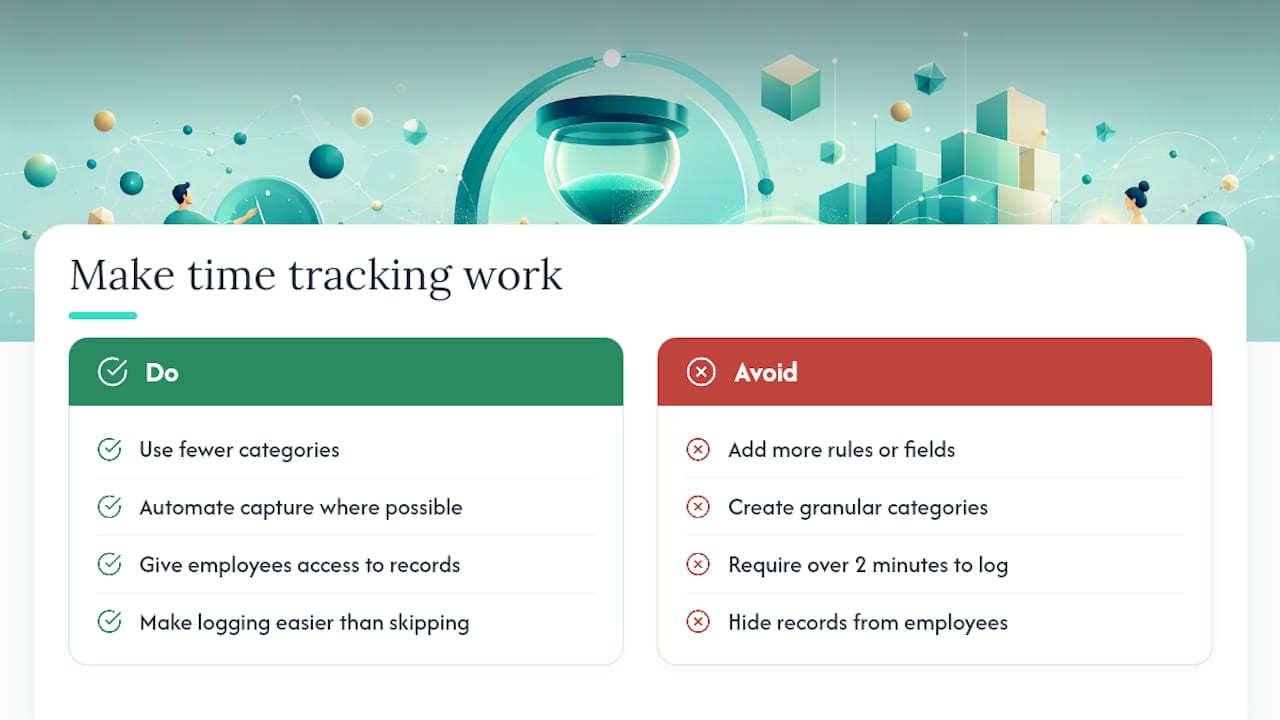
What actually drives time tracking failure in small businesses is friction and distrust, not laziness. When logging takes more than two minutes, people skip it. When the system feels like surveillance, people game it. When employees cannot see their own records, they stop caring whether the data is right.
The fix is almost always the opposite of what managers instinctively reach for. Fewer categories, not more. Automated capture where possible, not more manual steps. Transparency for employees, not just for managers. The businesses that get accurate time data are the ones that made logging easier than not logging, and that gave employees a reason to care about accuracy beyond “because I said so.”
The financial impact of getting this right is real. Every hour recovered from the unassigned bucket, every payroll correction eliminated, every overtime spike caught before it posts, those add up across a year in ways that show up directly in margin. The audit is not a bureaucratic exercise. It is the fastest way to find money you are already spending but not capturing.
Kloqk stops the leaks your current system is missing
If your audit surfaces retroactive entries, unassigned hours, or payroll corrections every cycle, Kloqk’s free time tracking plan is built to address exactly those problems. Real-time clock-in/out via mobile or kiosk eliminates the retroactive entry problem at the source. Required project fields at punch-in mean unassigned hours drop to near zero without any policy enforcement overhead. Payroll-ready exports remove the manual re-entry step entirely, cutting both error rate and admin time.

For businesses dealing with off-site teams or buddy punching, Kloqk’s GPS geofencing and photo verification at clock-in close the verification gap that most free tools leave open. Overtime calculations run automatically against the 40-hour FLSA threshold, so you catch the exposure before it posts to payroll rather than after.
The core plan is free, covers the features that matter most for small teams, and takes under an hour to set up. Start with Kloqk’s employee time tracking and run it alongside your one-week audit. By the end of the week, you will know exactly where your hours are going.
Further reading and authoritative sources
- Accelo Time is Money (conference white paper)
- How Micromanagement Kills Productivity and Morale And Why Granular Time Tracking Is One of the Worst Offenders
- 3 Signs Your Time Tracking System is Broken
- Common Costs of Manual Time Tracking Systems | Kloqk
- Why Accurate Hours Matter for Payroll in 2026 | Kloqk
- Time theft at work (Kloqk resources)
- Time value of money, Wikipedia
Recommended
Sources
Every figure on this page traces to one of these. Primary law and government sources are listed first.
Written by
Priya NairPeople Operations Writer
Priya focuses on HR and hiring for small teams, onboarding, scheduling people fairly, and the day-to-day of managing hourly staff without an HR department.
Keep Reading
Track Hours the Easy Way
Kloqk is a free time clock that handles punches, breaks, overtime, and payroll-ready reports.
Start free