How Payroll Discrepancies Are Detected for Small Businesses

Payroll discrepancies are detected by automated validation that compares incoming time and HR data against expected baselines, business rules, and peer cohorts to flag exceptions before a pay run finalizes. Modern payroll stacks use discrepancy logic and AI-driven anomaly detection to surface mismatches between time-tracking inputs and employee records. For small businesses, that means catching a missed overtime calculation or a duplicate deduction before employees notice it on their pay stubs.
Three things to verify in your current setup right now:
- Pre-run validation: Does your payroll system compare source data before calculating, or does it only flag errors after the run closes?
- Audit trail visibility: Can you trace every change to a named reviewer with a timestamp?
- Input-error prevention: Does your time-tracking tool use photo verification, GPS geofencing, and manager approvals to stop bad data at the source?
The IRS penalty for late tax deposits ranges from 2% to 15% depending on how late the deposit is. That range alone is reason enough to catch errors before finalization, not after.
Table of Contents
- Where do payroll discrepancies actually come from?
- How do modern systems detect payroll discrepancies?
- The layered detection process: from capture to reconciliation
- What signals and red flags should you watch for?
- How to investigate and fix a detected discrepancy
- What should you require from a time-tracking solution?
- Quick implementation checklist and realistic timeline
- Key Takeaways
- Why proactive detection beats reactive auditing every time
- Kloqk gives you the controls this guide describes
- Useful sources and further reading
Where do payroll discrepancies actually come from?
Most payroll errors start upstream, at the data-input stage, not inside the calculation engine. Industry data confirms that unapproved timesheets and stale employee records are among the most frequent root causes of downstream payroll problems.
Data-input sources:
- Unapproved or manually entered timesheets with missed punches
- Buddy punching (one employee clocking in for another)
- Stale employee records carrying wrong tax withholding or outdated bank details
- Missing punch approvals that let unverified hours flow into payroll
Payroll configuration sources:
- Incorrect pay-code mapping (a shift differential coded as base pay, for example)
- Wrong overtime rules applied to the wrong employee class
- Deduction sequencing errors that double-apply a benefit premium
- Duplicate off-cycle adjustments entered by two different admins
Concrete examples matter here. A missed overtime calculation reduces an employee’s net pay without any obvious error message. A duplicate deduction entry quietly overstates withholding. Ghost-employee payments, where a terminated worker’s record stays active, can go undetected for months. Payroll fraud schemes historically account for a meaningful share of occupational fraud and can take 18 months to detect on average if systematic reconciliation is not in place.
The primary cause of payroll errors is manual data handoffs between HR, finance, and time-tracking systems. Every transfer point is a potential omission or duplication. Eliminating those handoffs, or validating data at each one, is where detection starts.
How do modern systems detect payroll discrepancies?
The shift happening in 2026 is from reactive, end-of-run audits to proactive, AI-powered validation that flags anomalies in real time and routes them for human review before payroll finalizes. That is a meaningful operational change for small businesses.
Core detection mechanisms:
- Pre-run validation: The system compares source records (time-tracking, HRIS, benefits) against each other before any calculation runs.
- Historical baseline analysis: Each employee has a per-period baseline. A sudden 30% gross-pay increase triggers a flag even if every individual input looks correct.
- Peer-cohort anomaly detection: If three employees on the same crew all show unscheduled bonuses in the same period, that pattern surfaces as a group anomaly.
- Rule-based logical checks: Effective-date mismatches, deduction sequencing violations, and missing tax table entries each generate specific exception conditions.
AI adds a layer that rule-based checks alone cannot cover. It detects statistical and behavioral anomalies that fall outside normal patterns but do not violate any explicit rule. Critically, explainability methods like SHAP and LIME translate those AI alerts into plain-language reasons a reviewer can actually act on, reducing false-positive overhead and making alerts defensible to auditors.
Pro Tip: Ask your payroll vendor whether their anomaly alerts include a plain-language reason code. An alert that just says “outlier detected” is nearly useless. One that says “gross pay 28% above 90-day baseline, driven by 14 unapproved overtime hours” is something a manager can resolve in two minutes.

Automated QA also catches duplicate entries by comparing employee identifiers, pay amounts, and period references inside a tolerance window before the run closes. That catches accidental doubles from off-cycle adjustments before they hit bank accounts.
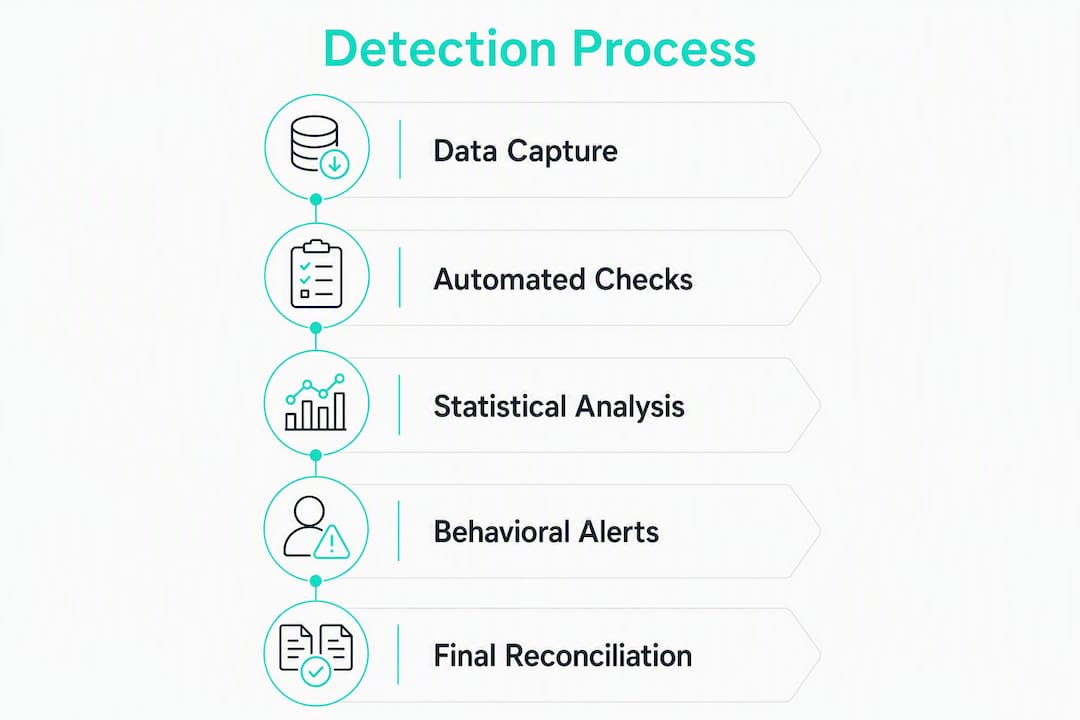
The layered detection process: from capture to reconciliation
Payroll accuracy works best as a layered process across four control stages. Each stage has a clear owner.
- Data collection controls (HR and managers): Manager-approved timesheets, photo and GPS verification at clock-in, hard cutoff rules that prevent late entries from slipping into a closed period.
- Calculation verification (payroll admin): Automated comparison of hours, pay rates, deductions, and tax tables against expected values. Variance reports that flag gross-pay changes outside a configured ±5% threshold focus review effort on the highest-risk records.
- Pre-approval auditing (managers and payroll admin): Exception packs routed to named reviewers before finalization. Multi-level approvals for any off-cycle adjustment or bank detail change.
- Post-run reconciliation (finance): A three-way check matching the payroll register to bank disbursements and the general ledger. This surfaces unprocessed adjustments or distribution mismatches that register-only reviews miss.
What a searchable audit trail must capture:
- Every timesheet edit with the editor’s name, timestamp, and original value
- Manager approval or rejection with a reason code
- Any change to employee bank details, tax elections, or deduction amounts
- Off-cycle payment authorizations with dual sign-off
Understanding why accurate hours matter at each stage is what separates a payroll process that catches errors from one that discovers them on payday.
What signals and red flags should you watch for?
Not all discrepancy signals carry equal weight. These are the ones that reliably point to real problems in time-tracking inputs.
High-value signals to monitor:
- Sudden overtime spikes with no corresponding schedule change (see overtime manipulation patterns)
- Repeated manual edits to the same employee’s timesheet across multiple periods
- GPS or photo mismatches at clock-in (location outside geofence, photo ID mismatch)
- Identical punch times across employees at different locations
- First-time direct-deposit account changes, especially near a pay run
- Negative net pay after deductions
- Duplicate payment amounts for the same employee in the same period
Cohort checks catch patterns that single-employee reviews miss. If multiple employees in one crew show unscheduled bonuses in the same period, that is a coordination signal worth investigating regardless of whether any individual record looks wrong.
For small businesses, configurable thresholds keep the alert volume manageable. Flag overtime above 10 hours per week for hourly staff, or any gross-pay variance above 5% from the prior period. Those two rules alone will surface the majority of high-impact discrepancies before they finalize.
How to investigate and fix a detected discrepancy
The same symptom, say, lower-than-expected net pay, can come from missing overtime, a duplicate deduction, or a tax setup change. Investigation has to trace back to the authoritative source record, not just the symptom.
- Triage: Classify the discrepancy type (hours, tax, deduction, employee status, payment distribution) and assign it to the right owner.
- Trace the source: Work backward from the payroll register to time-tracking entries, HRIS records, benefits enrollment, and bank disbursement data. Contact the responsible manager for hours disputes, HR for status or classification issues, and finance for bank or GL mismatches.
- Correct the authoritative record: Fix the upstream source, not just the payroll output. A correction made only in the payroll register will recur next period.
- Apply pay or tax adjustments: Issue an off-cycle payment if the employee was underpaid. Adjust tax withholding if the error affected a tax period. Document the adjustment type and authorization.
- Log the correction: Record the resolution in the audit trail with the corrector’s name, the original value, the corrected value, and the reason.
- Communicate with the affected employee: Tell them what happened, what was corrected, and when they will see the adjustment. Silence after a pay error damages trust faster than the error itself.
Fix the source, not the symptom. A payroll register correction that does not update the originating time-tracking or HRIS record will generate the same discrepancy in the next pay cycle. Every correction must trace back to where the data entered the system.
What should you require from a time-tracking solution?
Validation at the point of data capture prevents most discrepancies from ever reaching the payroll calculation stage. Here is the feature checklist for small U.S. businesses.
Non-negotiable features:
- Manager approval workflow with digital sign-off before timesheet export
- Mobile and kiosk clock-ins with photo verification
- GPS geofencing that blocks clock-ins from outside a job site
- Automatic overtime and break calculations aligned to federal and state rules
- Payroll-ready exports with mapped pay codes and effective-date handling
- Searchable audit logs with named editors and timestamps
Integration and export requirements:
- Two-way HRIS sync to keep employee records current
- Support for multi-state tax contexts if you operate across state lines
- Export formats compatible with your payroll processor (CSV, direct integration)
Operational controls to verify:
- Hard payroll cutoff windows that prevent late entries
- Dual approval for any bank detail or direct-deposit change
- Exception reporting that surfaces high-impact items before finalization
Pro Tip: Before signing with any time-tracking vendor, run a test export and map every pay code manually against your payroll processor’s import template. Mapping mismatches are the single most common cause of clean time data producing wrong payroll outputs. Understanding how payroll exports work before you go live saves a full reconciliation cycle.
Quick implementation checklist and realistic timeline
A phased rollout keeps payroll running while you validate the new system.
Suggested phases:
- Plan and map rules (1-2 weeks): Document overtime rules, break policies, pay codes, and export mappings before touching any software.
- Pilot with one site or team (2-4 weeks): Run the new time-tracking tool alongside your current process. Confirm photo and GPS capture, manager approvals, and export accuracy.
- Parallel validation (1-2 pay cycles): Run both systems simultaneously and compare outputs. Flag any variance above your configured threshold.
- Manager and admin training: Cover approval workflows, exception reporting, and how to read audit logs.
- Cutover: Finalize export mappings, disable the old system, and schedule a reconciliation review after the first live pay run.
Pilot checklist:
- Confirm time-capture accuracy across all clock-in methods (mobile, kiosk, web)
- Verify manager approval routing and cutoff enforcement
- Test export mapping against payroll processor import template
- Confirm exception reporting fires correctly for overtime and variance thresholds
Common timeline risks:
- Misconfigured overtime rules (especially for multi-state or tipped employees)
- Stale tax tables not updated before go-live
- Incomplete HRIS sync leaving terminated employees active
Build one extra parity check cycle into your timeline. It is far cheaper than an off-cycle correction run after cutover.
Key Takeaways
Proactive, layered detection catches payroll discrepancies before finalization, cutting correction costs and protecting employee trust across every pay cycle.
| Point | Details |
|---|---|
| Validate at the source | Most errors originate at data-input; photo verification and GPS geofencing stop bad data before it reaches payroll. |
| Use layered controls | A four-stage model (collection, calculation, pre-approval, reconciliation) assigns clear ownership and reduces repeat errors. |
| Configure variance thresholds | Flag gross-pay changes outside ±5% and overtime above 10 hours per week to focus review on the highest-risk records. |
| IRS penalty risk is real | Late tax deposits carry IRS penalties of 2%-15%; early detection reduces the exposure that comes from correcting errors after filing. |
| Kloqk covers the checklist | Kloqk’s free time tracking includes photo verification, GPS geofencing, overtime calculations, manager approvals, and payroll-ready exports. |
Why proactive detection beats reactive auditing every time
The conventional advice is to run a payroll audit after each cycle and fix what you find. That is backwards. By the time a discrepancy shows up in a post-run audit, an employee has already been underpaid, a tax deposit may already be late, and the correction requires an off-cycle run that costs time and erodes confidence.
The more useful frame is to treat payroll accuracy as a process with validation gates, not a checklist you run at the end. Manager approvals, hard cutoff windows, and searchable audit trails are not bureaucratic overhead. They are the controls that make discrepancies visible before they become problems. A manager who approves a timesheet with 18 overtime hours is making a deliberate decision. A manager who never sees that timesheet is not.
Small businesses are actually better positioned than large ones to implement this well. Fewer employees means tighter cohort comparisons, faster anomaly review, and a manager who personally knows whether a crew member’s overtime spike is legitimate. The tools exist to automate the detection. The judgment still belongs to the person who knows the business.
Kloqk gives you the controls this guide describes
If the feature checklist above describes what you need, Kloqk delivers it at no cost for the core functions. Photo verification at clock-in, GPS geofencing, automatic overtime and break calculations, manager approval workflows, and payroll-ready exports are all included in the free plan.

The workflow maps directly to the layered detection model covered here: time data captured with verification controls, approved by managers before export, and exported with mapped pay codes ready for your payroll processor. Exception reporting surfaces overtime and variance flags before finalization, so your pre-run review focuses on the records that actually need attention.
For businesses with job sites or remote crews, Kloqk’s GPS time clock with geofencing blocks offsite clock-ins and eliminates the buddy-punching problem at the source. Start a free pilot with one team, run a parallel pay cycle, and compare the outputs against your current process. Try Kloqk’s free time tracking and see how much cleaner your next payroll export looks.
Useful sources and further reading
- How AI Catches Payroll Errors Before Payday, covers AI anomaly detection, baseline analysis, and duplicate detection in payroll systems
- How Payroll Systems Detect and Escalate Pay Discrepancies Internally, explains discrepancy logic, escalation paths, and the role of input-stage data quality
- How to Achieve Payroll Processing Accuracy, layered control model, variance reporting, and reconciliation best practices
- What Is Payroll Reconciliation? A How-To Guide, three-way reconciliation mechanics and fraud detection through systematic auditing
- Explainable Anomaly Detection in Payroll and ERP Systems SHAP/LIME methods for making AI alerts auditable and actionable
- IRS Employment Tax Penalties, official IRS guidance on penalty rates for late tax deposits (2%-15%)
- Identifying Data Discrepancies in Payroll in 2026 -2026 industry shifts including agentic AI, continuous validation, and unified data governance
- Payroll Reconciliation and Error Resolution Guide, practical reconciliation steps, error classification, and audit process guidance
Recommended
Written by
Marcus ReyesPayroll & Timekeeping Specialist
Marcus covers payroll accuracy, timesheets, and time tracking, the unglamorous mechanics that keep paychecks correct and audits painless.
Keep Reading
Track Hours the Easy Way
Kloqk is a free time clock that handles punches, breaks, overtime, and payroll-ready reports.
Start free