How Overtime Alerts Prevent Overpayment for Small Businesses

Overtime alerts stop payroll overpayment by warning managers before extra hours are approved and paid. The moment an employee approaches a threshold, the system flags it, giving you time to act. Set warning thresholds, notify the right managers, and redistribute or formally approve hours before payroll runs.
Here is what to do this week:
- Set warning thresholds at 36, 38 hours so alerts fire before the 40-hour overtime threshold is crossed.
- Route notifications to the manager responsible for that employee’s location or department.
- Redistribute or document: reassign remaining shifts to under-scheduled staff, or approve the overtime in writing before it posts.
Pro Tip: Don’t wait until Thursday to check hours. A midweek alert on Tuesday or Wednesday gives you two full days to adjust schedules before the week closes.
Table of Contents
- How do overtime alert systems actually work?
- Why real-time alerts stop overpayment before it happens
- What features does your system need to prevent overpayment?
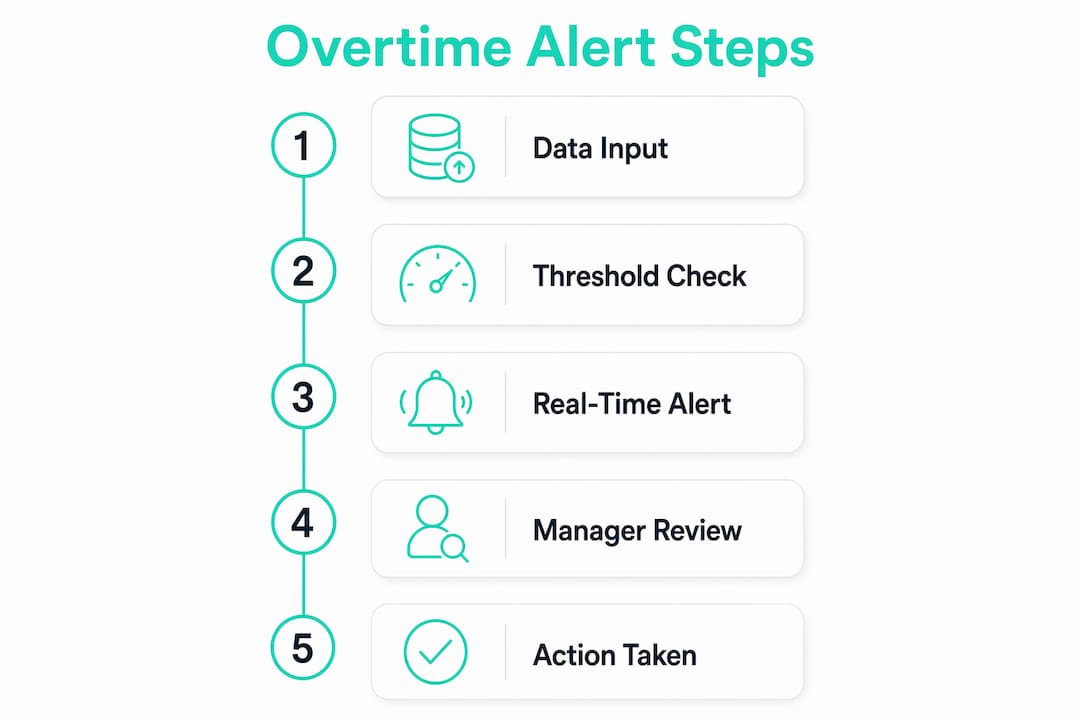
- Five steps to implement overtime alerts in a small business
- U.S. legal considerations managers need to understand
- How do you measure the ROI of overtime alerts?
- Common pitfalls that make alerts useless (and how to fix them)
- A small restaurant’s before-and-after with Kloqk
- Key Takeaways
- What managers consistently underestimate about overtime alerts
- Kloqk gives small businesses a free starting point
- Useful sources for further reading
How do overtime alert systems actually work?
The core flow is straightforward: timeclock data feeds into the system, the system compares accumulated hours against your configured rules, and a notification fires when a rule is triggered. What makes this useful is the at-risk calculation. Rather than waiting for an employee to hit 40 hours, a well-configured system adds actual hours worked to scheduled hours remaining in the week and compares that sum to your overtime setting. If the projected total crosses the threshold, the alert fires before the hours are worked.

Inputs → Trigger Logic → Notification → Manager Action
Common trigger types include:
- At-risk (projected): actual hours + remaining scheduled hours exceed the weekly limit.
- Daily threshold: hours in a single shift exceed a set limit (critical in states like California).
- Hard threshold: the employee has already hit 40 hours; any additional work is now overtime.
- After-hours activity: off-the-clock work detected outside scheduled windows, which creates unbudgeted liability if the employer knew or should have known it was happening.
Alerts can be routed to managers, HR, or both, and can be configured at the company, location, or department level. Managers only receive alerts for employees assigned to their locations, so routing and role settings must be verified during setup or notifications will simply not reach the right person.
The at-risk calculation is what separates a useful alert from a useless one. A system that only tells you an employee hit 40 hours is a payroll report. A system that tells you an employee is projected to hit 40 hours by Friday gives you Wednesday to do something about it.
Pro Tip: Configure your at-risk threshold several hours below the overtime point. Warnings well before the limit give you a realistic window to act; warnings too close to the limit are less useful.
Why real-time alerts stop overpayment before it happens
Overtime is a scheduling problem, not a payroll problem. By the time payroll runs, the hours are worked, the liability is fixed, and your only option is to pay it. Alerts shift the intervention point earlier, into the scheduling window where you can still change the outcome.
Here is the cause-and-effect chain:
- Alert fires at 36 hours → manager sees the flag → reassigns Friday’s closing shift to a part-time employee who has hours available.
- Alert fires for a remote field worker → manager reviews the schedule → splits remaining site visits between two technicians instead of one.
- Alert fires for after-hours activity → manager contacts the employee, documents the conversation, and either approves the time or corrects the record before payroll.
Consider two quick scenarios. A retail store manager gets a midweek at-risk alert for a cashier who picked up an extra shift. She reassigns Saturday’s four-hour shift to a part-time hire, and the cashier finishes the week at 38 hours. No overtime paid. A construction supervisor gets an alert for a field tech who logged hours on a remote site outside his scheduled window. The supervisor reviews the GPS-verified clock-in, confirms the work was authorized, and documents the approval. The overtime is paid, but it is documented and defensible.
Treating overtime as a scheduling issue rather than a payroll issue is the single most effective shift a manager can make. Alerts only work if they arrive early enough to let you redistribute tasks, not just document a liability.
What features does your system need to prevent overpayment?
Not every time-tracking tool gives you the controls you need. Here is what to look for:
- Real-time notifications (push, email, or in-app) that fire the moment a threshold is crossed, not in a nightly batch.
- Schedule sync so the system knows what hours are still planned for the week and can run the at-risk math accurately.
- Projected/at-risk calculation that adds actual hours to scheduled remaining hours and compares the total to your overtime setting.
- Daily and weekly thresholds configured separately, since some states trigger overtime on daily hours, not just weekly totals.
- Manager routing with location and department filters so alerts reach the person who can actually act on them.
- Photo verification at clock-in to prevent buddy punching, which inflates hours before an alert even has a chance to fire. Kloqk’s photo clock-in feature addresses this directly.
- GPS geofencing to confirm employees are on-site when they clock in, eliminating phantom hours from remote or field workers. Kloqk’s GPS time clock enforces location boundaries automatically.
- Audit trail and payroll exports that capture when alerts fired, when managers responded, and what action was taken. That log is your compliance record.
- Multi-location aggregation that rolls up hours across all sites so an employee working two locations does not slip past a single-site threshold.
Pro Tip: Start with thresholds slightly conservative, then loosen them after two weeks of data. It is easier to reduce false positives than to explain why an alert never fired.
Five steps to implement overtime alerts in a small business
Roll this out in stages. A rushed deployment produces misconfigured thresholds and managers who ignore alerts because they fired too often on day one.
- Define thresholds and policy (Days 1, 2). Set your warning threshold below the overtime limit and your hard threshold at the overtime limit. Document the policy in writing and get employee acknowledgment on file.
- Sync schedules and timeclocks (Days 3, 4). Connect your scheduling tool to your time-tracking system. Without schedule data, at-risk math cannot run. Kloqk’s scheduling software integrates both in one place.
- Set at-risk and hard alerts with correct routing (Day 5). Assign alert recipients by location and department. Verify that every manager appears correctly in the system and is linked to the right employees.
- Pilot test and train managers (Week 2). Run a two-week pilot with one team or location. Walk managers through what an alert looks like, what action it requires, and how to document approvals or reassignments.
- Evaluate and adjust (Week 3, 4). Review false-positive rates, missed alerts, and manager response times. Adjust thresholds and routing based on what the data shows.
During the pilot, track three things daily: how many alerts fired, how many were acted on, and how many resulted in a schedule change versus a documented approval.
U.S. legal considerations managers need to understand
Alerts help with compliance, but they do not replace written policies or required pay. A few guardrails matter here.
- FLSA “suffered or permitted” standard: if an employee works overtime and you knew or should have known, you owe the pay regardless of whether it was approved. Alerts create a record that you were notified, which cuts both ways. Use them to act, not just to document inaction.
- State daily overtime rules: California requires overtime pay after eight hours in a single day, not just after 40 hours in a week. Configure daily thresholds if you operate in states with daily limits. Check your state labor department for the applicable rule.
- Timestamped logs as audit evidence: contemporaneous monitoring records show precisely when work occurred and when managers were notified, which is valuable in disputes. The alert log is part of your defense.
- Recordkeeping retention: the FLSA requires employers to retain payroll records for at least three years. Keep alert logs for the same period.
Pro Tip: Export your alert log monthly and store it alongside payroll records. If a wage claim surfaces 18 months later, that log shows exactly when you were notified and what action followed.
How do you measure the ROI of overtime alerts?
ROI is measurable within one to three payroll cycles when you track the right numbers. Pull a baseline before you launch, then compare.
Key metrics to track:
- Overtime hours per pay period
- Overtime pay as a percentage of total payroll
- Payroll variance versus budget
- Number of manager-approved overtime instances
- Administrative hours spent on payroll corrections
- Disputed pay claims prevented (each avoided dispute saves legal and HR time)
| Metric | Baseline | Current | Target |
|---|---|---|---|
| Weekly overtime hours | Reduce by 30% | ||
| Overtime as % of payroll | Below budget threshold | ||
| Payroll variance vs. budget | Within 2% | ||
| Admin hours on corrections | Reduce by half |
Quick ROI formula: (reduction in overtime hours × average hourly rate) − implementation cost. For a business paying $22/hour and cutting 10 overtime hours per week, that is $330/week in straight-time savings, before the 1.5x multiplier on those hours. The cost savings from overtime automation compound quickly once the system is calibrated.
Common pitfalls that make alerts useless (and how to fix them)
Most alert failures come from configuration and process, not the technology itself.
- Alert fatigue: too many low-priority alerts train managers to ignore them. Fix: stagger thresholds so only genuinely at-risk employees trigger warnings.
- Inaccurate time sources: if clock-ins are unverified, the hours feeding the alert math are wrong. Fix: require photo verification and GPS check-in for every clock event.
- Bad multi-location math: an employee working across two sites may not trigger a single-location alert even at 42 hours. Fix: confirm your system aggregates hours across locations and configure accordingly.
- Managers ignoring alerts: an alert that goes unacknowledged is no better than no alert. Fix: build escalation into the process so unacknowledged alerts surface to a supervisor after a set window.
Pro Tip: In week one, log every alert and whether it was acted on. A false-positive rate above 30% means your thresholds are too loose. Tighten them before managers stop reading the notifications entirely.
A small restaurant’s before-and-after with Kloqk
A 12-person restaurant running two shifts had a recurring problem: servers picking up extra shifts mid-week pushed weekly hours past 40 before the manager noticed. By the time payroll ran, overtime was already baked in.
Before alerts: overtime was discovered at payroll, averaging several unplanned overtime hours per employee per week with no documentation trail and no ability to reassign work retroactively.
After configuring Kloqk with a 36-hour warning threshold and syncing the weekly schedule, the manager received midweek alerts every time a server was projected to exceed 40 hours. The specific features that drove the change:
- Schedule sync and at-risk alerts flagged projected overages by Tuesday or Wednesday.
- Photo verification at clock-in eliminated two instances of buddy punching that had inflated hours.
- Payroll-ready exports cut the time spent reconciling hours from roughly two hours per pay period to under 30 minutes.
Within eight weeks, the restaurant reduced unplanned overtime hours significantly and had a complete audit trail for every approved exception. Results will vary by business size, shift structure, and how consistently managers act on alerts, but the mechanism is the same regardless of sector.
Key Takeaways
Overtime alerts prevent overpayment by creating an intervention window before hours are worked, not after they are paid.
| Point | Details |
|---|---|
| Alerts work before payroll, not after | Warning thresholds at 36, 38 hours give managers time to redistribute shifts before overtime posts. |
| At-risk math is the critical feature | Systems that add actual hours to scheduled remaining hours catch overages before they happen. |
| Legal records matter | Timestamped alert logs serve as contemporaneous compliance evidence under the FLSA. |
| Measure within three pay cycles | Track overtime hours, payroll variance, and manager response rate to quantify savings quickly. |
| Kloqk as a free pilot path | Kloqk provides overtime alerts, photo verification, GPS geofencing, and payroll exports at no cost for small businesses. |
What managers consistently underestimate about overtime alerts
The feature most managers skip during setup is schedule sync. They configure the alert thresholds correctly, verify the routing, and then leave the scheduling tool disconnected. Without schedule data, the system cannot run at-risk projections. It can only tell you what has already happened, which puts you back in payroll-report territory.
Two things that make a real difference in practice: first, phase the rollout by location rather than launching company-wide on day one. One location gives you clean data to calibrate thresholds before you scale. Second, make manager response to alerts a tracked metric, not a suggestion. If alerts are acknowledged but no action is logged, the system is generating noise, not preventing cost.
Saad’s articles on payroll accuracy and overtime manipulation detection go deeper on both the compliance side and the behavioral patterns that make alerts fail.
Kloqk gives small businesses a free starting point
Small businesses that need overtime alerts without a monthly software bill have a direct option. Kloqk’s free time-tracking platform includes the features this article covers: at-risk overtime alerts, schedule sync, automatic overtime calculation, photo verification at clock-in, GPS geofencing, and payroll-ready exports. No subscription required for the core functionality.

The setup takes less than a day for most small teams. Configure your warning thresholds, connect your schedule, verify manager routing, and run a two-week pilot with one location or department. If the pilot reduces unplanned overtime hours, scale it. If thresholds need adjustment, the data from week one tells you exactly where to tune. Start your free account at kloqk.com and have alerts running before your next pay period closes.
Useful sources for further reading
Official and authoritative references are worth bookmarking, especially for the legal points in this article.
- FLSA overtime rules and recordkeeping: U.S. Department of Labor, Wage and Hour Division covers the federal overtime standard, the “suffered or permitted” doctrine, and the three-year recordkeeping requirement.
- State daily overtime rules: check your state labor department directly. California’s daily overtime rules (eight hours/day) differ significantly from the federal standard and from most other states.
- Overtime alert configuration guidance: eMonitor’s overtime detection resource covers threshold setup and audit-trail best practices.
- Kloqk implementation resources: the Kloqk articles hub includes Saad’s how-to guides on payroll calculation, overtime automation, and remote clock-in verification for teams getting started.
Recommended
Sources
Every figure on this page traces to one of these. Primary law and government sources are listed first.
- 1. U.S. Department of Laborprimary
Written by
Dana WhitfieldHR Compliance Lead
Dana writes about wage-and-hour law, FLSA overtime, and leave compliance for U.S. small businesses, translating dense regulations into plain steps owners can act on.
Keep Reading
Track Hours the Easy Way
Kloqk is a free time clock that handles punches, breaks, overtime, and payroll-ready reports.
Start free