Avoid Wage Claims: 5 to 10 Minute Time Clock Grace Periods for US SMBs

A grace period on a time clock is a short window, typically ranging from a few minutes up to around 15 minutes, where an early or late punch still counts as on time. It only stays unpaid if the employee does zero work during that window; the moment they perform any task for you, the FLSA treats it as compensable work time. Some time clock systems let you configure that window directly in your time clock settings, so the rule enforces itself instead of relying on a manager’s memory.
TL;DR:
- A time clock’s grace period should be set within five to ten minutes, depending on the organization’s policy, and is valid only if no work is performed during that window.
- If employees perform any work during the grace period, the time becomes compensable under the Fair Labor Standards Act, regardless of the label or system settings.
- Employers must configure the system to separate grace periods from rounding rules and regularly audit punch data to maintain neutrality and compliance.
- A clear, written policy should specify the exact window, no-work rule, reporting procedures, and how to handle work done during the grace period.
- Using systems like Kloqk with configurable settings helps enforce policies automatically, providing audit-ready reports and features such as photo verification and GPS geofencing.
Table of Contents
- What a Grace Period Is and How Time Clocks Apply It
- The Legal Line Between a Free Grace Period and Paid Work
- Setting Up Grace Periods and Rounding in Your Time Clock System
- Writing a Grace Period Policy Employees Actually Understand
- Handling Missed Punches and Payroll Corrections
- What Actually Protects You: Policy and System Alignment
- Setting Up Compliant Grace Periods With Kloqk
- Sources
- FAQ
What a Grace Period Is and How Time Clocks Apply It
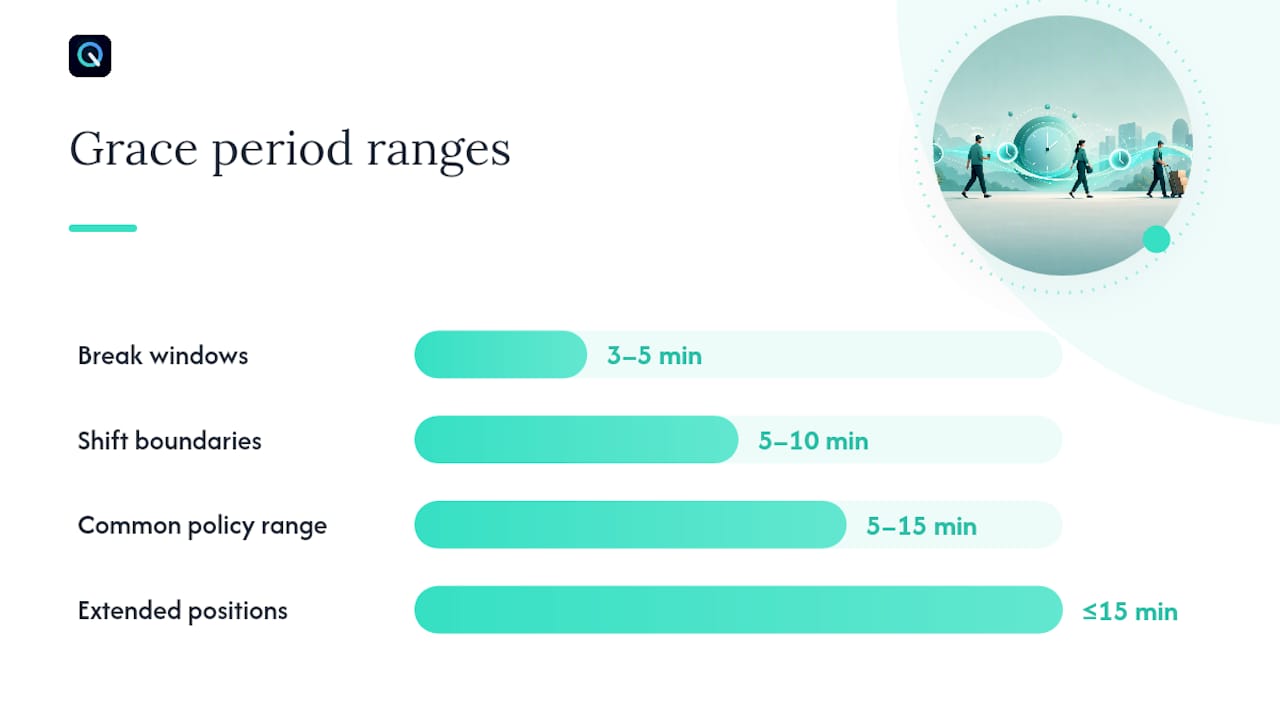
A grace period tells your time clock to treat a punch within a set number of minutes of the scheduled start or end time as if it happened exactly on schedule. Most policies land somewhere between 5 and 15 minutes, and some organizations extend it further depending on the role. Public-sector employers commonly use 3 to 5 minute windows for breaks and 5 to 10 minutes at shift boundaries, with a handful stretching to 15 minutes for certain positions.
Notre Dame’s campus policy is a clean real-world example: it runs a 10-minute grace period before and after scheduled shifts and tells staff to flag their supervisor if they actually worked during that window.
A grace period is not the same thing as rounding, and mixing the two up is where a lot of employers get into trouble. Here’s how they differ:
- Grace period: a window where a punch is treated as on time, with no work expected.
- Interval rounding: a system-wide rule that rounds every punch (early or late) to the nearest 5, 10, or 15 minute mark.
- Late or early windows: broader ranges used for scheduling and attendance tracking, distinct from the narrow on-time buffer a grace period creates.
- Shift limits: the outer boundaries a time system uses to decide which shift a punch belongs to at all, as Oracle’s time processing documentation lays out.
The Legal Line Between a Free Grace Period and Paid Work
The FLSA doesn’t care what you call the window on your time clock. It cares whether the employer controlled the employee during that time. If you require a uniform change, a pre-shift huddle, or a manager tells someone to start stocking shelves five minutes early, that time is compensable no matter how your system labels it.
The test that decides everything: was the employee free to leave, or under your direction?
California’s courts have actually weighed in on this directly. In Silva v. See’s Candy, an appellate court upheld a voluntary grace-period policy paired with neutral rounding, specifically because the employer exerted no control over employees during the window and the rounding didn’t systematically favor the company. That combination, voluntary plus neutral, is what kept it lawful.
Common ways employers blow this without realizing it:
- Requiring employees to be in uniform or at their station before the paid clock starts.
- Having a manager assign tasks “real quick” during the grace window.
- Letting rounding rules and grace periods stack, so a chronically early employee never gets paid for the extra minutes they actually work.
State rules add another layer. California courts scrutinize grace periods more closely than federal law alone requires, and several other states have their own wage-and-hour quirks. When your situation involves ambiguous facts, a habitual pattern of early clock-ins, or multi-state staff, get an employment attorney to look at your policy rather than guessing.
Setting Up Grace Periods and Rounding in Your Time Clock System
Configuration is where policy either becomes real or falls apart. A written rule that your time clock doesn’t enforce is just a suggestion, and suggestions don’t hold up in a Department of Labor audit.
- Pick your grace length and mark it voluntary. A short window of several minutes is a reasonable starting point for most hourly teams.
- Decide where it applies. Before the shift, after it, or both. Some businesses only need it at clock-in.
- Set shift limits separately from the grace window. Your system needs to know which shift a punch belongs to before it applies any grace-period rounding.
- Configure grace-period rounding as its own rule, distinct from general interval rounding. Some platforms let you round a punch to the scheduled start only if it falls within X minutes, otherwise the raw punch stands.
- Run a week of test punches against the new settings before going live, checking for edge cases like split shifts or overnight workers.
- Audit the output for neutrality. Pull a report and check whether rounding trends toward the company or the employee over time.
Pro Tip: Don’t layer a grace period on top of standard interval rounding without checking the combined effect first. Stacking the two can quietly shortchange employees who clock in consistently a few minutes early, which is exactly the pattern regulators look for.
Writing a Grace Period Policy Employees Actually Understand
A grace period policy needs to say four things plainly, or it’s not worth publishing. Vague language is how disputes start.
- Define the window. “Punches within 10 minutes before or after your scheduled shift start are treated as on time.”
- State the no-work rule. “You may not perform any work duties during the grace period unless directed by a supervisor.”
- Set the late mark trigger. “Punches beyond the grace window are recorded as the actual time and may be marked late.”
- Require reporting. “If you performed any work during the grace period, notify your supervisor immediately so your hours can be adjusted.”
Post this notice at every physical time clock and mobile kiosk, and repeat it during onboarding so new hires hear it before their first shift, not after their first paycheck dispute. Include a short line in your restaurant or retail clocking policy about who approves adjustments, because supervisors need a clear path to notify payroll the same week the work happened, not at month end.
Handling Missed Punches and Payroll Corrections
Work sometimes happens during a supposedly unpaid grace window, whether it’s a manager grabbing someone early or an employee jumping in before the clock officially starts. When it does, the fix is straightforward as long as you document it.
- Correct the punch record to reflect the actual time worked, not the scheduled shift time.
- Log who authorized the work, with a timestamp and a short note on what was done.
- Attach supporting details (a text message, a manager’s note, a kiosk log) so the adjustment isn’t just someone’s word after the fact.
- Push the correction through before the payroll export, not after, so the adjusted hours land in that pay period.
A missed punch policy that spells out this exact workflow saves you from reconstructing events weeks later. Audit logs tied to your payroll export are what actually protect you if a state labor board ever asks for records, since reviewing time clock discrepancies after the fact is far harder than catching them the same pay period.
What Actually Protects You: Policy and System Alignment
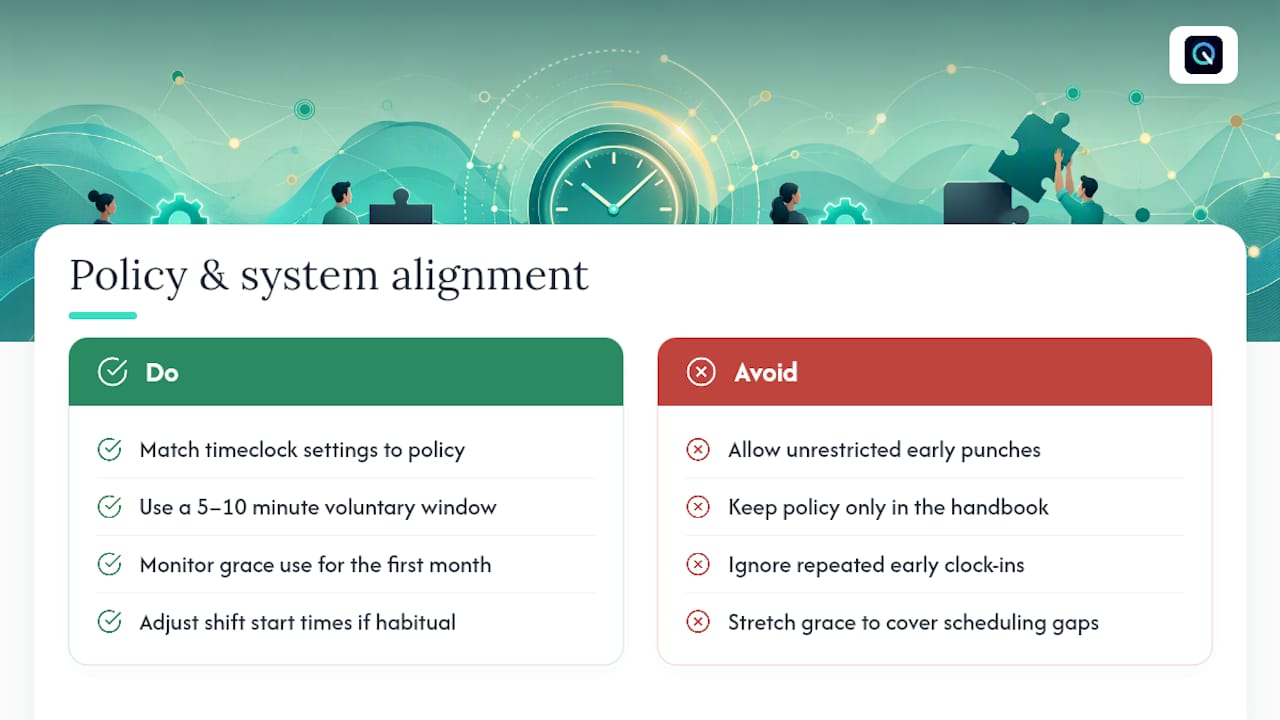
The single biggest risk most small businesses carry isn’t a bad grace-period policy on paper. It’s a policy that exists in an employee handbook but isn’t reflected anywhere in the time clock’s actual settings. If your system allows unrestricted early punches with no reporting prompt, your written rule about “no work during the grace window” is unenforceable the moment a dispute lands on a labor board’s desk.
Start small: a 5 to 10 minute voluntary window, watched closely for the first month. If you see the same three employees clocking in 12 minutes early every shift, that’s not a grace period anymore, that’s a scheduling problem. Adjust the shift start time instead of stretching the grace window to cover it. And whatever tool you use, make sure it exports payroll-ready hours with an audit trail attached. That’s the record that saves you when someone asks what happened six weeks ago.
Saad
Setting Up Compliant Grace Periods With Kloqk
Some time clock systems provide configurable shift limits, grace-period rounding, and payroll-ready exports that turn every punch into audit-ready hours without a spreadsheet in between. Unlike tools that lock rounding rules or overtime math behind a paywall, some keep those features free for unlimited employees, so small and larger teams get the same compliance-grade setup.

Some time clock systems offer photo verification to confirm who clocked in and GPS geofencing to flag punches that don’t match the job site, so you’re not guessing whether that early punch was real work or just an early arrival. Exports can land payroll-ready, with the audit trail already attached. Check the free time clock plan to see the setup in action, or compare tiers on the pricing page if you need scheduling or PTO tools layered on top.
Sources
- Rounding and grace-period policies comply with California wage and hour laws
- Time clock grace periods (campus notice)
- Shift limits in time processing (Oracle docs)
- Time clock rules for hourly employees: Grace periods explained
FAQ
How Long Should a Time Clock Grace Period Be?
Most employers use 5 to 10 minutes before and after a shift, though some public-sector policies extend to 15 minutes depending on the role.
Is a Grace Period on a Time Clock Legally Required to Be Paid?
No, as long as the employee performs no work and is free of employer control during the window, once they perform any task, the time becomes compensable under compensable work time.
What’s the Difference Between a Grace Period and Time Rounding?
A grace period treats a punch near the shift start as on time, while rounding adjusts every punch, early or late, to the nearest scheduled increment across the entire pay period.
Can Kloqk Enforce a Grace-Period Policy Automatically?
Yes. Kloqk supports configurable shift limits and grace-period rounding on its free plan, so punches within your set window are handled consistently without manual adjustment.
What Should I Do if an Employee Works During the Grace Period?
Have them notify their supervisor immediately so the punch can be corrected to reflect actual hours worked, then document who authorized the task before running payroll.
Recommended
Sources
Every figure on this page traces to one of these. Primary law and government sources are listed first.
- 1. SHRMprimary
- 2. timeclock44.com
- 3. infohub.nyced.org
- 4. controller.nd.edu
- 5. docs.oracle.com
- 6. learning.deltek.com
Written by
Marcus ReyesPayroll & Timekeeping Specialist
Marcus covers payroll accuracy, timesheets, and time tracking, the unglamorous mechanics that keep paychecks correct and audits painless.
Keep Reading
Track Hours the Easy Way
Kloqk is a free time clock that handles punches, breaks, overtime, and payroll-ready reports.
Start free