Restaurant Clocking Policy: What It Is and How to Build One
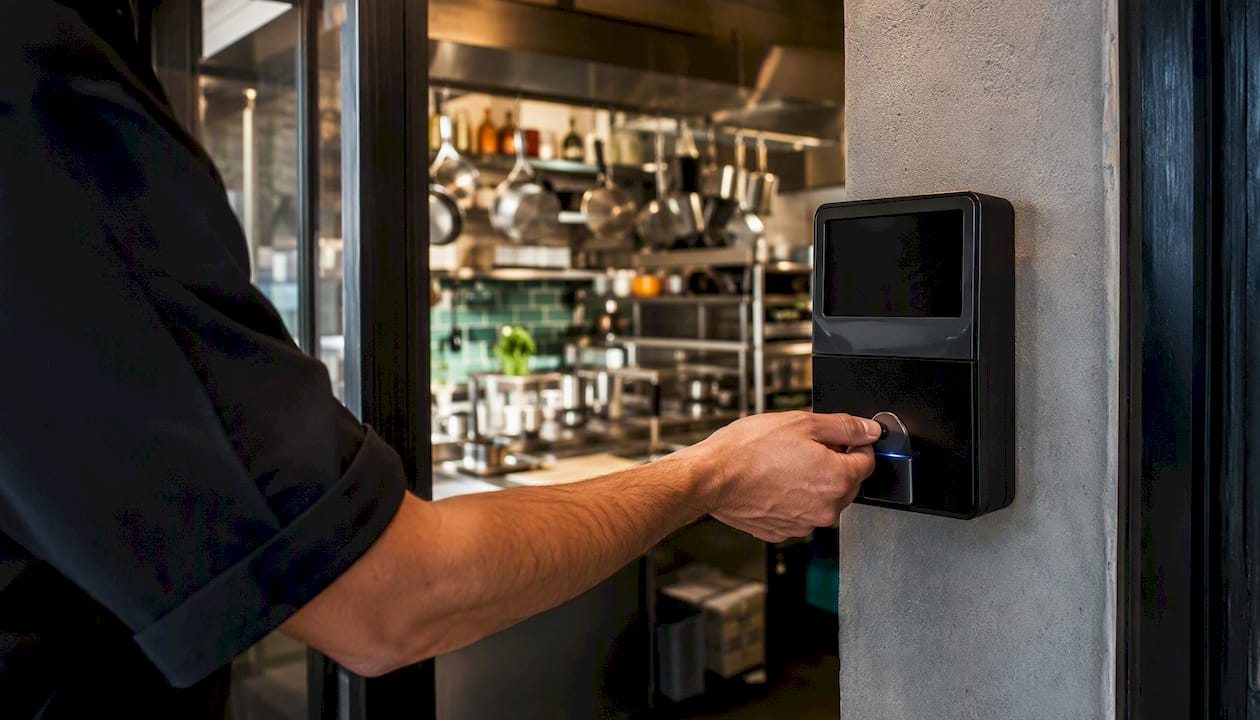
A restaurant clocking policy is a written rule that tells every hourly employee exactly when and where to clock in and out, which station or app to use, and what happens if they don’t follow the procedure. It’s the single document that ties labor cost control, FLSA recordkeeping compliance, and basic team fairness together in one place.
Why does it matter beyond the obvious? Without a written policy, you’re relying on verbal reminders that disappear the moment a new server starts. Disputes over missed punches, early clock-ins, and buddy punching become he-said-she-said conversations instead of documented policy violations. A clear, signed policy gives you a defensible paper trail when a wage claim lands on your desk and a consistent standard every manager on every shift can enforce.
Three things you can do in the next 24 hours:
- Publish a written clock-in window. Pick a specific window (for example, no more than 5 minutes before or after the scheduled shift start) and put it in writing.
- Set up a time-edit audit. Pull last week’s time records and flag every manual edit. If any lack a manager signature, fix the documentation now.
- Require a signed acknowledgement. Every current employee should sign a one-page policy summary. New hires sign it on day one.
Key Takeaways
A written, signed, and system-enforced clocking policy is the most cost-effective labor control a restaurant manager can put in place.
| Point | Details |
|---|---|
| Define the clock-in window | Set a specific window (5 minutes before/after shift start) and enforce it the same way every shift. |
| Require dual sign-off on edits | Every time correction needs a written reason plus both manager and employee signatures to create an audit trail. |
| Enable photo and GPS verification | These two controls together make buddy punching nearly impossible and create defensible records for wage claims. |
| Audit weekly, not just at payroll | A 15-minute weekly review of edits and missed punches catches patterns before they become payroll errors. |
| Kloqk enforces the policy automatically | Kloqk’s free plan includes photo verification, GPS geofencing, overtime calculations, and payroll exports at no cost. |
Table of Contents
- What does a restaurant clocking policy include?
- Copy-ready clocking policy template for your employee handbook
- What do grace periods, rounding rules, and the 7-minute rule actually mean?
- Legal and compliance requirements U.S. restaurants must know
- How to implement your clocking policy with the right tools
- How to train staff and enforce the policy consistently
- Manager quick-reference checklist for daily, weekly, and monthly audits
- The part most managers get wrong about clocking policies
- Kloqk makes your clocking policy enforceable from day one
- Sources
What does a restaurant clocking policy include?
A complete policy covers more ground than most managers expect. Here’s what every clause needs to address, and why each one earns its place.
Who it applies to. State upfront that the policy covers all non-exempt (hourly) employees. Exempt salaried managers are typically excluded from punch requirements, though they may still need to approve timesheets. Defining scope prevents the “I didn’t know this applied to me” argument.
Designated clock stations. Specify whether employees clock in at a physical kiosk, a mobile app, or both, and name the approved location. Attendance tracking guidance for restaurants consistently recommends writing a specific clock-in window that is enforced the same way every shift. Vague instructions (“clock in when you arrive”) create the exact inconsistencies you’re trying to prevent.
Clock-in and clock-out windows. A narrow window, such as the five-minute rule used in many institutional timeclock procedures, limits unsanctioned early punches and late clock-outs. Any punch outside that window requires manager approval before the timesheet is processed.
Meal and rest break rules. Federal law doesn’t mandate meal breaks, but many states do. Your policy should state the break length, whether it’s paid or unpaid, and whether the system automatically deducts a 30-minute unpaid meal break after a set number of hours. Document the deduction rule clearly so employees know what to expect on their paychecks.
Overtime handling. State that overtime is calculated at time-and-a-half after 40 hours in a workweek under the FLSA, and that no employee may work overtime without prior manager authorization. This one clause alone reduces unauthorized overtime disputes.
Missed punches and time edits. Every missed punch must be reported to a manager the same day. The manager submits a correction with a written reason, and both the manager and employee sign off. A missed-punch workflow that requires two signatures creates an audit trail that holds up under scrutiny.
Anti-time-theft controls. Name the specific controls in place: photo verification at clock-in, GPS geofencing that limits punches to the restaurant’s address, unique employee badges or PINs, and a prohibition on clocking in for another employee. Digital systems with geofencing and photo verification create defensible records and reduce buddy-punching complaints compared with paper or spreadsheet tracking.
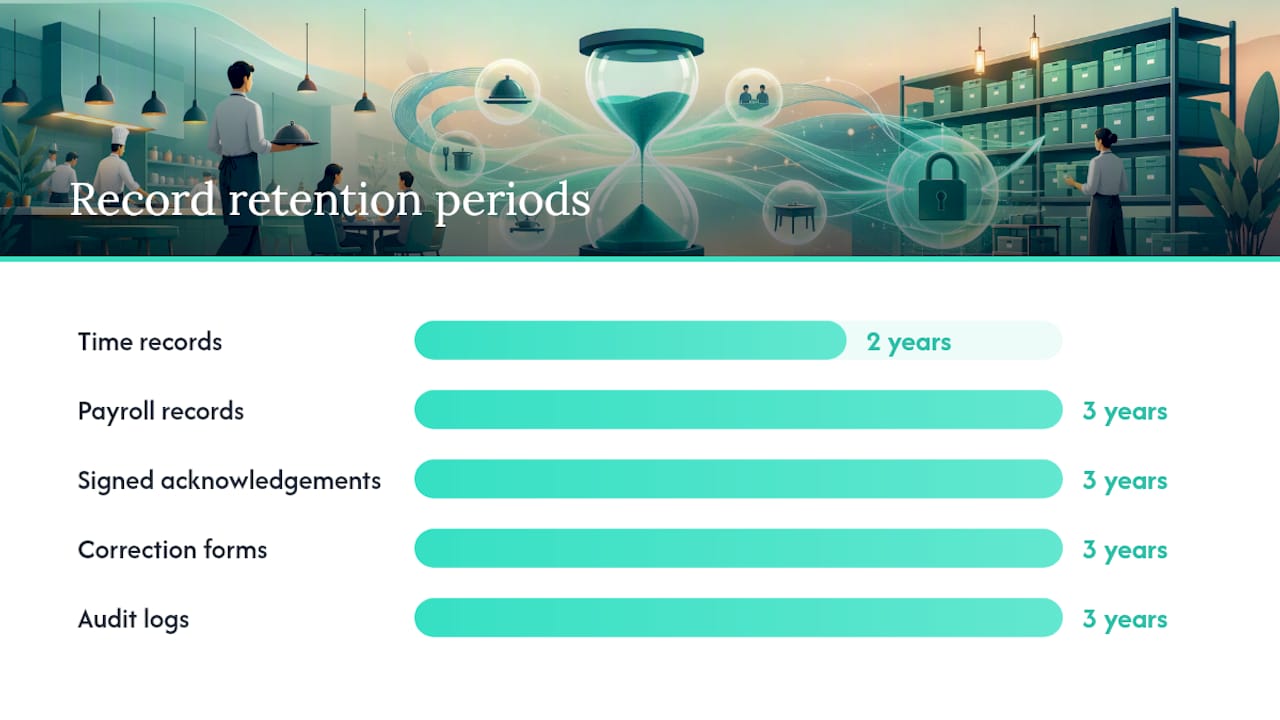
Record retention. Federal law requires employers to keep payroll records for at least three years and time records for at least two years. Your policy should reference this requirement and state that audit logs, signed acknowledgements, and edited-time documentation are retained accordingly.
| Policy element | What to specify | Why it matters |
|---|---|---|
| Clock station | Kiosk location, app name, or both | Prevents “I didn’t know where to clock in” |
| Clock-in window | Minutes before/after shift start | Limits unsanctioned early punches |
| Break deduction | Length, paid/unpaid, auto-deduct trigger | Avoids paycheck disputes |
| Missed punch process | Same-day report, dual sign-off | Creates audit trail |
| Anti-theft controls | Photo, GPS, unique PIN/badge | Deters buddy punching |
| Record retention | 2 years time records, 3 years payroll | FLSA compliance |
Restaurants that skip the anti-theft controls section often discover the gap only when a wage claim surfaces. By then, the missing documentation is the problem.
Copy-ready clocking policy template for your employee handbook
Paste the language below into your handbook and fill in the bracketed fields. This template covers the core clauses; add state-specific break rules as needed.
[RESTAURANT NAME] Employee Timekeeping Policy
Scope. This policy applies to all non-exempt (hourly) employees at [RESTAURANT NAME]. Exempt salaried employees are excluded from punch requirements but must approve hourly timesheets within their department.
Designated clock station. All hourly employees must clock in and out using [KIOSK LOCATION / APP NAME] at [RESTAURANT ADDRESS]. Clocking in from any other location is prohibited.
Clock-in window. Employees may clock in no earlier than a few minutes before their scheduled shift start and no later than a few minutes after their scheduled start. Clocking out must occur within a few minutes of the scheduled shift end. Punches outside this window require written manager approval before the timesheet is processed.
Off-the-clock work prohibition. No employee may perform any work before clocking in or after clocking out. Managers may not instruct or allow off-the-clock work under any circumstances.
Meal breaks. Employees scheduled for longer shifts receive an unpaid meal break of standard duration. The system may automatically deduct this break after a set period of continuous work. Employees who work through a meal break must notify their manager immediately so the deduction can be reversed with documentation.
Missed punches. If you forget to clock in or out, notify your manager before the end of your shift. Your manager will submit a time correction with a written explanation. Both you and your manager must sign the correction form. Repeated missed punches may result in disciplinary action.
Time edits. Only managers may edit time records. Every edit requires a written reason and dual sign-off (manager + employee). Unauthorized edits to another employee’s time record are grounds for immediate termination.
Overtime. Overtime is paid at 1.5× your regular rate for all hours worked over 40 in a workweek. Overtime must be pre-approved by a manager. Working unauthorized overtime may result in disciplinary action, but you will always be paid for all hours worked.
Anti-fraud controls. Clocking in for another employee (“buddy punching”) is prohibited and is grounds for termination. The timeclock system uses [photo verification / GPS geofencing / unique PIN] to verify identity and location.
Acknowledgement. I have read, understood, and agree to follow the timekeeping policy above.
Employee name (print): ________________________ Employee signature: ________________________ Date: ________________________ Manager signature: ________________________
Example clauses for common restaurant situations:
- Split shifts. Employees working a split shift must clock out at the end of the first segment and clock back in at the start of the second. Both segments count toward total daily hours.
- Side work and prep before service. Any prep work performed before the dining room opens is compensable time. Clock in before starting prep, not at the posted service start time.
- Closing duties. Employees may not clock out until all assigned closing duties are complete. Clocking out early and continuing to work is a policy violation.
Pro Tip: Print the acknowledgement block as a standalone half-page insert. Keep signed copies in each employee’s personnel file and a scanned backup in your payroll system. When a wage dispute arises, that signature is often the fastest way to close it.
What do grace periods, rounding rules, and the 7-minute rule actually mean?
These terms show up in almost every timekeeping conversation, but they mean different things and carry different legal risks. Here’s a plain-English breakdown.
Grace period. A short window (typically 5-10 minutes) during which a late or early punch is accepted without manager intervention. A grace period is a management convenience, not a legal requirement. The risk: if you allow a 10-minute early grace period but don’t pay for that time, you may owe wages for it under the FLSA.
Rounding. Many systems round punches to the nearest quarter hour (every 15 minutes). The FLSA permits rounding only when it averages out fairly over time, meaning it can’t consistently round in the employer’s favor. If your system rounds a 7:53 punch to 8:00 every day, that’s a wage violation waiting to happen.
The 7-minute rule. Under quarter-hour rounding, a punch within 7 minutes of a quarter-hour mark rounds down; 8 minutes or more rounds up. So a 7:07 punch rounds to 7:00, and a 7:08 punch rounds to 7:15. One school district’s time-clock procedures illustrate this clearly: employees may clock in no earlier than 7 minutes before their scheduled start, and pay begins at the scheduled shift time regardless of when they punched.
Early clock-in. Clocking in 15 minutes early doesn’t automatically mean pay starts 15 minutes early. Your policy should state explicitly that pay begins at the scheduled start time unless a manager authorizes early work in writing.
Late clock-out. The mirror problem. An employee who forgets to clock out and the system records them as working until midnight creates a payroll error and a potential overtime liability. Same-day correction with dual sign-off is the fix.
Key considerations when choosing your rules:
- Rounding rules must be applied consistently across all employees, not selectively.
- A grace period that allows early punches without pay is legally risky; if the employee is on-site and working, you owe them wages.
- State law may restrict rounding or require specific break timing; check your state labor department before finalizing these clauses.
- Whatever rules you set, document them in writing and enforce them the same way every shift.
The simplest approach for most small restaurants: use a narrow 5-minute window, no rounding, and pay from the actual punch time. It’s easier to explain to staff, easier to audit, and harder to challenge.
Legal and compliance requirements U.S. restaurants must know
Federal law sets the floor; state law often raises it. Here’s what you need to have in order.
FLSA recordkeeping basics. Under the Fair Labor Standards Act, employers must keep accurate records of hours worked each day and each workweek, total daily and weekly straight-time earnings, overtime earnings, and deductions. Time records must be retained for at least two years; payroll records for at least three. The records don’t have to be in a specific format, but they must be accurate and accessible. Inaccurate records are the single most common reason employers lose wage claims.
Why clock-in/out accuracy matters for wage claims. When a former employee files a wage claim, the burden of proof can shift to the employer if records are incomplete or altered. A tamper-evident audit log showing every punch, every edit, and every manager sign-off is your primary defense. Restaurant time and attendance compliance guidance recommends keeping start and finish times, unpaid break records, overtime identification, and employee acknowledgements, all in a system that creates a tamper-proof trail.
State-level variations. Several states require paid rest breaks (typically 10 minutes per 4 hours worked), mandatory meal breaks, and daily overtime calculations rather than weekly. California, for example, calculates overtime daily after 8 hours, not just weekly after 40. Your policy template above covers federal minimums; add a state-specific addendum for any state where you operate.
Criminal exposure in extreme cases. Timekeeping fraud at scale carries serious consequences. The Department of Justice has prosecuted cases where employees manipulated time records as part of larger payroll fraud schemes. That’s an extreme scenario, but it illustrates why tamper-evident systems matter.
Practical compliance steps to implement now:
- Use a system that timestamps every punch automatically and logs every edit with a user ID.
- Require employee sign-off on their timesheet at the end of each pay period.
- Require a second manager to approve any time edit made by the primary manager.
- Store signed acknowledgements, correction forms, and audit logs for at least three years.
- Review your state labor department’s break and overtime rules annually; they change.
Pro Tip: If you’re audited, the first thing a Wage and Hour investigator asks for is your time records and your written policy. Having both ready, organized, and consistent is the difference between a quick resolution and a prolonged investigation.
How to implement your clocking policy with the right tools
The best-written policy fails if the hardware or app makes clocking inconvenient. Here’s how to match your setup to your enforcement needs.
Hardware options at a functional level. A wall-mounted kiosk near the employee entrance is the most common setup for restaurants. Employees swipe an ID card or enter a PIN, select Clock In or Clock Out, confirm the action, and receive a success confirmation, a workflow documented in standard kiosk punching guides. Mobile app clock-ins work well for delivery drivers or multi-location operations; GPS geofencing limits punches to within a set radius of the restaurant’s address. Badge or key-fob systems add a physical layer but don’t prevent buddy punching on their own.
Anti-theft features worth requiring. Photo verification captures an image at clock-in and matches it to the employee’s profile, making buddy punching nearly impossible to execute without detection. GPS geofencing prevents off-site punches. A GPS time clock with geofencing combined with photo verification gives you two independent checks on every punch. Tamper-evident audit logs record every change with a timestamp and user ID. Manager approval workflows prevent any edit from entering payroll without a second set of eyes.
Implementation checklist:
- Choose your clock station type (kiosk, mobile app, or both) and install it before the policy goes live.
- Configure the clock-in window and any automatic break deductions in the system settings.
- Enable photo verification and GPS geofencing if the system supports them.
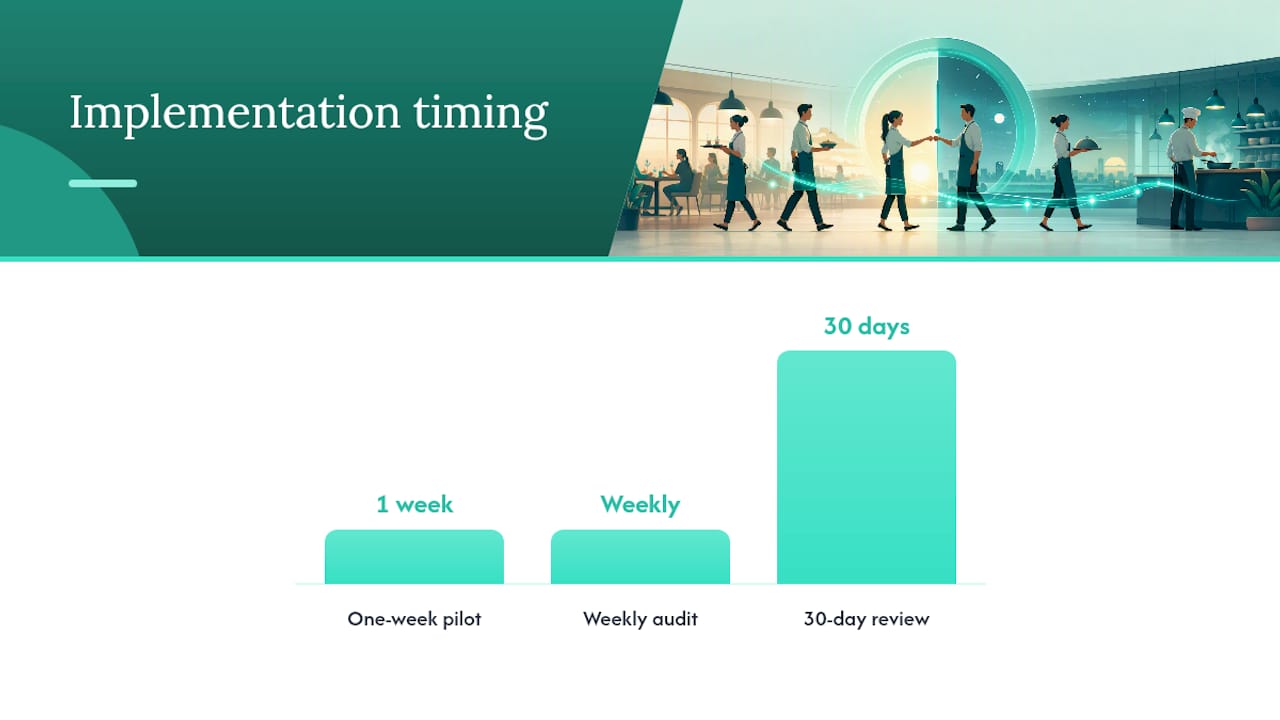
- Run a one-week pilot with a single shift team before rolling out to all staff.
- Train every employee on the correct punch procedure before the policy takes effect.
- Set a fixed audit day each week (Friday afternoon works well) to review edits and flag anomalies.
- After 30 days, review the data: how many missed punches, how many edits, any patterns by shift or employee?
Pro Tip: A short pilot phase with a single shift team surfaces edge cases you didn’t anticipate, like what happens when the kiosk goes offline or an employee forgets their PIN, before those edge cases become payroll errors across your entire staff.
For restaurants choosing a clock-in/out app, look for systems that export payroll-ready timesheets directly, calculate overtime automatically, and flag unapproved edits before payroll runs. That combination eliminates most of the manual reconciliation that eats up manager time on payroll day.
How to train staff and enforce the policy consistently
A policy that lives only in the handbook doesn’t change behavior. Training and consistent enforcement do.
Training checklist for new hires:
- Walk the employee to the clock station and demonstrate the correct punch procedure (swipe/PIN, select Clock In, confirm, verify the success screen).
- Show them where to find the policy in the employee handbook and review the clock-in window, missed-punch process, and buddy-punching prohibition.
- Have them perform a practice clock-in and clock-out while you observe.
- Walk through the missed-punch correction form: what it looks like, how to submit it, and why both signatures are required.
- Collect the signed acknowledgement before the employee’s first shift.
Discipline ladder. Tie each step to an objective, documented trigger, not a manager’s judgment call.
- First offense (coaching). Manager documents the incident (date, time, nature of violation) and reviews the policy with the employee verbally. No formal write-up, but the documentation goes in the file.
- Second offense (written warning). Manager issues a written warning citing the specific policy clause violated and the date of the prior coaching. Employee signs the warning.
- Third offense (suspension). One-shift unpaid suspension. Written notice states that a fourth offense may result in termination.
- Fourth offense (termination). Termination for repeated policy violation, documented with all prior disciplinary records attached.
Buddy punching and deliberate time fraud skip straight to step 4 in most operations. State that explicitly in your policy.
Sample notice language for a missed-punch incident:
Consistent recordkeeping across every incident is what makes progressive discipline defensible. If you document the first offense for one employee but not another, you’ve created an inconsistency that can look like selective enforcement in a dispute.
Manager quick-reference checklist for daily, weekly, and monthly audits
Keep this at the manager station or pinned near the POS.
Daily checks:
- Clock station is powered on and functioning; photo/GPS verification is active.
- No pending missed-punch approvals in the system from the prior shift.
- No employees currently clocked in who are not scheduled to be working.
- Today’s scheduled start and end tolerances match the system’s configured window.
Weekly checks:
- Pull all time edits from the past 7 days; confirm each has a written reason and dual sign-off.
- Verify that all new hires from the week have signed acknowledgements on file.
- Export payroll-ready timesheets and cross-check against the schedule for unexplained gaps.
- Flag any employee with three or more missed punches in the week for a coaching conversation.
Monthly checks:
- Review late and early punch trends by shift and by employee. Patterns often signal a scheduling mismatch, not just carelessness.
- Confirm record retention: audit logs, correction forms, and signed acknowledgements are stored and accessible.
- Adjust clock-in windows or shift start times if data shows a consistent pattern of late arrivals on a particular shift.
| Audit frequency | Key action | What to look for |
|---|---|---|
| Daily | Verify clock station and active controls | Offline kiosk, pending approvals |
| Weekly | Review all time edits | Missing sign-offs, unexplained gaps |
| Monthly | Analyze punch trends | Repeated late/early patterns by shift |
A weekly audit takes about 15 minutes once you have a system that exports clean data. That 15 minutes is the cheapest labor-cost control available to a restaurant manager.
The part most managers get wrong about clocking policies
Most managers treat a clocking policy as a paperwork exercise. Write it, file it, forget it. That’s the wrong frame entirely.
The policy’s real job is to make the default behavior correct without requiring a manager to intervene every shift. When the system captures a photo at clock-in, flags an early punch for approval, and exports a clean timesheet on Friday, the policy is working in the background without anyone thinking about it. The written document matters, but it’s the system enforcement that actually changes behavior.
There’s also a fairness argument that gets underplayed. The server who clocks in on time every shift and the one who routinely punches in 12 minutes early are being paid differently for the same scheduled hours. A written, enforced policy levels that. Staff notice when enforcement is inconsistent, and the ones following the rules resent it most.
One more thing worth saying plainly: attendance and punctuality are not the same thing, and your policy should treat them separately. Attendance answers whether the employee showed up. Punctuality answers whether they were station-ready at the scheduled start. An employee who clocks in on time but spends 10 minutes in the parking lot before entering is punctual on paper but not operationally ready. Write both definitions into your policy and enforce both.
Kloqk makes your clocking policy enforceable from day one
Writing the policy is the easy part. The harder part is making sure every punch, every edit, and every missed clock-in is captured accurately and automatically, without adding work to your managers’ plates.
Kloqk’s free time tracking for restaurants turns the policy controls described in this guide into built-in system features: photo verification at every clock-in, GPS geofencing that limits punches to your restaurant’s address, automatic overtime calculations, and payroll-ready timesheet exports. Every edit is logged with a timestamp and user ID, giving you the tamper-evident audit trail that FLSA compliance requires. There are no per-feature charges for these controls.

If you’re ready to stop reconciling timesheets manually and start enforcing your clocking policy automatically, try Kloqk’s free employee time tracking and have your first payroll-ready export running before your next pay period closes.
Sources
Every manager building or updating a clocking policy should keep these references bookmarked.
- Dol
- Restaurant time and attendance compliance guide | RosterElf Blog
- What is employee attendance tracking in a restaurant? (Altametrics)
- TimeClock Plus Punching Guide
- Timeclock procedures (SFASU payroll policies)
- Time-Clock Procedures (Hudson CSD)
Recommended
Sources
Every figure on this page traces to one of these. Primary law and government sources are listed first.
- 1. U.S. Department of Laborprimary
- 2. altametrics.com
- 3. sfasu.edu
- 4. rosterelf.com
- 5. hudsoncsd.org
- 6. justice.gov
- 7. cmich.edu
Written by
Marcus ReyesPayroll & Timekeeping Specialist
Marcus covers payroll accuracy, timesheets, and time tracking, the unglamorous mechanics that keep paychecks correct and audits painless.
Keep Reading
Track Hours the Easy Way
Kloqk is a free time clock that handles punches, breaks, overtime, and payroll-ready reports.
Start free