Multi-Shift Scheduling Payroll Setup: A Practical Guide

Getting multi-shift scheduling payroll setup right is not optional for US employers running round-the-clock operations. At its core, this process means configuring your payroll system to accurately capture hours, apply the correct pay rates, and calculate overtime across employees who work different shifts, different locations, and often different pay rules within the same workweek.
The components that make this complex:
- Shift differentials: Extra pay for evening, overnight, or weekend shifts that must be folded into the regular rate before overtime is calculated
- Overtime rules: The FLSA requires overtime at 1.5x the regular rate for all hours over 40 in a single workweek, with no averaging across weeks
- Multi-location payroll integration: Each site may have different state wage laws, local ordinances, or union agreements
- Rotating patterns: Schedules like the 2-2-3 rotation create weeks where employees average slightly above 40 hours, triggering overtime almost by design
- Employee classifications: Exempt vs. non-exempt status, union vs. non-union, full-time vs. part-time all affect which rules apply
When this setup is done correctly, payroll runs cleanly, employees are paid accurately, and audits are manageable. When it is done poorly, you are looking at back-pay claims, compliance penalties, and hours of rework every pay period.
Table of Contents
- What makes multi-shift and multi-location payroll so hard to manage?
- How scheduling software improves payroll accuracy and efficiency
- Best practices for managing multi-location scheduling and payroll
- How overtime and pay rate calculations actually work for rotating shifts
- Step-by-step: setting up your payroll system for multi-shift schedules
- Employee classifications and union rules that affect multi-shift payroll
- What payroll software should handle for multi-shift environments
- Kloqk handles the payroll complexity your shifts create
- Key Takeaways
What makes multi-shift and multi-location payroll so hard to manage?
The honest answer: most payroll problems in shift-heavy environments trace back to manual processes and fragmented systems. When one location tracks hours on a spreadsheet, another uses a paper timesheet, and a third uses a scheduling app that does not talk to payroll, errors are not a matter of if but when.
Common pain points HR and payroll managers run into:
- Administrative overload: Manually reconciling hours across shifts and sites consumes time that should go toward verification and compliance, not data entry
- Scheduling conflicts and overlaps: Without a centralized view, shift overlaps get missed, employees get double-scheduled, and hours records become unreliable
- Shift differential misconfiguration: If your payroll system is not set up to include night or weekend differentials in the regular rate, every overtime calculation in those weeks is wrong
- Inconsistent rules across locations: A California location has daily overtime requirements; a Texas location does not. Running both through the same payroll logic without location-specific rules creates compliance exposure
- Payroll rework: Errors from scheduling and calculation mistakes consume substantial HR and finance resources annually in multi-site operations
The compliance risk is real. Employers who exclude shift differentials from overtime calculations face retroactive payroll liabilities, and the Department of Labor’s Wage and Hour Division does not treat this as a minor technicality.
Employee dissatisfaction follows payroll errors closely. A worker who receives a short paycheck on Friday is not waiting until Monday to raise it, and the trust damage from repeated errors is hard to repair.
How scheduling software improves payroll accuracy and efficiency
The single biggest lever you have against payroll errors in a multi-shift environment is replacing manual data transfer with direct integration between scheduling and payroll. When hours flow automatically from a time clock into your payroll system, you eliminate the transcription errors that account for a large share of payroll mistakes.
What well-configured shift scheduling software actually does for you:
- Automates hours recording: Clock-in and clock-out data feeds directly into payroll without manual entry, reducing miscalculations
- Applies pay rules at the source: The system tags each shift with the correct rate, including differentials, so overtime calculations start from accurate inputs
- Centralizes multi-location scheduling: One system covering all sites means consistent rule application and a single audit trail
- Flags compliance issues in real time: Built-in alerts for approaching overtime thresholds or missed break requirements catch problems before they become payroll errors
- Generates audit-ready reports: Detailed shift and pay reports make it straightforward to verify that every employee was paid correctly before the pay run closes
Automation in scheduling software significantly lowers payroll errors and administrative burden for multi-shift workplaces, particularly when the tool integrates directly with your payroll management system rather than requiring a manual export step.
Pro Tip: Run a weekly pre-payroll audit using your scheduling software’s hours report. Compare scheduled hours against actual clock-in data before processing payroll, not after. Catching a missed shift differential or an unrecorded break on Wednesday costs you five minutes; catching it after the pay run costs you a correction cycle.
Best practices for managing multi-location scheduling and payroll
Running payroll across multiple sites without a unified system is the operational equivalent of filing taxes from memory. You might get close, but the gaps will find you.
Use one platform for all locations. Centralized scheduling across all sites reduces errors, improves compliance, and gives you a single source of truth for labor cost tracking. Separate spreadsheets per location guarantee inconsistency.

Standardize shift definitions while accommodating local rules. Define shift types, pay codes, and differential rates at the system level so every location starts from the same baseline. Then layer in location-specific rules, such as California’s daily overtime threshold or a state’s specific break requirements, as overrides rather than exceptions managed manually.
Build communication into the scheduling workflow. Poor communication and manual updates are a direct cause of scheduling conflicts and payroll errors. Automated notifications for shift changes, approvals, and schedule publications reduce the back-and-forth that leads to missed shifts and incorrect time records.
Use scheduling analytics to control labor costs. Most scheduling platforms surface data on overtime trends, shift coverage gaps, and labor cost by location. Reviewing this weekly lets you adjust staffing before overtime accumulates, not after the pay period closes.
Audit payroll against current labor law for each jurisdiction. State and local wage laws change. Assign someone to track updates for every location where you operate, and verify that your payroll system reflects the current rules. If your team needs outside support on payroll configuration and compliance, a firm like The Gap ProAdvisors can help map your shift structure to the correct pay rules.
Train payroll staff on multi-shift specifics. The person running payroll needs to understand how shift differentials affect overtime, how rotating schedules create variable weekly hours, and how to read the reports your software generates. Software does not fix a knowledge gap.
How overtime and pay rate calculations actually work for rotating shifts
This is where most multi-shift payroll setups go wrong, and the consequences are expensive.

Under the FLSA, the “regular rate of pay” is not just base wages. It includes all nondiscretionary compensation earned in the workweek, which means shift differentials are part of the regular rate. If an employee earns a night differential on top of their base hourly rate, overtime must be calculated on the blended rate, not just the base.
The correct method:
- Total all straight-time earnings for the week, including base pay and any shift differentials
- Divide by total hours worked to get the true regular rate
- Multiply the regular rate by 0.5 for each overtime hour (the half-time premium, since straight time is already included in total earnings)
The common mistake: calculating overtime at 1.5x the base hourly rate while ignoring differentials. That approach underestimates overtime pay and creates back-pay liability. The Department of Labor’s enforcement position on this is consistent and well-documented.
A few additional rules that catch employers off guard:
- Each workweek stands alone. Federal regulations prohibit averaging hours over two or more weeks. A 30-hour week followed by a 50-hour week means overtime is owed in week two, full stop.
- Multiple differentials in one week: If an employee works both a night shift and a weekend shift in the same week, both differentials enter the regular rate calculation for that week.
- Documentation matters: Keep records of how each week’s regular rate was calculated. If a back-pay claim arises, your calculation methodology is your defense.
Payroll software that excludes shift differentials from overtime calculations is not just inefficient, it is a compliance failure waiting to surface. Verify your software configuration before the next pay run, not after a DOL audit.
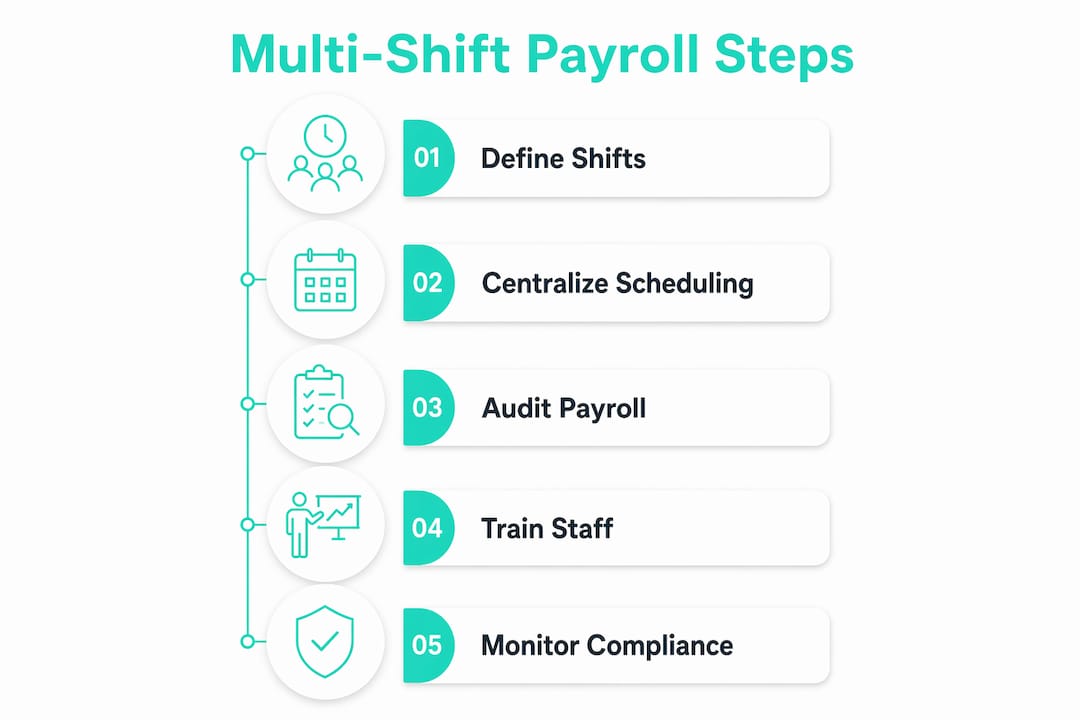
Step-by-step: setting up your payroll system for multi-shift schedules
A clean setup prevents most of the problems described above. Work through these steps before your first pay run under a new or revised multi-shift structure.
- Define your workweek. Set a fixed, recurring 168-hour workweek start time in your payroll system. This cannot float or change to avoid overtime obligations.
- Create shift types and pay codes. Build a pay code for each shift category: standard, evening, overnight, weekend, holiday. Assign the correct differential rate to each.
- Configure the regular rate calculation. Verify that your payroll system includes all nondiscretionary pay, including differentials, when computing the regular rate for overtime purposes. Test this with a sample employee who worked both a standard and a night shift in the same week.
- Set up location-specific rules. For each state or locality where you operate, configure the applicable overtime thresholds, break requirements, and minimum wage rates as separate rule sets.
- Integrate time tracking with payroll. Connect your time clock or scheduling software directly to payroll so hours transfer without manual entry. Map each shift type to the correct pay code automatically.
- Run a parallel payroll test. Before going live, process one pay period manually alongside the system and compare results. Discrepancies reveal configuration errors before they affect real paychecks.
- Set up audit reports. Configure weekly reports showing hours by employee, shift type, and location. These are your early-warning system for overtime creep and miscoded shifts.
Employee classifications and union rules that affect multi-shift payroll
Classification errors are among the costliest mistakes in multi-shift payroll, and they are more common than most HR managers expect.
Exempt vs. non-exempt status determines whether FLSA overtime rules apply at all. Misclassifying a non-exempt shift worker as exempt eliminates their overtime protections on paper but not in law. The DOL’s salary threshold for the white-collar exemptions applies regardless of how many shifts someone works or how their schedule rotates.
Union agreements add another layer. Collective bargaining agreements often define their own overtime triggers, shift premium rates, and pay calculation methods. These may be more generous than FLSA minimums, and they are legally binding. A union contract that requires overtime after eight hours in a day overrides the federal 40-hour weekly standard for covered employees. Your payroll system needs to reflect the contract terms, not just federal defaults.
Part-time and variable-hour employees in multi-shift environments frequently cross overtime thresholds unexpectedly when covering open shifts. Tracking their hours with the same rigor as full-time staff is not optional.
Tipped employees in industries like food service have a separate regular rate calculation when tips are involved. If tipped employees also work non-tipped shifts in the same week, the calculation becomes more complex and requires careful configuration.
The practical fix: document the classification basis for every employee in your system, attach the applicable pay rules, and review classifications whenever a role changes or a new location opens.
What payroll software should handle for multi-shift environments
Most payroll platforms marketed to US businesses handle basic payroll. Fewer handle multi-shift complexity well. The features that actually matter for this use case:
- Shift differential pay codes with automatic inclusion in overtime rate calculations
- Multi-location rule sets that apply state and local law by work location, not just the employer’s home state
- Direct integration with scheduling and time tracking so hours do not require manual transfer
- Overtime calculation by workweek, not pay period, with no averaging across weeks
- Audit logs showing every change to hours, rates, and pay codes with timestamps
- Union contract support for employers with collective bargaining agreements
Kloqk is built specifically for small US businesses running shift-heavy operations. It handles overtime calculations, break tracking, and payroll exports at no cost, with GPS geofencing and photo verification to keep time records accurate from the moment an employee clocks in. For multi-location teams, Kloqk’s multi-location time clock gives you a single view across all sites without the per-feature pricing that makes other platforms expensive as you scale.
Kloqk handles the payroll complexity your shifts create

Multi-shift payroll is not a problem you solve once. Schedules change, employees move between locations, and state wage laws update. What you need is a system that stays accurate without requiring constant manual intervention.
Kloqk gives small business owners and HR managers exactly that. Free employee time tracking with built-in overtime calculations, break tracking, and payroll-ready exports means your hours data is always clean before it reaches payroll. GPS geofencing and photo clock-ins eliminate the time theft and buddy punching that inflate hours records in multi-shift environments. And because Kloqk is free, you are not paying per feature just to get the basics right.
If you are managing shifts across more than one location, start with Kloqk’s multi-location time clock and connect it to your payroll system. Your next pay run will be the cleanest one you have had.
Key Takeaways
Accurate multi-shift payroll setup requires including shift differentials in the regular rate, applying location-specific rules, and integrating time tracking directly with payroll to eliminate manual errors.
| Point | Details |
|---|---|
| Shift differentials enter overtime | All nondiscretionary pay, including differentials, must be included in the regular rate before calculating overtime under the FLSA. |
| Each workweek stands alone | Federal law prohibits averaging hours across two or more weeks; overtime is owed in any week where hours exceed 40. |
| Centralized systems reduce errors | Using one scheduling and payroll platform across all locations improves consistency and creates a single audit trail. |
| Classifications and union rules matter | Exempt status, collective bargaining agreements, and tipped-employee rules all require separate payroll configurations. |
| Kloqk covers multi-shift basics at no cost | Kloqk provides overtime calculations, break tracking, GPS geofencing, and payroll exports free for small US businesses. |
Recommended
Sources
Every figure on this page traces to one of these. Primary law and government sources are listed first.
- 1. U.S. Department of Laborprimary
- 2. mygappro.com
Written by
Marcus ReyesPayroll & Timekeeping Specialist
Marcus covers payroll accuracy, timesheets, and time tracking, the unglamorous mechanics that keep paychecks correct and audits painless.
Keep Reading
Track Hours the Easy Way
Kloqk is a free time clock that handles punches, breaks, overtime, and payroll-ready reports.
Start free