What Does on-the-Clock Mean Legally? 2026 Guide

Being on-the-clock is defined legally as any period when an employee performs compensable work time that an employer must pay for under the Fair Labor Standards Act (FLSA). The standard term for this concept in labor law is “compensable work time,” and understanding what does on-the-clock mean legally protects both employees from wage theft and employers from costly litigation. The FLSA covers most non-exempt workers in the United States, and its rules extend well beyond the hours shown on a scheduled shift. Federal wage claims can reach back two years, or three years for willful violations, making accurate records a legal necessity, not just good practice.
What activities legally count as on-the-clock work?
Compensable work time includes far more than the hours an employee sits at a desk or stands on a job site. The FLSA applies a “suffered or permitted” standard, meaning an employer must pay for any work it knew about or reasonably should have known about, even if it never explicitly asked for that work. A restaurant manager who sees a cook arrive 20 minutes early to prep ingredients owes that cook pay for those 20 minutes, regardless of what the schedule says.
The following activities are generally compensable under federal law:
- Scheduled shift hours, including all overtime beyond 40 hours per workweek for non-exempt employees
- Pre-shift tasks such as putting on required safety gear, booting up work systems, or setting up a workstation
- Post-shift tasks such as cleaning equipment, completing closing paperwork, or securing a job site
- Remote work activities including answering work emails, joining calls, or completing assignments outside normal hours
- Mandatory training and meetings, even when held outside regular shift times
- On-call time when restrictions prevent an employee from using the time freely
One concept that trips up many employers is the de minimis rule. Courts have allowed employers to skip recording trivially small, irregular time increments that are genuinely impractical to track. However, the de minimis exception is very narrow and shrinking, especially as digital work creates regular small tasks like VPN logins that courts increasingly treat as compensable.
Pro Tip: Document every pre-shift and post-shift task in writing. If a task happens daily, courts will not consider it de minimis, regardless of how short it is.

When does compensable time legally begin and end?
The Portal-to-Portal Act of 1947 established that ordinary commuting and purely preliminary or postliminary activities are not compensable. The challenge is defining what counts as “preliminary.” That line has become blurry, particularly for remote employees.
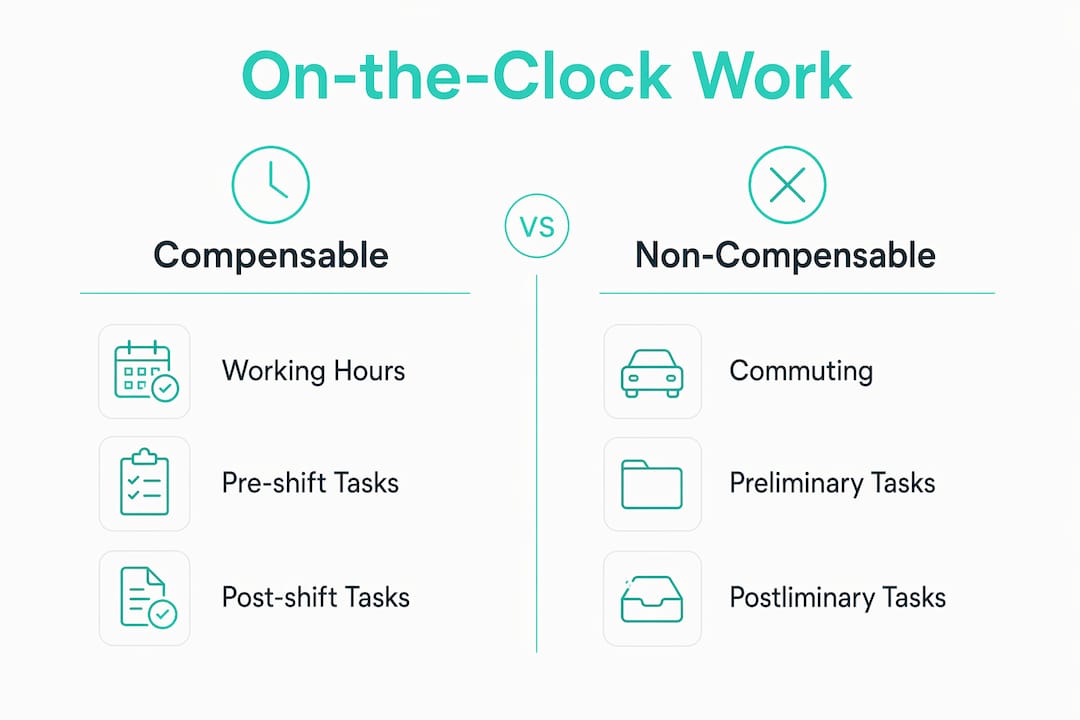
Federal courts currently disagree on this question. The 9th and 10th Circuits treat activities like logging into a VPN and launching required software as integral to an employee’s principal duties, making them compensable. A federal trial court in Ohio reached the opposite conclusion, finding those same login tasks non-compensable. That split means the legal answer depends on where your business operates.
Practical steps employers can take to define the compensable workday clearly:
- Issue a written remote work policy that states the exact moment compensable time begins, such as when the employee opens the first work application.
- Require digital clock-in before any work task, including checking messages, so the timestamp creates a clear legal record.
- Train supervisors to recognize and report any work activity that happens before or after a clock-in, because supervisor knowledge triggers the pay obligation.
- Audit digital access logs periodically to catch patterns of early logins or late system activity that suggest off-the-clock work.
The table below shows how the compensable workday boundary differs by scenario:
| Scenario | Compensable? | Legal basis |
|---|---|---|
| Commuting to the office | No | Portal-to-Portal Act |
| Donning required safety gear on-site | Yes | FLSA integral activity rule |
| VPN login before clocking in (9th/10th Circuit) | Yes | Integral and indispensable standard |
| VPN login before clocking in (Ohio federal court) | No | Preliminary activity ruling |
| Answering a work email after clocking out | Yes | Suffered or permitted standard |
Pro Tip: If your workforce spans multiple states, apply the most protective circuit standard company-wide. That single policy costs less than defending a wage claim in a plaintiff-friendly jurisdiction.
How do exempt and non-exempt classifications change the rules?
The FLSA divides employees into two categories, and the classification determines how on-the-clock hours translate into pay obligations. Non-exempt employees must receive at least the federal minimum wage for all hours worked and overtime pay at 1.5 times their regular rate for every hour beyond 40 in a workweek. Exempt employees are generally salaried professionals, executives, or administrators who meet specific salary and duties tests, and they do not receive overtime.
Key distinctions between the two classifications:
- Non-exempt employees must be paid for every minute of compensable work time, including unscheduled or unauthorized work the employer knew about
- Exempt employees receive their full salary regardless of hours worked in most weeks, but employers cannot require them to perform unpaid work that effectively reduces their compensation below the salary threshold
- Misclassifying a non-exempt worker as exempt exposes an employer to back pay, liquidated damages equal to the unpaid amount, and attorney fees under the FLSA
- Voluntary work by non-exempt employees is still compensable if the employer knows it is happening, even if the employee claims they do not want pay
The suffered or permitted standard applies equally to both groups when it comes to unpaid work. An exempt employee cannot be docked pay for missing a partial day of work in most circumstances, and an employer cannot simply reclassify a worker as exempt to avoid overtime costs without meeting the FLSA’s strict salary and duties tests. The Department of Labor audits misclassification aggressively, and back-pay awards in class action suits regularly reach into the millions.
How can employers and employees track on-the-clock hours accurately?
Accurate time records are the primary legal defense in any wage dispute. Digital clock-in systems are used by 75% of U.S. employers and serve as primary evidence in FLSA litigation. A paper sign-in sheet is far harder to defend than a timestamped digital record with GPS coordinates or biometric verification.
Employers carry a specific legal obligation here. Employers cannot withhold pay simply because an employee forgot to clock in or out. If a supervisor knows work was performed, the employer must pay for it and may correct the time record with supervisor verification. Discipline for the missed clock-in is permissible, but withholding wages is not.
Best practices for maintaining compliant time records:
- Use a digital time clock that timestamps every clock-in and clock-out with date, time, and location data
- Establish a written policy that prohibits off-the-clock work and requires employees to report any work performed outside their recorded hours
- Train every supervisor to submit a correction form when they observe unrecorded work, creating a paper trail that satisfies the FLSA’s recordkeeping requirements
- Review time records weekly to catch patterns of early arrivals, late departures, or after-hours digital activity before they become a wage claim
Federal regulations permit time rounding to the nearest quarter hour, where 1, 7 minutes rounds down and 8, 14 minutes rounds up. That practice is only lawful when it averages out neutrally over time. If rounding consistently favors the employer, regulators in New York and at the federal level treat it as systematic underpayment. Reviewing rounding outcomes quarterly protects against that risk.
Pro Tip: Pair your clock-in system with automated overtime alerts so supervisors know before an employee crosses 40 hours, not after payroll closes.
Key Takeaways
Being on-the-clock legally means all compensable work time an employer must pay for under the FLSA, covering scheduled shifts, pre-shift and post-shift tasks, and any remote work the employer knew or should have known about.
| Point | Details |
|---|---|
| Compensable work time scope | On-the-clock covers all work suffered or permitted by the employer, not just scheduled hours. |
| De minimis rule is shrinking | Regular small tasks like VPN logins are increasingly compensable and rarely qualify as de minimis. |
| Circuit court splits matter | The 9th and 10th Circuits treat remote login tasks as compensable; apply the stricter standard company-wide. |
| Exempt vs. non-exempt distinctions | Non-exempt employees must be paid for all hours worked, including unauthorized work the employer knew about. |
| Digital records are legal evidence | Timestamped clock-in data with GPS or biometrics is the strongest defense in any wage dispute. |
The real cost of fuzzy on-the-clock policies
Most wage disputes I have seen do not start with bad intentions. They start with a vague policy and a supervisor who never got clear instructions. A construction foreman who texts the crew 15 minutes before the official start time to discuss the day’s layout has just created compensable time, whether or not anyone clocks in for it. That pattern, repeated five days a week across a crew of 10, adds up to a significant back-pay exposure before anyone files a complaint.
Remote work has made this worse. When the office is a laptop on a kitchen table, the line between personal time and work time disappears fast. I have seen employers genuinely surprised to learn that an employee answering a Slack message at 9 PM is legally working, even if the employee did not mind doing it. The suffered or permitted standard does not care about intent or attitude. It cares about whether the employer knew.
The de minimis exception is not the safety net many employers think it is. Courts are narrowing it steadily, and the trend will continue as digital work creates more traceable, regular small tasks. A VPN login that takes 90 seconds and happens every single workday is not trivial. It is a pattern, and patterns are compensable.
The fix is not complicated, but it requires commitment. Written policies, supervisor training, and a reliable digital clock-in system eliminate most of the ambiguity that leads to litigation. Employers who wait for a complaint to clarify their policies pay far more than those who build compliance into their daily operations from the start.
Saad
Kloqk makes on-the-clock compliance straightforward
Tracking compensable work time accurately is not optional under the FLSA, and the tools you use to do it become your legal record. Kloqk gives small businesses a free, complete solution built around that reality.

Kloqk’s employee time tracking app captures every clock-in and clock-out with GPS geofencing, photo verification, and automatic overtime calculations. Remote teams benefit from Kloqk’s GPS time clock, which creates the location-stamped records that courts treat as reliable evidence. Break tracking and payroll-ready exports are included at no cost, so employers in restaurants, construction, and other hourly industries can meet their FLSA obligations without adding administrative overhead. Accurate records protect employees and employers equally.
FAQ
What does on-the-clock mean legally?
On-the-clock legally means any period of compensable work time that an employer must pay for under the FLSA, including scheduled shifts, pre-shift tasks, post-shift duties, and remote work the employer knew about.
Does an employer have to pay for work done before clocking in?
Yes. If an employer knows or should have known that work was performed before a clock-in, the suffered or permitted standard requires payment for that time regardless of company policy.
Are remote login tasks compensable work time?
It depends on jurisdiction. The 9th and 10th Circuits treat VPN logins and system startups as compensable integral activities, while some other courts have found them non-compensable as preliminary tasks.
Can an employer legally round employee time?
Federal regulations allow rounding to the nearest quarter hour, but only when the practice averages out neutrally over time. Rounding that consistently favors the employer constitutes illegal underpayment.
What is the difference between on-the-clock and off-the-clock work?
On-the-clock work is compensable time an employer must pay for. Off-the-clock work is any job-related activity performed outside recorded hours. Off-the-clock work is still compensable if the employer knew or should have known it was happening.
Recommended
Sources
Every figure on this page traces to one of these. Primary law and government sources are listed first.
- 1. legalclarity.org
- 2. hrdive.com
- 3. nisarlaw.com
- 4. hyring.com
Written by
Marcus ReyesPayroll & Timekeeping Specialist
Marcus covers payroll accuracy, timesheets, and time tracking, the unglamorous mechanics that keep paychecks correct and audits painless.
Keep Reading
Track Hours the Easy Way
Kloqk is a free time clock that handles punches, breaks, overtime, and payroll-ready reports.
Start free