Prevailing Wage Time Tracking for Small U.S. Employers, Payroll Ready

Here, “prevailing wage time tracking” means one thing: payroll-ready time tracking for small U.S. businesses, not certified public-works reporting under Davis-Bacon rules. What you need is a clock that captures accurate in/out times, calculates weekly overtime automatically, handles breaks correctly, and exports clean hours to payroll. Pick a system built around verification and automatic exports, like Kloqk, and you cut manual errors while saving hours of admin work every pay period.
TL;DR:
- Small businesses must accurately track hours, bonuses, and breaks to comply with federal overtime rules, preventing underpayment and disputes.
- Verified clock-ins with GPS and photos protect against buddy punching, ensure proper location, and create a defense-ready audit trail.
- Proper setup involves defining workweeks, enabling automatic overtime calculation, and establishing workflows before payroll runs.
- Rounding hours or mishandling multiple pay rates can understate wages; manual calculations and regular checks help catch errors early.
- For unionized or multi-class employees, adapting overtime and break rules to stricter standards ensures compliance and correct wages.
Table of Contents
- The Federal Baseline for Prevailing Wage Time Tracking: FLSA Overtime and Recordkeeping
- Set Up Payroll-Ready Time Tracking: A Step-by-Step Checklist
- How Do You Calculate Overtime and Handle Break Deductions?
- Why an Audit-Trail Time Clock Like Kloqk Fits Small Business Payroll
- What Are Prevailing Wage Laws, and How Do They Differ From General Wage Law?
- Department of Labor Time Tracking Requirements for Everyday Payroll
- Common Pitfalls That Trip Up Small Business Time Tracking
- How Union Agreements Affect Time Tracking Requirements
- Handling Apprentices and Different Wage Classifications
- Auditing and Reporting Requirements for Small Business Payroll
- Get Started With Payroll-Ready Time Tracking Today
- Sources
The Federal Baseline for Prevailing Wage Time Tracking: FLSA Overtime and Recordkeeping
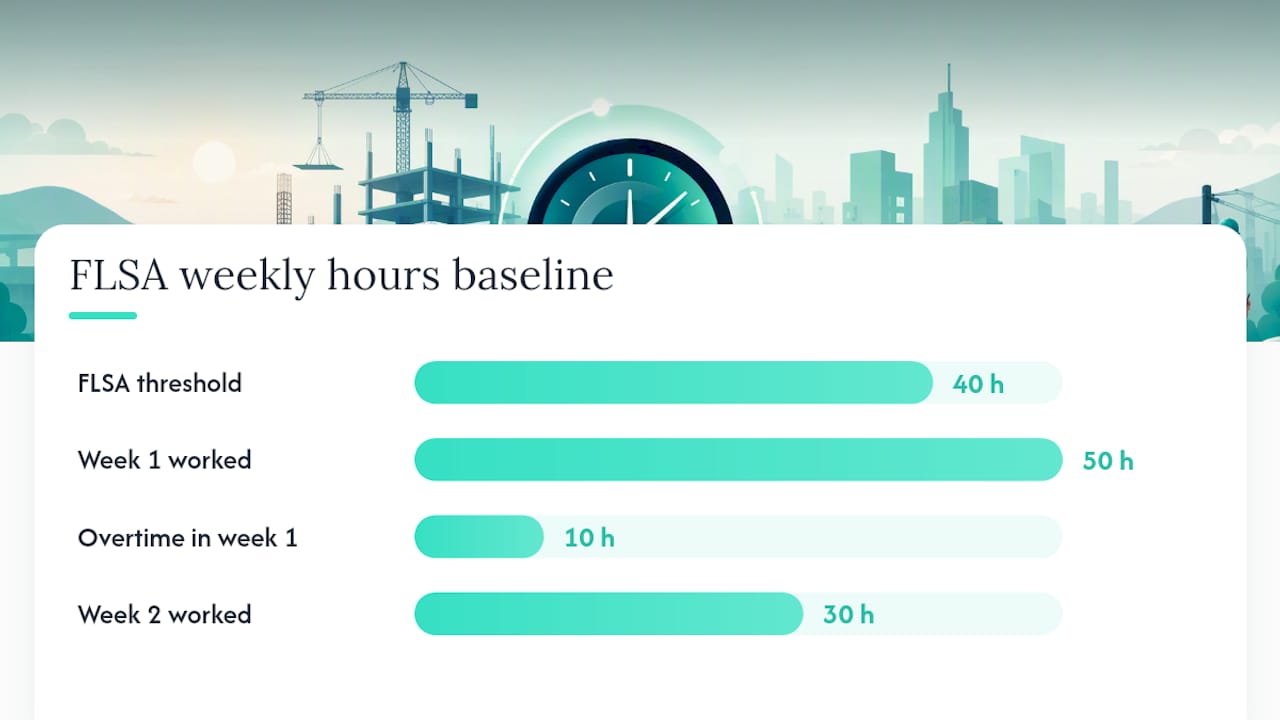
Every hourly payroll system in the country answers to the same federal floor: the Fair Labor Standards Act. Covered nonexempt employees must earn overtime at one and one-half times their regular rate for any hours worked past 40 in a single workweek. That workweek is a fixed block of seven consecutive 24-hour periods, and you cannot average hours across two weeks to dodge overtime. A 50-hour week followed by a 30-hour week still triggers 10 hours of overtime pay in week one.
The “regular rate” trips up more small business owners than anything else in payroll. It is not just the base hourly wage. It is total weekly compensation divided by total hours worked, and it generally has to include non-discretionary bonuses, shift differentials, and commissions. Skip that calculation and you underpay overtime without realizing it.
The FLSA also requires employers to keep accurate records of hours worked and wages paid. There’s no mandated format, but the records have to hold up if questioned.
A few things make that recordkeeping burden easier to carry:
- Timestamped clock-ins and clock-outs that can’t be edited after the fact
- A weekly total that matches what employees actually worked, not a rounded guess
- Photo or GPS verification tied to each punch, which builds a defensible trail if a wage claim ever surfaces
That last point matters more than most owners assume. An audit trail doesn’t just protect you in a dispute. It removes the guesswork from your own payroll review.
Set Up Payroll-Ready Time Tracking: A Step-by-Step Checklist
Getting your time clock configured correctly the first time saves you from re-running payroll or issuing correction checks later. Follow these five steps in order.
- Define your workweeks and flag nonexempt staff. Before touching any settings, decide when each team’s workweek starts and ends, and confirm which employees are nonexempt and therefore overtime-eligible under the FLSA.
- Turn on automatic weekly overtime calculation. Make sure the system pulls in every component of pay that belongs in the regular rate, including shift premiums and non-discretionary bonuses, not just the base hourly wage. Our step-by-step overtime guide walks through the math if you want to double-check the logic yourself.
- Set your break rules correctly. Short paid rest breaks, typically 5 to 20 minutes, count as hours worked and stay in the paycheck. Only bona fide unpaid meal periods, where the employee is fully relieved of duty, get deducted.
- Turn on verification. Set a GPS geofence radius appropriate to your site, generally 50 to 300 meters, and enable timestamped photo capture at punch. Tighter radii work for a single storefront; looser ones make sense for a construction crew spread across a lot.
- Build an approval workflow. Choose a manager sign-off step before hours lock, pick your export format (CSV or a QuickBooks-friendly file usually covers it), and set how long you’ll retain the audit records.
Pro Tip: Run a two-week trial period with verification turned on but with employees warned in advance. You’ll catch configuration mistakes, like a geofence set too tight for a delivery entrance, before they show up as a payroll dispute.
How Do You Calculate Overtime and Handle Break Deductions?
The math is where good intentions go wrong. Walk through two real scenarios before you trust your system’s output blindly.
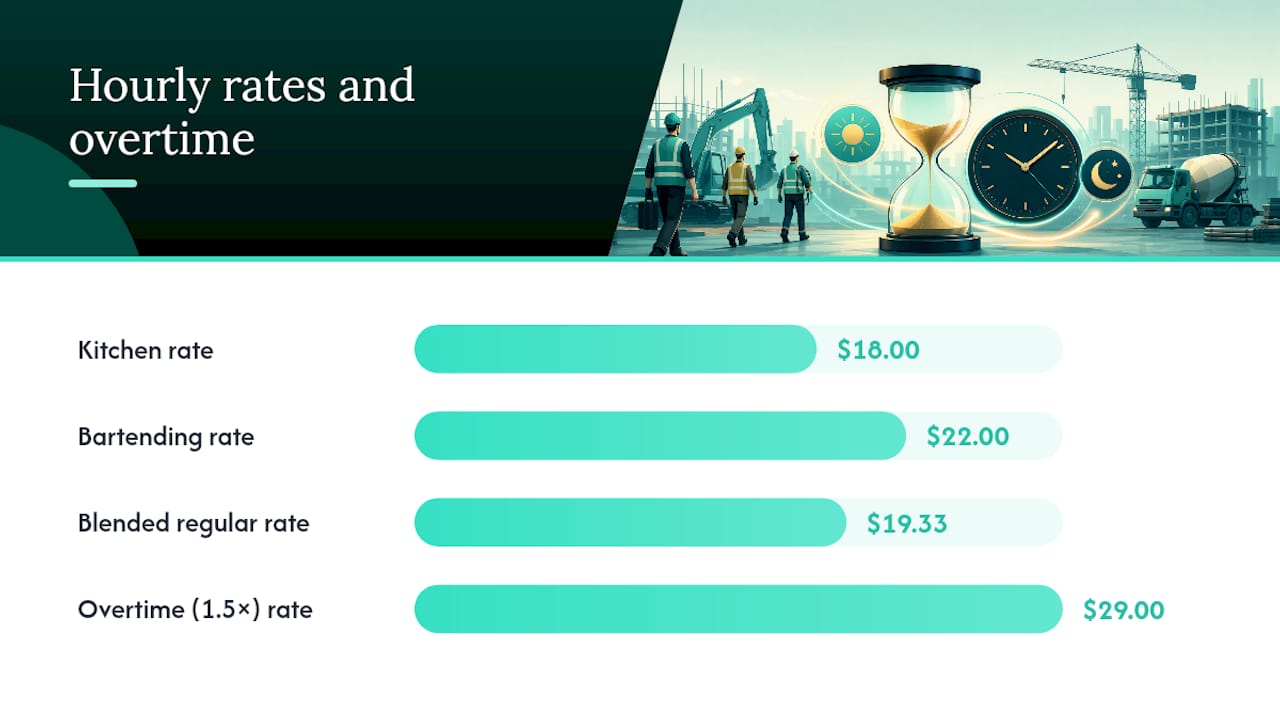
Scenario one: multiple pay rates in one week. Say an employee works 30 hours at $18 per hour in the kitchen and 15 hours at $22 per hour bartending, for 45 total hours. Total pay is $540 plus $330, or $870, divided by 45 hours, gives a regular rate of $19.33. Overtime applies to the 5 hours over 40, paid at 1.5 times that blended rate, not at either individual hourly rate. DOL Fact Sheet #23 lays out this blended-rate requirement in detail.
Scenario two: breaks inside a single shift. An employee clocks a paid 15-minute rest break and an unpaid 30-minute meal period during an 8-hour shift. The rest break counts as hours worked; the meal period does not, assuming the employee is fully off duty. That shift pays for 7.75 hours, and DOL guidance on breaks treats that split as the standard, not the exception.
Watch for these edge cases specifically:
- Multiple jobs or pay rates in the same week, which change the regular-rate math
- Rounding practices that consistently favor the employer, which can violate FLSA guidance even if unintentional (our rounding rules breakdown covers what’s compliant)
- Piece-rate or commission pay layered on top of hourly wages
Before your first payroll run on a new system, manually calculate one full week by hand and compare it against the software’s output. A mismatch of even a few cents per hour points to a misconfigured break rule or an incomplete regular-rate calculation, and it’s far cheaper to catch that on a spreadsheet than after checks go out.
Why an Audit-Trail Time Clock Like Kloqk Fits Small Business Payroll
Every item on the setup checklist above maps directly to features you should expect from a modern time clock, and Kloqk builds all of them into its core, free product rather than gating them behind a paid tier.
- Automatic weekly overtime calculation using the correct regular-rate inputs
- Break tracking that distinguishes paid rest breaks from unpaid meal periods
- Payroll-ready exports that plug into your existing accounting workflow
- Photo verification at clock-in to confirm who is actually punching in
- GPS geofencing to keep punches tied to your job site or storefront
The operational payoff shows up fast. Fewer manual timesheet edits means a faster payroll run every single cycle, and a defensible, timestamped record means you’re not scrambling to reconstruct hours if a wage dispute or audit ever lands on your desk. For crews spread across job sites, our guide on geofencing for time clocks explains how to size a geofence so it protects against buddy punching without blocking legitimate check-ins from a parking lot or loading dock.
If you’re still tracking hours on paper or in a spreadsheet, the jump to an automated, verified system is less about technology for its own sake and more about closing the exact gaps that cause wage claims in the first place.
What Are Prevailing Wage Laws, and How Do They Differ From General Wage Law?
Separate from everything above, “prevailing wage” is also a specific legal term tied to government-funded construction contracts. Under laws like Davis-Bacon at the federal level and similar statutes in many states, contractors on public works projects must pay workers a wage rate set by the government for that trade and region, not just the federal or state minimum wage.
That’s a fundamentally different framework from the general wage rules covered in this guide. General wage law, the FLSA baseline discussed above, sets a floor: minimum wage and overtime rules that apply broadly across nearly all U.S. employers. Prevailing wage law layers an additional, project-specific rate on top of that floor, but only for contractors working on covered government contracts.
If your business is a restaurant, retail shop, salon, clinic, or a construction crew working exclusively on private jobs, prevailing wage statutes almost certainly don’t apply to you. Your compliance obligation starts and ends with standard FLSA overtime and recordkeeping rules, which is exactly what a payroll-ready time clock is built to handle. If you do occasionally bid on a public contract, that project requires separate certified payroll reporting software and a different compliance process entirely, distinct from your day-to-day employee time tracking.
Department of Labor Time Tracking Requirements for Everyday Payroll
Setting aside certified public-works reporting, the Department of Labor’s actual, everyday requirement for small employers is simpler than most owners assume: keep accurate records of hours worked and wages paid, in whatever format works for your business.
There’s no federally mandated software or template. What matters is that the record reflects reality. The DOL’s FLSA reference guide specifies what needs tracking, including hours worked each day, total hours each workweek, and the basis on which wages are paid, but leaves the mechanism up to the employer.
That flexibility is exactly why so many small businesses default to a paper log or a punch clock that only stores raw numbers. The problem is those systems don’t hold up well under scrutiny. If an employee disputes their hours six months later, a paper timesheet with no timestamp and no verification gives you nothing to point to beyond your word against theirs.
A digital system that timestamps every punch, logs GPS location, and locks records after manager approval satisfies the DOL’s actual requirement while giving you something a paper log never can: a record that’s hard to dispute after the fact. That’s the practical standard worth building toward, regardless of your industry or crew size.
Common Pitfalls That Trip Up Small Business Time Tracking
Most compliance problems in small business payroll come from a small handful of repeated mistakes, not exotic legal gray areas.
The most frequent one: subtracting every break from paid hours, including short rest periods that federal law requires you to pay for. Owners often assume “break” means “unpaid,” when in fact only bona fide meal periods, ones where the employee is fully relieved of duty, qualify for that deduction. Rest breaks under 20 minutes stay on the clock.
A close second is rounding hours in a way that consistently shaves time off the employee’s side, even by a minute or two per punch. Done systematically across a large staff, that adds up to real underpayment over a year.
Multiple pay rates within a single week cause a third common error. If an employee splits time between two roles at two different hourly rates, plenty of basic time clocks calculate overtime against just one of those rates instead of the properly blended regular rate, understating what’s owed.
Finally, treating GPS or photo verification as optional, then having no fallback when the technology fails. A phone with a dead GPS signal in a basement kitchen or a dense urban block shouldn’t mean no record at all. Document the failure, capture a photo as backup proof, and have a supervisor manually approve and log the punch to preserve your audit trail.
How Union Agreements Affect Time Tracking Requirements
If your team is covered by a collective bargaining agreement, your time tracking system often needs to layer union-specific terms on top of the federal FLSA baseline. Union contracts frequently define overtime thresholds that exceed the federal 40-hour standard, daily overtime after 8 hours worked, for instance, or specify premium pay for particular shifts, holidays, or job classifications.
Break rules can differ too. Some collective bargaining agreements mandate longer or more frequent paid breaks than federal law requires, and those terms take precedence over the general FLSA minimum as long as they’re more generous to the employee.
For a small business with a unionized crew, whether that’s a construction outfit with a handful of union electricians or a hospitality business with a service employees’ union contract, the practical move is building your time clock’s overtime and break rules around whichever standard is stricter: the union contract or the federal floor. Most modern time tracking software lets you customize overtime triggers and break categories per employee group, which makes it possible to run union and non-union staff through the same system without manually recalculating one group’s hours by hand every pay period.
Handling Apprentices and Different Wage Classifications
Apprenticeship programs and mixed wage classifications add another layer small business owners in construction, salons, and trade-based businesses need to track carefully. Apprentices often start at a percentage of the full journeyman wage rate, stepping up incrementally as they complete program milestones, and that rate needs to update in your payroll system on schedule, not months after the fact.
The bigger risk is misclassifying which rate applies to which hours worked. If an apprentice works some hours under supervision at the apprentice rate and other hours performing journey-level work, your time tracking needs to capture that distinction accurately, or you risk both underpayment and inaccurate labor cost reporting.
The same logic applies to any business running multiple wage classifications, a salon paying stylists one rate and front-desk staff another, or a clinic with different rates for medical assistants versus administrative staff. A time clock that lets you assign distinct pay rates and overtime rules per role, and that clearly tags which classification each punch falls under, removes the manual reconciliation work that otherwise falls on whoever runs payroll. Get the classification wrong at the clock level, and every downstream calculation, from overtime to workers’ comp reporting, inherits that error.
Auditing and Reporting Requirements for Small Business Payroll
Even outside certified public-works reporting, your time tracking records need to survive an audit, whether that’s a state labor department inquiry, a wage claim from a former employee, or your own accountant catching a discrepancy at tax time.
The core requirement is straightforward: retain records that show hours worked, wages paid, and any deductions, in a format you can produce quickly if asked. A system with a locked, timestamped audit trail, photo verification and GPS data included, gives you evidence beyond a simple spreadsheet total. If a former employee claims they worked unpaid overtime, a timestamped record with location data settles the question far faster than trying to reconstruct memory from months ago.
Retention periods matter here too. Keeping payroll and time records for at least a few years protects you if a claim surfaces well after the pay period in question. Beyond legal protection, a clean audit trail speeds up your own internal reviews. If you’re managing crews across a job site, a busy weekend shift, or seasonal staffing spikes, having a project timeline reference alongside labor records, tools like a project timeline calculator can help here, makes it easier to cross-check labor hours against actual project or shift schedules when questions come up.
A Note on Rolling Out Verification With Your Team
Introducing GPS and photo verification tends to go smoothly when you’re upfront about it from day one. Document the policy in writing, walk your team through why it exists, and log everyone’s acknowledgment before the first shift under the new system. Transparency here does more to reduce pushback than any feature you turn on. For unusual cases, union contracts, apprentice rates, multi-state crews, loop in a payroll or HR advisor before finalizing your setup.
Saad
Get Started With Payroll-Ready Time Tracking Today
Everything covered in this guide, overtime math, break rules, verification, payroll exports, is built into Kloqk’s core product at no cost, which is a rare combination in an industry where most competitors charge for exactly these features. You don’t need a separate tool for construction crews spread across job sites versus a single-location salon or clinic; the same system handles both.

Start with the free employee time tracking features to see how clock-ins convert directly into payroll-ready hours. If your team works across multiple sites, the GPS time clock with geofencing keeps punches tied to the right location automatically, and the buddy-punching prevention tools add photo verification on top. Kloqk also publishes setup guides for first-time payroll exports, so getting your first pay period right doesn’t require guessing your way through the configuration alone.
Recommended
Sources
Every figure on this page traces to one of these. Primary law and government sources are listed first.
- 1. U.S. Department of Laborprimary
- 2. digitalfractal.com
Written by
Dana WhitfieldHR Compliance Lead
Dana writes about wage-and-hour law, FLSA overtime, and leave compliance for U.S. small businesses, translating dense regulations into plain steps owners can act on.
Keep Reading
Track Hours the Easy Way
Kloqk is a free time clock that handles punches, breaks, overtime, and payroll-ready reports.
Start free