Manage Shift Schedules for Your Small Store: A Practical Guide

The most reliable way to manage shift schedules for a small store is a weekly, demand-driven rota built from your sales-hour forecast, a handful of reusable shift templates, and one accurate source of time data. Get those three things working together and scheduling stops being a weekly fire drill.
Three things to do this week:
- Draft next week’s schedule today. Use your busiest sales hours to anchor coverage, then fill in the rest.
- Verify you have no uncovered shifts. Check opening, peak midday, and closing slots before you publish.
- Enable time tracking. Connect clock-ins to payroll-ready hours so you stop reconciling timesheets by hand. Kloqk’s free time tracking handles overtime calculations and break tracking at no cost, which keeps you on the right side of FLSA recordkeeping requirements from day one.
Table of Contents
- How do you set up a shift schedule for a small store in two weeks?
- What do sample shift schedules look like for small stores?
- How do you calculate staffing needs and control labor costs?
- Should you use a spreadsheet, a wall board, or an app?
- What does your weekly scheduling routine look like?
- Key Takeaways
- What small stores actually get wrong about scheduling
- Kloqk turns your schedule into payroll-ready hours, free
- Useful sources and further reading
How do you set up a shift schedule for a small store in two weeks?
The goal for the first 14 days is simple: go from whatever you’re doing now to a published, repeatable weekly schedule your staff actually trusts. Here’s how to run it, based on the small-business scheduling workflow Kloqk recommends.
Days 1-3: Gather your inputs. Collect staff availability in writing (a simple Google Form works). Pull your last four weeks of sales data and identify your three or four peak-traffic windows per day. Note any state-mandated break rules for your location.
Days 4-5: Choose your templates. Decide on three standard shift types: open (e.g., 8 AM, 2 PM), mid (11 AM, 5 PM), and close (3 PM, 9 PM). Write them down once. You’ll reuse them every week.
Days 6-7: Build and check the draft. Slot staff into shifts based on availability and peak coverage needs. Run a quick coverage check: is every peak window staffed? Does anyone hit 40 hours before the week ends? Who has the same undesirable closing shift three weeks running?
Days 8-9: Publish and announce. Post the schedule at least 72 hours before the first shift. Send a short message: “Next week’s schedule is posted. Check your shifts, flag any conflicts by [date], and confirm you’ve seen it.” That’s all the announcement needs to say.
Days 10-14: Collect feedback and lock the process. Note what broke: a coverage gap on Saturday afternoon, an employee who didn’t see the schedule in time, a missed break. Fix those in week three. Store the master schedule in one shared location, whether that’s a pinned message in your team chat or a shared folder, and designate one person to own edits.
Pro Tip: Before you publish any draft, run a three-point audit: (1) every shift has at least one person, (2) no one is scheduled past 40 hours without your explicit sign-off, (3) the same person isn’t closing and opening back-to-back (a “clopening”). Catching these takes five minutes and saves a week of complaints.
What do sample shift schedules look like for small stores?
Three shift types cover most retail situations: open (morning setup through early afternoon), mid (overlap with both open and close), and close (afternoon through end of day). Add a short midday shift (e.g., 11 AM, 3 PM) when foot traffic spikes at lunch, and an overlap shift during your busiest hour to avoid a single-coverage gap. You can find ready-to-use formats in Kloqk’s shift schedule template library and sample schedules by industry.
Sample weekly grid: tiny store (1-4 staff)

| Day | Staff A | Staff B | Staff C |
|---|---|---|---|
| Monday | Open 8-2 | Close 2-8 | Off |
| Tuesday | Off | Open 8-2 | Close 2-8 |
| Wednesday | Close 2-8 | Off | Open 8-2 |
| Thursday | Open 8-2 | Close 2-8 | Off |
| Friday | Mid 11-5 | Open 8-2 | Close 2-8 |
| Saturday | Close 2-8 | Mid 11-5 | Open 8-2 |
| Sunday | Open 8-2 | Off | Close 2-8 |
Sample weekly grid: typical small store (5-10 staff)
| Shift | Mon | Tue | Wed | Thu | Fri | Sat | Sun |
|---|---|---|---|---|---|---|---|
| Open (8-2) | 2 staff | 2 staff | 2 staff | 2 staff | 2 staff | 3 staff | 2 staff |
| Mid (11-5) | 1 staff | 1 staff | 1 staff | 1 staff | 2 staff | 2 staff | 2 staff |
| Close (2-8) | 2 staff | 2 staff | 2 staff | 2 staff | 3 staff | 3 staff | 2 staff |
Weekend-heavy retail: Flip the staffing ratio. Schedule your strongest cashier and floor lead on Saturday and Sunday, rotate the mid shift to cover 10 AM, 4 PM instead of 11-5, and keep Monday and Tuesday lean. Rotating who works weekends every four weeks keeps the schedule fair over time. For a deeper look at rotation mechanics, Kloqk’s rotating shift schedule guide walks through the trade-offs.
Customize templates by role: cashiers need to overlap with the prior shift by 15 minutes for register handoff; stock staff work best in the first two hours before the store opens; floor staff should mirror your peak traffic windows, not your open/close times.
How do you calculate staffing needs and control labor costs?
Two formulas do most of the work.
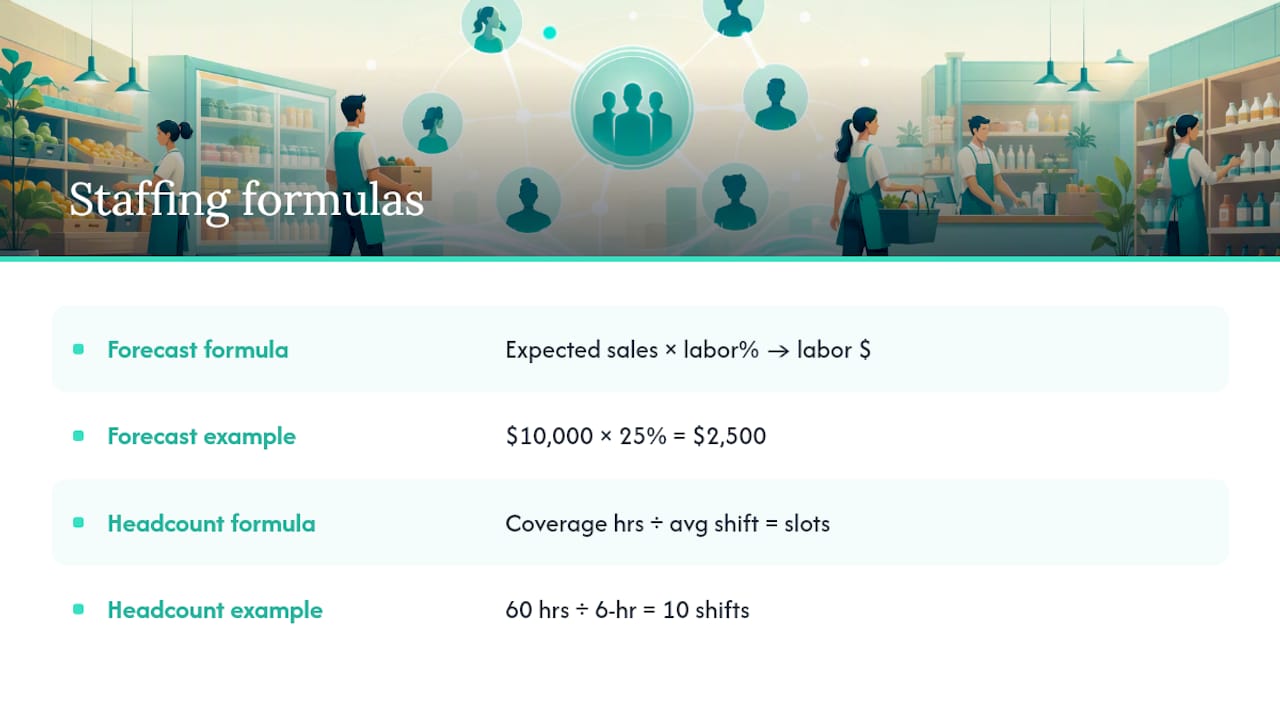
Forecasted labor hours = expected weekly sales hours × your labor % target. If you expect $10,000 in sales and target a 25% labor cost, you have $2,500 to spend on wages. Divide by your average hourly rate to get the hours you can schedule.
Shift headcount = total coverage hours needed ÷ average shift length. If you need 60 coverage hours across the week and your shifts average 6 hours, you need 10 shift slots filled.
For small retail, labor cost as a percentage of sales typically runs in the 20-35% range depending on store type and margin structure. If you’re running above your target, the fastest fixes are trimming overlapping shifts by 30 minutes, adjusting start times to match actual foot traffic (not when you think it picks up), and catching overtime before it happens rather than after.
Overtime is where small stores bleed money quietly. Under the FLSA, non-exempt employees earn 1.5× their regular rate for any hours over 40 in a workweek. A single employee hitting 43 hours three weeks in a row costs more than you’d spend on a part-time hire to cover those extra shifts.
Pro Tip: Track labor spend on a rolling four-week window, not just week-to-week. A single heavy week looks manageable in isolation; four weeks of creeping overtime tells you there’s a structural coverage gap that a template fix, not a conversation, will solve.
Should you use a spreadsheet, a wall board, or an app?
For a team of four or fewer, a shared Google Sheet works. You can build a template once, copy it each week, and share the link. The real cost is your time: checking for overtime manually, texting shift reminders, and reconciling timesheets by hand.
Once your team grows past four, or once overtime becomes a recurring problem, an app pays back its cost in the first month. The feature checklist that actually matters for small stores:
- Reusable shift templates (not rebuilding from scratch weekly)
- Automatic overtime warnings before you publish
- Employee notifications when the schedule posts or changes
- Mobile clock-in with photo verification and GPS
- Payroll export that doesn’t require manual reformatting
Kloqk’s free scheduling and shift planner covers templates, coverage checks, and staff notifications. The free core tier handles time tracking, overtime calculations, and payroll exports. Paid tiers add scheduling, PTO management, and integrations when you’re ready. For managers evaluating automated scheduling options more broadly, this overview of automated scheduling approaches is worth a read before you commit to any tool.
Onboarding to Kloqk takes three steps: create your account and add your store, import your staff list, then either publish your first schedule or enable time tracking for the current week. Most managers have clock-ins running within an hour.
Pro Tip: Start with time tracking only, even before you use the scheduling features. Two weeks of accurate clock-in data tells you exactly when your real peak hours are, which makes your first demand-driven schedule far more accurate than one built from memory.
What does your weekly scheduling routine look like?
Run the same checklist every week, on the same day, before you publish.
- Verify every shift slot has coverage, including opening and closing.
- Check approved PTO and block those slots before assigning anyone.
- Run the overtime scan: flag anyone projected above 38 hours so you can adjust before they hit 40.
- Confirm any pending swap requests are resolved and logged.
- Export payroll hours from the prior week before starting the new draft.
Suggested weekly timeline: Build the draft on Thursday, freeze changes by Saturday noon, publish by Saturday evening for the following week. Staff see their schedule with at least 48 hours before the first shift. For last-minute gaps after the freeze, use a direct message to your on-call or most-available employee first, then escalate to a group message if no one responds within two hours.
Key Takeaways
The most effective way to manage shift schedules for a small store is a weekly demand-driven rota, reusable templates, and payroll-ready time tracking running in parallel from day one.
| Point | Details |
|---|---|
| Start with demand, not availability | Build your schedule from sales-hour forecasts first, then fit staff availability around peak coverage windows. |
| Three templates cover most stores | Open, mid, and close shifts handle the majority of small-store scheduling; add a short midday shift for lunch peaks. |
| Labor cost target: 20-35% of sales | Use the formula (forecasted sales × labor %) to set your weekly hour budget before you assign anyone. |
| FLSA compliance is non-negotiable | Keep payroll records for three years, time records for two, and pay 1.5× for all hours over 40 per workweek. |
| Kloqk connects schedules to payroll | Kloqk’s free time tracking captures clock-ins, calculates overtime, and exports payroll-ready hours without manual cleanup. |
What small stores actually get wrong about scheduling
The conventional wisdom says scheduling is a logistics problem. Get the right number of people in the right slots and you’re done. That framing misses the part that actually breaks down in practice: the gap between the schedule on paper and what gets tracked.
Most small-store managers spend more time fixing payroll after the fact than they spend building the schedule in the first place. An employee clocks in 12 minutes early every day; another forgets to clock out twice a week. Multiply that across six people and you’re looking at hours of phantom time every pay period, plus the FLSA exposure that comes with it.
The trade-off worth naming honestly: fairness and coverage pull in opposite directions. The employee who’s always available and never complains about closing shifts is also the one who quietly burns out by month four. Rotating undesirable shifts on a four-week cycle feels like extra admin until the day your most reliable person quits with two days’ notice.
Simplicity matters more than optimization for stores under ten employees. A schedule that’s 80% optimal and actually gets published on time beats a perfect schedule that’s always late.
Kloqk turns your schedule into payroll-ready hours, free
Scheduling is only half the problem. The other half is making sure the hours your staff actually work match what you pay them, without spending Sunday night on a spreadsheet.

Kloqk’s free time tracking gives small store managers payroll-ready timesheets from the moment staff clock in: overtime calculations, break deductions, and clean export files that go straight to payroll. Photo verification at clock-in and GPS geofencing mean you’re not guessing whether someone was actually on-site. The core features cost nothing. When you’re ready to add scheduling, PTO tracking, or integrations, paid tiers are available without a long-term contract.
Getting started takes three steps: create your Kloqk account, add your staff, and start tracking time this week. Your first payroll-ready timesheet is ready before your next pay run.
Useful sources and further reading
- Employee Scheduling: A Small Business How-To Guide | Kloqk
- Sample Work Schedules: Examples by Industry | Kloqk
- Multi-Shift Scheduling Payroll Setup: A Practical Gu | Kloqk
- Employee Shift Schedule Template: Build Your Team’s Rota | Kloqk
- Free Employee Scheduling Software & Shift Planner | Kloqk
- Free Employee Time Tracking Software & App | Kloqk
- GPS Time Clock App with Geofencing (Free) | Kloqk
This article provides general information about scheduling and labor law basics. It is not legal or professional advice. Confirm current FLSA rules and your state’s specific requirements with the Department of Labor or a qualified employment attorney.
Recommended
Sources
Every figure on this page traces to one of these. Primary law and government sources are listed first.
- 1. U.S. Department of Laborprimary
- 2. rootedup.net
Written by
Sam TolbertWorkforce Operations Editor
Sam writes about scheduling, shift work, and the software that runs an hourly workforce, what actually saves time on the floor versus what just adds clicks.
Keep Reading
Track Hours the Easy Way
Kloqk is a free time clock that handles punches, breaks, overtime, and payroll-ready reports.
Start free