Stop Overtime Underpayments: Shift Differential Tracking for Payroll

Shift differential tracking is the process of tagging and recording premium-eligible hours so payroll can fold those premiums into the regular-rate calculation for correct overtime pay. If your team works nights, weekends, or holidays, that tracking isn’t optional paperwork. Under federal overtime rules, most shift differentials count toward the regular rate, and skipping that step is one of the fastest ways to underpay overtime without realizing it.
TL;DR:
- Most shift differentials, whether flat-dollar or percentage-based, must be included in the regular rate for accurate overtime calculation, not paid as separate bonuses.
- Employers should define premium windows accurately in their time system, automatically split shifts at boundaries, and track differential hours against the workweek to ensure compliance.
- Stacking premiums for the same shift, such as night and holiday pay, requires clear rules in policy because they can significantly impact paychecks.
- Failing to blend base and differential pay before computing overtime can lead to underpayment, and manual calculation or audits are necessary to verify correctness.
- Using automated tools like Kloqk can simplify tracking, configuration, and export of differential hours, reducing errors and easing compliance risks.
Table of Contents
- What Shift Differentials Are and Why Employers Use Them
- Types of Shift Differentials and How to Structure Them
- Calculating Shift Differentials and Their Effect on Overtime
- Configuring Time Systems to Track Differential Hours Accurately
- Compliance Risks and the Payroll Mistakes That Cause Them
- How Kloqk Handles Shift Differential Tracking End to End
- A Practical Priority List for Small Payroll Teams
- Automate Differential Tracking Without the Manual Math
- Where to Verify the Numbers
- Sources
What Shift Differentials Are and Why Employers Use Them
A shift differential is extra pay on top of a base wage for working hours most people would rather avoid: overnight, weekends, holidays, or split shifts that break up a normal day. The federal government doesn’t force any employer to offer one. There’s no statute requiring a night-shift bump. But once a company decides to pay one, that premium usually can’t be treated as separate “bonus” money sitting outside the overtime math.
Where does the policy itself live? Usually in one of three places:
- An employee handbook section on pay practices
- A union contract with negotiated differential rates
- An individual offer letter for a specific role or shift
Employers add differentials for reasons that are mostly about staffing, not generosity. Someone has to cover the 11 PM to 7 AM shift at a hospital or a 24-hour manufacturing line, and without extra pay, most workers will pick the day shift every time. A well-structured differential also signals fairness. Two employees doing the same job shouldn’t feel like the one working weekends got a worse deal for no reason. Retention follows from that fairness: workers who feel fairly compensated for inconvenient hours are less likely to bail for a competitor down the street offering the same base rate with better hours.
Types of Shift Differentials and How to Structure Them
Most companies pick one of three structures, and the choice usually comes down to how predictable payroll needs to be versus how much the differential should scale with someone’s pay grade.
- Flat-dollar premiums add a fixed amount per hour, like an extra $2.00 for overnight work, regardless of the employee’s base rate.
- Percentage premiums add a set percentage on top of the base rate, such as 10% for weekend shifts.
- Tiered windows apply different premiums depending on the time block, with a heavier premium for, say, 12 AM to 6 AM than for 6 PM to 12 AM.
SHRM’s research on shift differentials shows healthcare employers lean toward percentage-based premiums because they scale naturally as nurses and techs move up pay bands. Union agreements tend to favor flat-dollar amounts instead, largely because a fixed number is easier to negotiate and easier for members to verify on a pay stub.
Stacking is where policies get messy fast. If an employee works a night shift on a holiday, do they get both premiums, or just the higher one? There’s no universal rule here. Some employers stack every applicable premium; others cap it at whichever single differential pays the most. Whatever the choice, it needs to be written down in plain language, because “highest only” and “stack everything” produce very different paychecks for the same hours worked.
Benchmark ranges vary by sector, but healthcare differentials tend to run higher than retail or manufacturing, reflecting the difficulty of staffing overnight clinical roles. Whatever range you land on, write it into policy before you configure a single pay code in your time system.
Calculating Shift Differentials and Their Effect on Overtime
Here’s the part that trips up more payroll teams than anything else on this list: overtime doesn’t get calculated on the base rate alone once a differential is in play. The Department of Labor’s guidance on the regular rate is direct about this. You add total base pay and total differential pay for the week, divide by total hours worked, and that blended number becomes the regular rate used for overtime.
Pro Tip: Run this blended-rate math on a spreadsheet before trusting any new payroll configuration. If the software’s overtime line doesn’t match your manual calculation, stop and investigate before running payroll.
The formulas break down like this:
- Flat-dollar differential pay = differential hours × flat premium amount
- Percentage differential pay = base hourly rate × premium percentage × differential hours
- Blended regular rate = (total base pay + total differential pay) ÷ total hours worked
- Overtime premium owed = blended regular rate × 0.5 × overtime hours
For example, a worker earning $18/hour with a $2/hour night differential will have a blended regular rate above the base rate once differential pay is included. Calculating overtime using the blended rate increases the overtime premium owed compared to using the base rate alone, preventing underpayment errors common among shift workers.
Edge cases worth flagging: partial shifts that straddle a premium window need to be split at the boundary, not rounded up or down wholesale. Stacked premiums require the payroll system to apply both rates before the blended-rate math runs, not after. And when a pay period splits mid-week, differential hours still get tracked against the workweek defined in policy, not the payroll calendar.
Configuring Time Systems to Track Differential Hours Accurately
Policy on paper means nothing if the time clock doesn’t enforce it. Configuration is where most of the compliance work actually happens.
Start by defining premium windows as fixed time blocks in the system, such as 10 PM to 6 AM for night differential. Split-shift employees need those windows to auto-split their punch, so only the eligible portion of a cross-midnight shift picks up the premium rate. SHRM’s practitioner guidance notes that splitting shifts at the premium boundary is one of the more common operational fixes employers rely on to avoid disputes.
A few configuration essentials worth locking down before rollout:
- Set rounding rules that apply consistently to premium and non-premium hours alike
- Decide whether unpaid breaks fall inside or outside the differential window
- Tag every differential-eligible punch with a distinct pay code so payroll exports separate base and premium hours automatically
- Build a weekly differential-hours report for reconciliation before each payroll run
For field and mobile teams, GPS location data and photo verification at clock-in add a layer of protection against buddy punching and mis-tagged shift starts, particularly on job sites where supervisors aren’t watching every punch. A tool like Kloqk’s time tracking system can apply these premium windows automatically instead of relying on a manager to remember which shift qualifies.
Before going live, run a checklist: confirm every premium window matches the written policy, test a sample split shift, verify the export includes separate line items for base and differential pay, and reconcile one full pay period manually against the system’s output. Skipping that last step is how configuration errors survive three or four payroll cycles before anyone notices.
Compliance Risks and the Payroll Mistakes That Cause Them
The Department of Labor is explicit that nondiscretionary shift differentials generally must be included in the regular rate before overtime is calculated. Ignore that rule, and you’re not looking at a minor bookkeeping slip. You’re looking at a wage claim.
The most common mistakes payroll teams make:
- Calculating overtime at 1.5× the base rate and adding the differential as a separate line, instead of blending both into one regular rate first
- Mislabeling differential pay as a discretionary bonus to avoid including it in overtime math
- Failing to split cross-midnight shifts, so an employee gets full-shift premium pay for hours that should have been base rate
- Applying stacking rules inconsistently between pay periods for the same employee
If you suspect past underpayment, audit at least one full quarter of pay periods where differentials and overtime overlapped. Recalculate the blended regular rate by hand for a sample of affected employees, compare it against what was actually paid, and if a gap shows up, correct it retroactively rather than waiting for a complaint. A payroll consultation service can help if the audit turns up systemic issues across multiple pay periods rather than a one-off error.
How Kloqk Handles Shift Differential Tracking End to End
Kloqk’s free time tracking platform maps directly onto the checklist above. Premium windows get configured once and applied automatically to every clock-in that falls inside them. Split-shift logic handles cross-midnight punches without manual adjustment, and payroll exports separate base and differential hours into distinct fields so nothing gets blended incorrectly downstream. GPS and photo verification add anti-fraud protection for field crews clocking in from job sites.
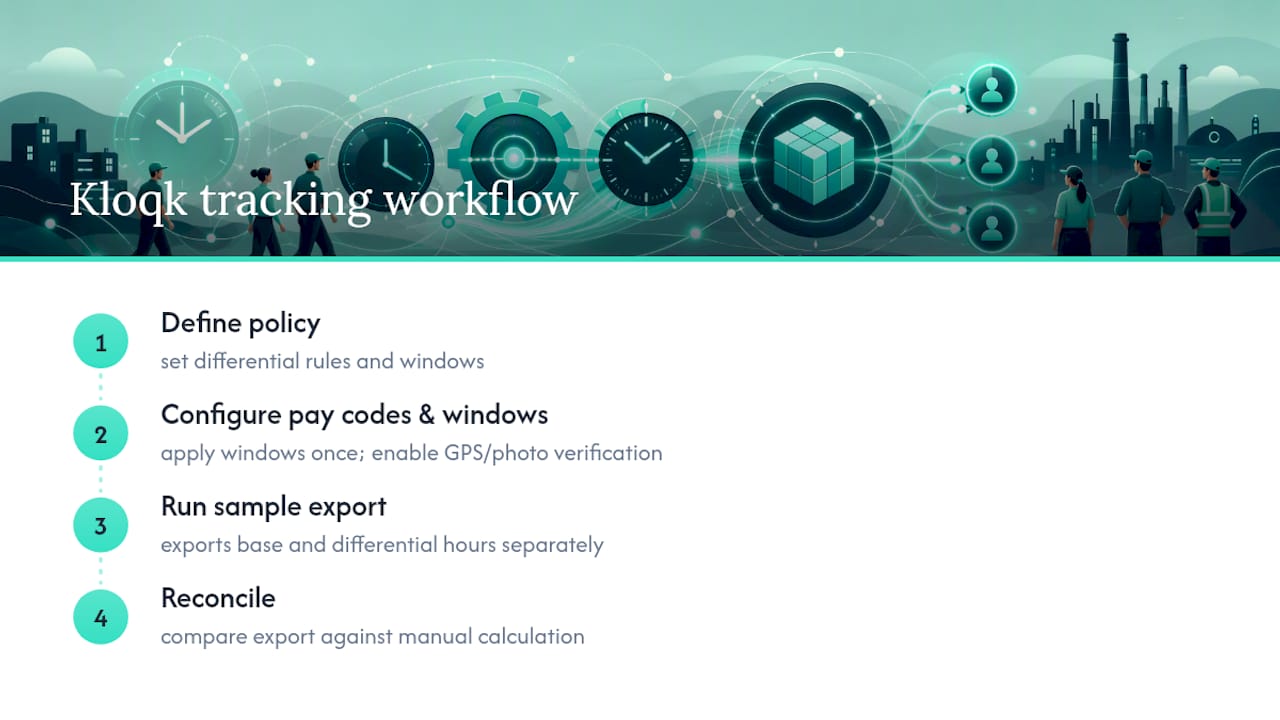
The workflow is simple: define the policy, configure pay codes and windows, run a sample export, then reconcile against a manual calculation. Saad’s guide to tracking nurse shift differentials walks through sector-specific setup for healthcare teams facing exactly this challenge.
A Practical Priority List for Small Payroll Teams
If you’re managing this with limited payroll staff, don’t try to solve every edge case on day one. Audit one representative week first. Confirm your premium windows are written down somewhere everyone can see, not just living in a manager’s head. Then run a payroll export and check that it separates base and differential hours cleanly.
For small employers, start with a flat-dollar or straightforward percentage structure. Save tiered windows and stacking rules for later once the basics are running clean. If an audit turns up back-pay issues spanning multiple employees or pay periods, that’s the point to bring in a payroll provider or employment counsel rather than trying to fix it alone.
Saad
Automate Differential Tracking Without the Manual Math
Kloqk gives you the pay codes, split-shift handling, and payroll exports to track shift differentials without building a spreadsheet from scratch every pay period. The free plan includes overtime calculations that account for blended regular-rate math, break tracking, and GPS or photo verification for teams working outside a single office. That combination matters most for restaurants, construction crews, and clinics juggling overnight and weekend coverage across a rotating staff.

If your crew works remote or multi-site shifts, the GPS time clock with geofencing adds location verification to every punch, and the remote time tracking app extends the same premium logic to field teams. Set up your first premium window and run a sample payroll export today at Kloqk’s employee time tracking page to see how the blended-rate math comes out before your next pay period closes.
Where to Verify the Numbers
Check your math against the DOL’s Fact Sheet #56A on the regular rate and the Office of Personnel Management’s overtime computation guide. For quick spot checks, a shift differential calculator can confirm your blended rate before payroll runs.
Sources
Recommended
Sources
Every figure on this page traces to one of these. Primary law and government sources are listed first.
- 1. SHRMprimary
- 2. thecaretracker.com
- 3. opm.gov
- 4. paycalctools.com
Written by
Dana WhitfieldHR Compliance Lead
Dana writes about wage-and-hour law, FLSA overtime, and leave compliance for U.S. small businesses, translating dense regulations into plain steps owners can act on.
Keep Reading
Track Hours the Easy Way
Kloqk is a free time clock that handles punches, breaks, overtime, and payroll-ready reports.
Start free