How to Track Field Worker Hours Remotely in 2026

Use a GPS-enabled mobile time clock with geofencing, photo verification, and payroll export to reliably track field worker hours remotely. That combination gives you a timestamped, location-confirmed record for every shift, an audit trail that holds up under wage disputes, and timesheet data that flows directly into payroll without manual re-entry. Run a pilot with one crew before full deployment.
Kloqk delivers all of this at no cost for core features, making it the practical starting point for most U.S. small businesses.
- Best approach: GPS mobile time clock + geofencing + photo verification + payroll export
- Why it works: Eliminates manual timesheets, prevents buddy punching, and produces payroll-ready records
- Pilot goal: Reduce payroll corrections and cut manual entry time within two weeks.
- Recommended tool: Kloqk (free GPS time clock, geofencing, overtime calculations, payroll exports)
Table of Contents
- How does real-time field worker hour tracking actually work?
- What features should you prioritize when choosing a solution?
- How do you select a vendor and roll out tracking without disrupting operations?
- What U.S. legal and privacy rules apply to tracking field workers?
- What does field time tracking cost, and what ROI can you expect?
- Why Kloqk is a practical pick for U.S. small businesses
- Key Takeaways
- The part most managers get wrong about tracking adoption
- Kloqk makes it easy to start your pilot today
- Useful sources and further reading
How does real-time field worker hour tracking actually work?
The core loop is straightforward. A field employee opens a mobile app, taps clock-in, and the app captures three things simultaneously: a timestamp, a GPS coordinate, and (when enabled) a photo or biometric confirmation. That record uploads to the cloud in real time. If the worker is underground, in a dead zone, or on a rural site with no signal, a well-built app stores the entry locally and syncs the moment connectivity returns.
GPS-verified digital clock-ins are timestamped and location-tagged, producing an attendance record you can filter by date, site, role, or individual and export directly for payroll or compliance reporting. That is the audit trail that resolves disputes.
GPS verification vs. geofencing: what’s the difference?
GPS verification confirms where an employee was when they clocked in. Geofencing goes a step further: it draws a virtual boundary around a job site and either blocks clock-ins from outside that boundary or flags them for supervisor review. GPS verification is useful for any mobile workforce; geofencing is the right tool when workers must be physically on-site before their shift counts.

Photo verification adds a third layer. The app captures a selfie at clock-in, which a supervisor can review later. Combined with GPS, this makes proxy clock-ins (buddy punching) nearly impossible. Photo and GPS verification are the two most effective defenses against time fraud in field settings.
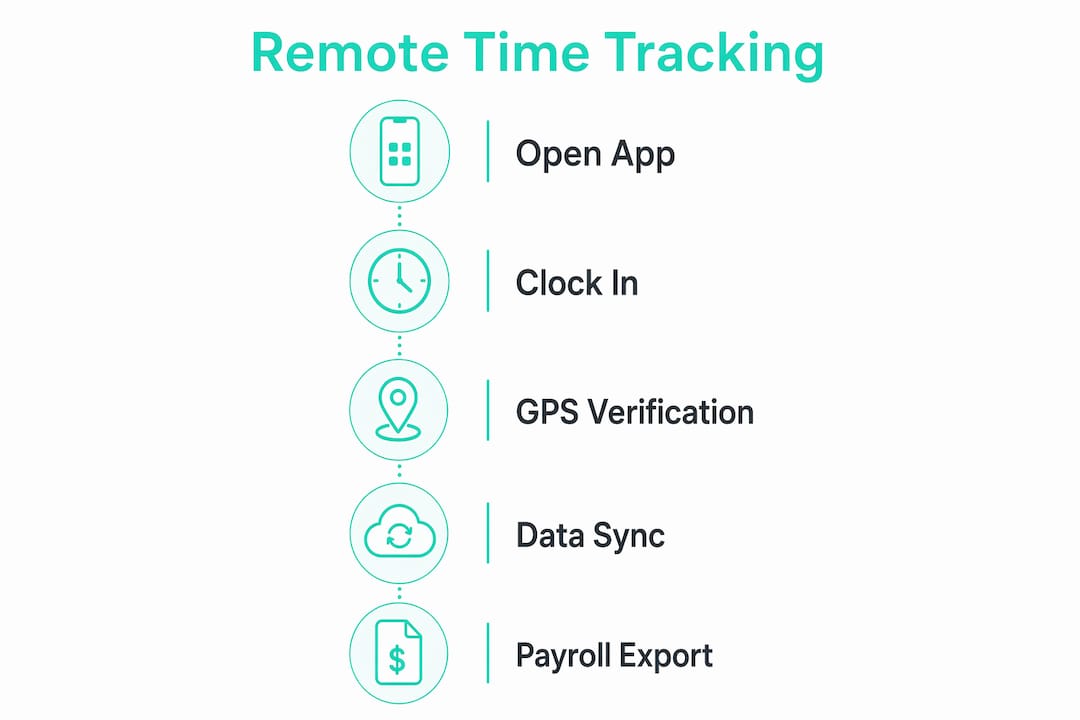
How data flows from phone to payroll
The employee’s mobile device sends clock-in/out events to a cloud platform. The platform applies your overtime and break rules automatically, then generates a timesheet. Most platforms export to CSV, QuickBooks, or ADP. Field service time tracking that logs exact hours and locations per job can sync directly to payroll, cutting out manual entry entirely.

Pro Tip: Set offline sync to automatic rather than manual. Workers on rural sites often forget to sync; automatic sync on reconnect means no gaps in your records.
| Method | Offline behavior | Connectivity needed | Record reliability |
|---|---|---|---|
| GPS mobile clock-in | Stores locally, syncs on reconnect | Data or Wi-Fi at sync | High when auto-sync is on |
| Geofencing | Boundary check queued until online | Required at clock-in | Medium (boundary check may fail offline) |
| Photo verification | Photo stored locally, uploads on sync | Required for upload | High when auto-upload is on |
| Manual timesheet | No dependency | None | Low (human error, no location proof) |
What features should you prioritize when choosing a solution?
Not every feature on a vendor’s marketing page earns its place. The ones below are ranked by their direct impact on payroll accuracy, compliance, and the time you spend fixing errors.
Core features (non-negotiable)
- GPS time clock: Location-confirmed clock-ins with timestamps. The foundation of any remote tracking setup.
- Geofencing: Restricts or flags clock-ins outside defined job-site boundaries.
- Photo or biometric verification: Prevents buddy punching; creates a visual audit record.
- Offline mode with automatic sync: Keeps records intact on sites with poor connectivity.
- Payroll exports (CSV, QuickBooks, ADP): Eliminates re-entry and the errors that come with it. Time and attendance platforms that automate timesheet submission and payroll sync are the primary driver of admin time savings.
- Overtime and break rule automation: Calculates FLSA and state-specific rules without manual adjustment.
- Job and task tagging: Lets you see hours by project, not just by employee. Critical for job costing.
- Supervisor approvals and audit logs: Creates a chain of custody for every timesheet.
- Role-based access: Managers see their crews; payroll staff see exports; employees see their own records.
Secondary features that speed adoption
Scheduling integration, push notifications for missed clock-ins, time-off requests, and connections to dispatch or field-service tools all reduce friction for workers and supervisors. They are not required on day one, but they matter for retention once the system is live.
Pro Tip: For crews of fewer than 15 people, prioritize GPS clock-in and payroll export above everything else. Add geofencing and photo verification in week three once workers are comfortable with the app. Stacking every feature at launch is the fastest way to kill adoption.
| Feature | Impact on accuracy | Impact on compliance | Admin time saved |
|---|---|---|---|
| GPS time clock | High | High | High |
| Geofencing | High | Medium | Medium |
| Photo verification | High | Medium | Low |
| Offline sync | High | High | High |
| Payroll export | Medium | High | Very high |
| Overtime/break rules | Medium | Very high | High |
| Job/task tagging | Medium | Low | Medium |
| Supervisor approvals | Medium | High | Medium |
How do you select a vendor and roll out tracking without disrupting operations?
The selection process does not need to take months. A focused four-week effort from requirements to pilot results is realistic for most small businesses.
Vendor selection steps
- Define your requirements. List must-have features (GPS, payroll export, offline mode), crew size, number of sites, and any payroll software you already use.
- Shortlist by feature fit. Mobile usability, location verification, integration support, and reporting are the four criteria buyer guides consistently rank highest. Filter your list against those.
- Run vendor demos. Ask each vendor to walk through a clock-in on a mobile device, show an offline scenario, and export a sample timesheet.
- Check integrations. Confirm the export format matches your payroll software before committing.
- Request a pilot. Any vendor worth considering will let you run a free trial with a real crew.
Rollout phases
- Pilot (weeks 1, 2): Deploy with one crew or one site. Collect baseline data on payroll corrections and manual entry time.
- Feedback (week 3): Survey workers and supervisors. Fix friction points before scaling.
- Policy update (week 3, 4): Formalize the time-tracking policy in writing. Include consent language for GPS and photo features.
- Full deployment (week 4+): Roll out to all crews. Run parallel timesheets for one payroll cycle to catch discrepancies.
- Ongoing audit: Review audit logs monthly for anomalies; adjust geofence boundaries as job sites change.
Pro Tip: Assign one “tracking champion” per crew during the pilot. That person handles questions, models correct clock-in behavior, and reports friction back to you. It cuts support load significantly.
Pilot recommendations consistently point to 2, 4 week pilots with baseline and end-line metrics as the most reliable way to validate accuracy and admin-effort reductions before full deployment.
| KPI | Baseline target | Pilot improvement goal |
|---|---|---|
| Payroll corrections per cycle | Count before pilot | Reduce by 50% or more |
| Manual timesheet entry time | Hours per pay period | Reduce payroll corrections significantly. |
| Clock-in compliance rate | % of shifts with verified clock-in | Achieve high clock-in compliance |
| Payroll processing time | Hours per cycle | Reduce by 30% or more |
Questions to ask every vendor
- How long is data retained, and can you export a full history?
- What export formats are supported (CSV, ADP, QuickBooks)?
- Is there a per-user limit on the free or base tier?
- What is the support SLA for a payroll-day issue?
- How is location data stored, and who has access to it?
What U.S. legal and privacy rules apply to tracking field workers?
Tracking is legal in most U.S. workplaces when used for legitimate business purposes, but state laws and consent practices matter more than most managers realize.
Core compliance requirements
- FLSA timekeeping: The Fair Labor Standards Act requires employers to keep accurate records of hours worked and wages paid. A GPS-verified digital record satisfies this requirement more reliably than paper timesheets.
- State overtime and break rules: California, New York, and several other states have break and overtime rules that exceed federal minimums. Your time-tracking software must apply the correct state rules automatically.
- Payroll record retention: Federal rules require payroll records to be kept for at least three years. Most states match or exceed this.
- Location data: Tracking location during work hours on company-owned or work-use devices is generally permissible. Tracking off-duty hours or personal devices without clear consent is where legal risk rises sharply.
Privacy best practices
- Publish a written tracking policy before launch. Workers should know what is captured, when, and who can see it.
- Limit GPS sampling to work hours and job-site boundaries. Continuous off-hours tracking creates liability with no operational benefit.
- Use role-based access so only authorized personnel can view location history.
- For unionized employees or multi-state teams, consult an employment attorney before rollout. Location privacy laws vary significantly by state, and union contracts may require bargaining over new monitoring tools.
Pro Tip: Frame the tracking policy around two benefits workers actually care about: accurate pay and safety. “This system makes sure you’re paid for every minute you work and helps us find you fast in an emergency” lands better than any compliance-first explanation.
| Compliance item | Federal requirement | State variation |
|---|---|---|
| Hours records | FLSA: keep 3 years | Most states match or exceed |
| Overtime threshold | CA, NY, and others have daily thresholds | |
| Break tracking | No federal mandate | CA, WA, OR require paid/unpaid break records |
| Location consent | No federal law | IL, TX, and others have specific notice rules |
| Off-duty tracking | Generally prohibited | Varies; consult state law |
This article is general information, not legal advice. Confirm current rules with a qualified employment attorney or your state labor agency for your specific situation.
What does field time tracking cost, and what ROI can you expect?
Most vendors price on a per-user-per-month basis, sometimes tiered by feature set. Free tiers for core GPS clock-in and basic reporting exist, and Kloqk is one of the few platforms that keeps GPS time clock, geofencing, and payroll exports in the free tier rather than locking them behind a paid plan.
Common cost components
- Per-user monthly subscription (core features)
- Add-on fees for advanced payroll sync, detailed analytics, or API access
- Setup or onboarding fees (common with enterprise platforms; rare with small-business tools)
- Optional hardware (dedicated time clock tablets for job sites without smartphones)
A simple ROI calculation
ROI formula: (Hours saved on payroll processing × hourly rate of payroll staff) + (Overpayment reduction per cycle) − Monthly subscription cost = Monthly net gain
For a crew of 10 workers paid weekly, if manual timesheet processing takes three hours per cycle at $25/hour and the platform eliminates two of those hours, that is $200/month in direct labor savings before you count reduced overpayments. Automation, including mobile clock-ins and payroll sync, is the primary ROI driver for small businesses, with payroll processing time and error rates as the two metrics that move fastest.
Hidden costs to watch for
- Per-integration fees for connecting to your payroll software
- Overage charges when crew size exceeds the plan’s user limit
- Data export fees on some platforms (check before signing)
- Support tier costs: some vendors charge extra for phone or priority support
The break-even point shifts with crew size. A five-person crew on a free plan breaks even immediately. A 50-person crew on a paid plan needs to save roughly two hours of payroll processing per cycle to cover the subscription.
Why Kloqk is a practical pick for U.S. small businesses
Kloqk fits the manager who needs GPS-verified time tracking with payroll exports and does not want to pay for features that should be standard. The free employee time tracking feature set includes GPS time clock, geofencing, photo verification, overtime calculations, break tracking, and payroll-ready exports, all without a monthly fee for core functionality.
How Kloqk maps to the feature checklist
- GPS time clock: Confirms location at every clock-in and clock-out
- Geofencing: Restricts clock-ins to defined job-site boundaries
- Photo verification: Captures a selfie at clock-in to prevent buddy punching
- Payroll exports: Generates payroll-ready files compatible with common U.S. payroll workflows
- Overtime and break calculations: Applies federal and state rules automatically
- Multi-location support: Manages distributed crews across multiple sites from one dashboard
Quick-start pilot template for Kloqk
- Sign up and configure one job site with a geofence boundary.
- Add five to ten workers from one crew.
- Enable photo verification and GPS time clock.
- Run for two weeks. Track clock-in compliance rate, payroll corrections, and manual entry time.
- Export the first payroll cycle and compare it to your previous manual process.
Pro Tip: Use Kloqk’s remote employee time tracking page to walk workers through the clock-in flow before their first shift. A five-minute walkthrough at a crew meeting eliminates most first-week support questions.
Key Takeaways
GPS-enabled mobile time tracking with geofencing, photo verification, and automated payroll export is the most reliable way to monitor field employee hours remotely while staying U.S.-compliant.
| Point | Details |
|---|---|
| Lead with GPS + geofencing | GPS time clock and geofencing together confirm location and prevent unauthorized clock-ins. |
| Pilot before full deployment | Run a 2, 4 week pilot with one crew; target improved clock-in compliance and a substantial drop in payroll corrections. |
| Automate payroll export | Automated timesheet submission and payroll sync are the primary source of admin time savings. |
| Stay compliant by state | Apply state-specific overtime and break rules automatically; keep payroll records for at least three years per FLSA. |
| Kloqk for small businesses | Kloqk offers GPS time clock, geofencing, photo verification, and payroll exports at no cost for core features. |
The part most managers get wrong about tracking adoption
The technology is rarely the hard part. A GPS time clock with geofencing works on day one. What takes longer is the cultural shift, and most managers underestimate it.
The conventional wisdom is to lead with compliance: “We need accurate records for payroll and audits.” That framing is accurate but it puts workers on the defensive. They hear “we don’t trust you.” What actually moves the needle is connecting tracking to outcomes workers care about: getting paid correctly for every minute worked, having a record that protects them in a dispute, and knowing the system can locate them fast on a dangerous site.
There is also a real risk on the other side. Over-monitoring, checking location every few minutes, reviewing every photo, flagging every two-minute deviation, signals distrust and burns out supervisors. The managers who get the best long-term results use tracking as a background system: it runs, it records, it exports to payroll, and it only surfaces in a conversation when something is genuinely wrong. That approach keeps the data clean and the crew willing to use the app.
Start small, be transparent about what you collect and why, and tie every policy decision to a specific operational outcome. The tracking system that runs quietly in the background and saves three hours of payroll work every week is worth far more than one that generates daily friction.
Kloqk makes it easy to start your pilot today
If you manage a field crew and payroll corrections are eating your time, the fastest fix is a GPS time clock that does the record-keeping automatically. Kloqk gives you GPS-verified clock-ins, geofencing, photo verification, and payroll-ready exports at no cost for core features. No per-user fees to start, no long-term contract required.

Here is a pilot checklist to get started this week:
- Day 1: Sign up, configure one job site, set your geofence boundary
- Day 2: Add your pilot crew (5, 10 workers), enable GPS and photo verification
- Week 1: Monitor clock-in compliance daily; note any friction points
- Week 2: Run your first payroll export; compare corrections to your previous cycle
- After week 2: Decide on full deployment based on compliance rate and time saved
Start your free pilot with Kloqk’s GPS time clock and see the difference in your next payroll cycle.
Useful sources and further reading
These sources back the recommendations in this guide and give you direct paths to verify compliance requirements and product capabilities.
- Free Employee Time Tracking Software & App | KloqkPrimary feature page covering GPS time clock, geofencing, overtime calculations, and payroll exports. Start here for your pilot setup.
- Remote Employee Time Tracking App (GPS, Free) | KloqkDetailed GPS and geofence documentation; useful for walking workers through the clock-in flow.
- How to Prevent Buddy Punching | KloqkCovers photo verification and GPS anti-fraud features in detail.
- Multi-Location Time Clock for Small Business | KloqkRelevant for businesses managing crews across multiple job sites.
- 30 Best Time Tracking Software for Remote Teams | The Digital Project ManagerBuyer guide covering selection criteria, pilot design, and feature comparisons for remote time tracking solutions.
- Time & Attendance Tracking | RemoteExplains automation benefits and timesheet submission workflows; useful for ROI modeling.
- Attendance Tracking Software | PULSEDocuments GPS-verified check-ins, site-level reporting, and audit-trail outputs.
- Job Time Tracking Software | Housecall ProField-service-specific time tracking with job-level logs and payroll sync.
For multi-state teams, unionized workforces, or any situation where off-duty tracking is under consideration, consult a qualified employment attorney before rollout. State privacy and location-tracking laws vary, and the cost of getting it wrong exceeds the cost of an hour of legal advice.
Recommended
Sources
Every figure on this page traces to one of these. Primary law and government sources are listed first.
Written by
Priya NairPeople Operations Writer
Priya focuses on HR and hiring for small teams, onboarding, scheduling people fairly, and the day-to-day of managing hourly staff without an HR department.
Keep Reading
Track Hours the Easy Way
Kloqk is a free time clock that handles punches, breaks, overtime, and payroll-ready reports.
Start free