Eliminate Manual Timesheet Busywork for Good

Manual timesheet busywork costs small businesses far more than a few lost hours per week. The fix is straightforward: replace manual entry with automated time capture that feeds directly into payroll, and back it up with clear policies and a brief training push. When you do that, payroll errors drop, manager review time shrinks, and your HR team shifts from chasing down spreadsheets to actually managing people.
Here is what that shift looks like in practice:
- Digital time capture records clock-ins, clock-outs, and breaks the moment they happen, with no manual input required
- Payroll integration moves hours directly into your payroll system, cutting out the copy-paste step that introduces most errors
- Clear policies define when and how employees log time, so there is nothing to interpret or argue about on payday
- Training gets everyone on the same page fast, usually in a single session
- Ongoing review catches process gaps before they become payroll disputes
The seven strategies below walk through each of these levers in detail, from picking the right software to building a culture where accurate time tracking is just how things work.
Table of Contents
- What manual timesheets are really costing you
- 7 strategies to automate timesheet management and cut the admin load
- What your business actually gains by going automated
- Why Kloqk works for small US businesses
- Kloqk gives you payroll-ready hours at no cost
- Key Takeaways
What manual timesheets are really costing you
Most small business managers think of manual timesheets as a minor annoyance. The actual cost is closer to a slow leak in the budget that compounds every pay period.
Time theft and manual tracking errors cost employers a noticeable portion of gross payroll, according to the American Payroll Association. For a business with a moderate annual payroll, that is a significant amount walking out the door every year, mostly unnoticed. And that figure does not include the manager hours spent chasing missing submissions, correcting transposed digits, or reconciling four different spreadsheet formats from four different employees.
Manual entry errors compound across locations and pay periods. A single missed punch at one location is a five-minute fix. The same error pattern across ten employees over 26 pay cycles turns into a recurring audit problem with real compliance exposure.
The indirect costs hit just as hard:
- Payroll delays when managers submit on different schedules, holding up the entire cycle
- Overpayments that are difficult to recover from employees once processed
- Compliance risk from underpayments and incomplete records during labor audits
- Employee frustration from pay discrepancies discovered on payday, when nothing can be corrected quickly
That last point has a measurable tail. Administrative burdens from manual entry increase employee turnover cost by up to 15, 20% annually, attributable to frustration and disengagement. Replacing an hourly worker costs real money in recruiting, onboarding, and lost productivity during the ramp period.
The hidden multiplier: indirect costs from manual timesheet processes, including project overruns, compliance exposure, and manager productivity loss, often exceed the direct cost of manual entry by 3, 5x.
The good news is that every one of these costs is recoverable. Automation does not just reduce errors; it removes the conditions that create them.
7 strategies to automate timesheet management and cut the admin load
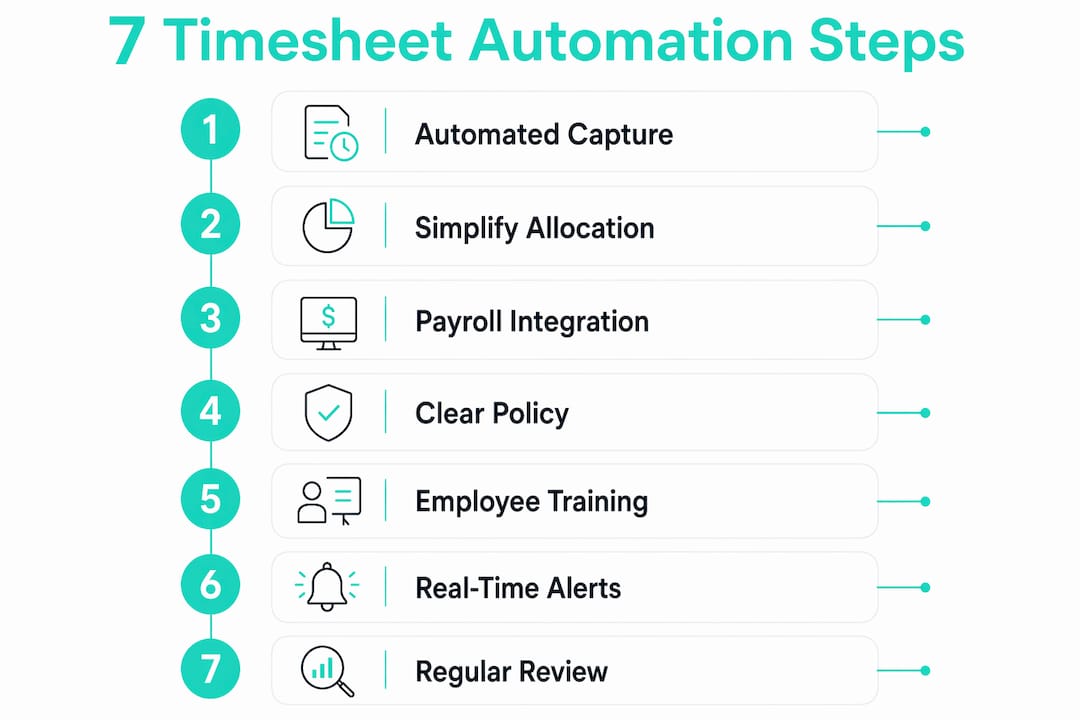
1. Switch to automated time capture software
The single highest-impact move is replacing manual entry with a system where the clock event is the timesheet entry. Employees clock in on a mobile device or shared kiosk, and the system records the exact time automatically. No one types anything in.

Look for software that handles overtime calculations, break tracking, and payroll exports without requiring manual configuration each pay period. For small businesses in restaurants, construction, or retail, GPS geofencing adds a layer of accountability by confirming employees are on-site when they clock in.
Pro Tip: When evaluating time tracking software, test the payroll export before you commit. A system that produces a clean, formatted file your payroll processor can import directly is worth far more than one that requires manual cleanup after export.
2. Simplify how employees allocate time
Complex time allocation rules are one of the biggest reasons employees skip or fudge entries. If logging time requires choosing from 40 project codes or navigating a multi-step form, people will find shortcuts, and those shortcuts become payroll errors.
Reduce the number of categories employees need to select. For most small businesses, three to five time categories cover 90% of actual work. Build the rest into the system as defaults or manager-assigned rules, so employees are not making judgment calls at the clock.
3. Connect time tracking directly to payroll
A time tracking system that does not talk to your payroll software is still half-manual. Someone still has to export, format, and import the data, and that handoff is where errors creep back in.
Direct integration between your time tracking and payroll systems means hours flow from clock-out to payroll calculation without anyone touching the data. Most modern payroll platforms accept direct imports from time tracking software, so this is usually a one-time setup rather than ongoing work. The payoff is immediate: payroll shifts from data collection to a review process, which is a fundamentally different and faster job.
4. Build and enforce a clear timesheet policy
Automation handles the mechanics, but policy handles the edge cases. What happens when an employee forgets to clock out? Who approves corrections? What is the submission deadline before payroll runs?
Write these answers down and share them with every employee before you go live with new software. A one-page policy document covers most scenarios and gives managers a consistent reference point when disputes arise. Accurate timesheets reduce workplace disputes precisely because everyone is working from the same rules.
5. Train employees with the right framing
Employee resistance to automation drops significantly when the rollout is framed around accurate pay and less logging burden, not surveillance. The employees who push back hardest are usually the ones who have been burned by payroll errors in the past. Show them that the new system gives them real-time visibility into their own hours, and most of that resistance disappears.
Keep training short and hands-on. A 15-minute walkthrough on the first day, with a reference card for the first week, is enough for most frontline teams. Involve a few employees in the pilot phase so they become internal advocates before the full rollout.
6. Use real-time visibility to prevent overtime before it happens
One of the clearest advantages of automated tracking is that managers can see hours accumulating during the week, not after the pay period closes. A manager who sees on Wednesday that two employees are already at 32 hours can adjust Thursday scheduling before overtime is triggered.

Automated systems provide this real-time visibility as a standard feature, not an add-on. Manual processes make proactive overtime management nearly impossible because the data does not exist until someone compiles it, which usually happens after the fact.
7. Review and improve the system on a regular schedule
No time tracking setup is perfect on day one. Schedule a monthly review for the first quarter after launch to catch patterns: which employees consistently have flagged exceptions, which managers are slow to approve corrections, and whether the payroll export is landing cleanly every cycle.
After the first quarter, a quarterly review is usually enough. The goal is to catch process gaps before they calcify into habits. Redeploying HR staff from manual corrections to analysis creates capacity that most small businesses did not know they had. Use that capacity to actually improve the system rather than just maintain it.
What your business actually gains by going automated
The ROI from dropping manual timesheet processes tends to show up faster than most managers expect. Most organizations see payback shortly after deployment, with the fastest returns coming from billing leakage recovery and time theft reduction, both of which improve the moment accurate tracking goes live.
For businesses with billable hours, the numbers are striking. Billing leakage typically runs at a modest percentage of billable hours, and automation recovers a significant portion of that leakage. A consulting firm or contractor with 20 billable employees can recover a meaningful chunk of annual revenue simply by capturing hours accurately.
Beyond the financial return, the operational shift is just as valuable. GPS and biometric verification prevent buddy punching and inflated hours, which are common in manual systems and nearly impossible to catch without automated verification. Managers stop spending the last two days of every pay period in recovery mode and start spending that time on actual management.
The compliance benefit compounds over time. Every automated clock event creates a timestamped, auditable record. When a labor audit happens or an employee disputes their hours, the record is retrievable in seconds. Manual systems require that documentation to be reconstructed, which is both expensive and unreliable.
The role shift that matters most: automation moves HR from data collection to exception management. Instead of reviewing every timesheet, HR reviews only the flagged ones. That change alone can substantially cut manager review time.
For small businesses thinking about the benefits of digital timesheets, the practical case is not complicated. Less time on admin, fewer payroll errors, and a defensible audit trail are outcomes that pay for themselves quickly.
Why Kloqk works for small US businesses
Kloqk is built specifically for the kind of small business where the owner or a single HR person is also the payroll processor, the scheduler, and the person chasing down missing clock-outs. The system turns clock-ins into payroll-ready timesheets automatically, with no manual compilation required.
What sets Kloqk apart from most time tracking options is the price point: zero. The features that other platforms charge for as upgrades are included at no cost.
- Photo verification at clock-in confirms identity without requiring biometric hardware
- GPS geofencing prevents time fraud by restricting clock-ins to approved locations
- Automatic overtime calculations apply federal and state rules without manual configuration
- Break tracking records meal and rest periods in compliance with labor law requirements
- Payroll exports produce clean, formatted files ready for direct import into your payroll system
For restaurants, construction crews, and retail teams managing hourly workers across one or more locations, Kloqk handles the compliance layer that manual systems leave exposed. Federal overtime rules, state-specific break requirements, and multi-location hour aggregation are built into the framework rather than bolted on as optional modules.
Pro Tip: Use Kloqk’s GPS geofencing feature to set location boundaries for each job site or store location. Employees can only clock in when they are physically within the boundary, which eliminates the most common form of time theft in hourly workforces without requiring any confrontation from managers.
The time management benefits for small businesses go beyond payroll accuracy. When managers stop spending hours on timesheet administration, that time goes back into the business. For a small operation, that is not a marginal improvement; it is a meaningful shift in how the owner or manager spends their week.
Kloqk gives you payroll-ready hours at no cost
If you have been running payroll on spreadsheets, paper logs, or a patchwork of text messages and app screenshots, the gap between where you are and where you could be is smaller than it looks.

Kloqk is free time tracking software built for small US businesses that need accurate hours without the administrative overhead. Clock-ins with photo verification, GPS geofencing to keep time records honest, automatic overtime and break calculations, and clean payroll exports ready to go every pay period. No subscription fee. No per-seat charge. No features locked behind a paid tier.
The businesses that get the most out of Kloqk are the ones that have been absorbing the cost of manual tracking without realizing it: the restaurant manager spending Sunday afternoon reconciling the week’s punches, the construction foreman texting hours to the office, the retail HR coordinator manually calculating overtime for 15 part-time employees. Kloqk handles all of that automatically.
Start tracking time for free and have your first payroll-ready export ready before your next pay period closes.
Key Takeaways
Automating timesheet management is the fastest way to cut payroll errors, recover lost hours, and free your team from administrative work that adds no value to the business.
| Point | Details |
|---|---|
| Manual tracking costs real money | Time theft and errors cost employers 1.5, 5% of gross payroll every year. |
| Automation pays back fast | Most businesses see payback within 2, 4 weeks of switching to automated tracking. |
| Billing leakage is recoverable | Automation recovers a significant portion of billing leakage typically lost to inaccurate timesheets. |
| Manager time drops sharply | Automation substantially cuts manager review time, freeing hours for real work. |
| Kloqk covers it all at no cost | Kloqk provides photo verification, GPS geofencing, overtime calculations, and payroll exports free for small US businesses. |
Recommended
Sources
Every figure on this page traces to one of these. Primary law and government sources are listed first.
Written by
Marcus ReyesPayroll & Timekeeping Specialist
Marcus covers payroll accuracy, timesheets, and time tracking, the unglamorous mechanics that keep paychecks correct and audits painless.
Keep Reading
Track Hours the Easy Way
Kloqk is a free time clock that handles punches, breaks, overtime, and payroll-ready reports.
Start free