Why Late Punch-Outs Inflate Labor Costs for Hourly Teams

Late punch-outs add paid minutes that compound across shifts and employees, quietly inflating your payroll before you ever notice the pattern. Three things you can do right now:
- Set a written end-of-shift rule that defines when the clock stops and what happens when an employee forgets to punch out.
- Enable an auto-timeout or scheduled punch-out in your time-tracking system so the clock stops itself if an employee walks away without clocking out.
- Pull one week of timecards and flag every shift where paid time ran more than three minutes past the scheduled end.
Even a small number of extra paid minutes per shift, multiplied across a team of several employees working multiple days a week, adds up to a significant number of unplanned paid hours annually. That is real money, and it is recoverable.
Table of Contents
- Why late punch-outs inflate labor costs minute by minute
- Why employees punch out late, common root causes
- How to calculate the cost: simple worked examples
- How to detect late punch-out problems and the metrics to track
- Practical fixes: policies and technology that stop late punch-outs
- How Kloqk addresses late punch-outs directly
- Rollout checklist and timeline to fix late punch-outs
- What FLSA ‘de minimis’ rounding actually allows, and what it doesn’t
- Key Takeaways
- The part most managers underestimate
- Kloqk stops late punch-outs before they hit your payroll
- Useful sources and references
Why late punch-outs inflate labor costs minute by minute
Payroll systems don’t round in your favor by default. Many platforms apply a rounding rule, typically to the nearest quarter-hour, which means a 3:03 PM punch-out on a 3:00 PM shift end gets rounded to 3:15 PM. That employee just earned 15 paid minutes for three minutes of actual work.
The mechanics look like this:
- An employee’s shift ends at 3:00 PM.
- They punch out at 3:03 PM.
- The system rounds up to 3:15 PM.
- That’s 12 extra paid minutes per occurrence.
- Across 20 shifts per month, that’s 240 extra paid minutes, or 4 hours.
- At $15/hour, that’s $60 per employee per month, $720 per year, from one person’s 3-minute habit.
Now multiply that across a team of eight. You’re looking at nearly $5,800 in annual payroll waste from a rounding rule and a forgetful habit.
The overtime risk is worse. If an employee is already at 39.5 hours for the week and punches out 30 minutes late on Friday, that late punch-out triggers an overtime hour at 1.5× their regular rate. A single late punch-out can cost you $22.50 instead of $15 for that final hour, and it happens without any manager approving extra time.
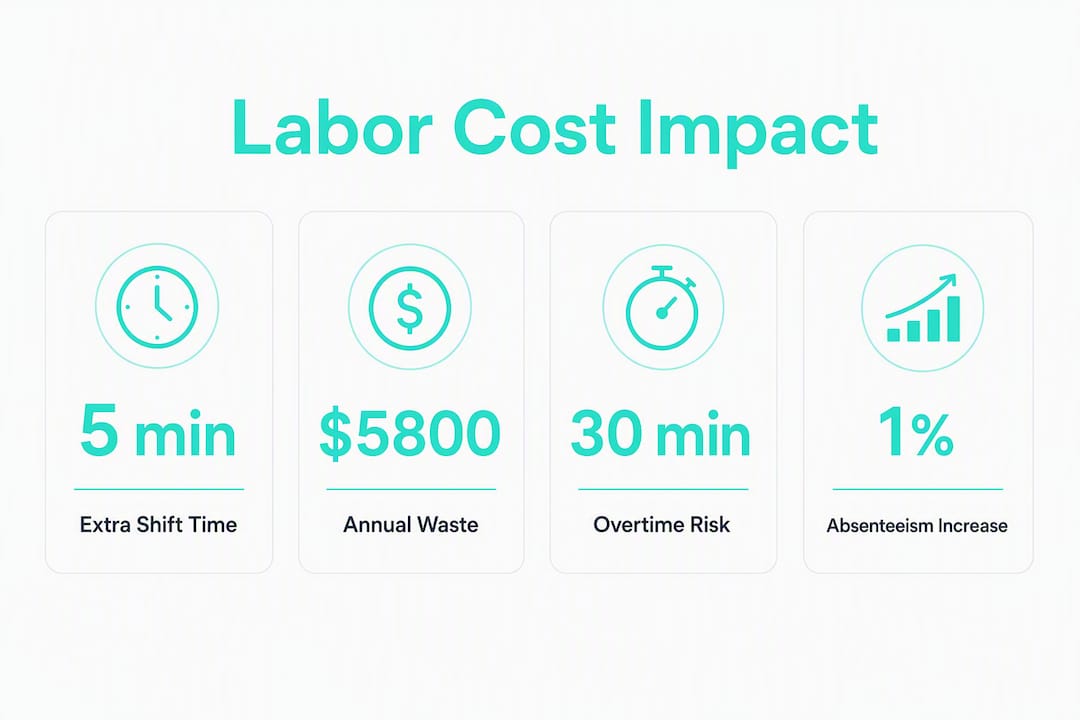
Harvard Business School’s analysis of 25 million timecards found that a 1% increase in lateness and absenteeism was associated with a 2.3% decline in daily sales, with contagion effects spreading across teams. The payroll cost is only part of the damage.
Pro Tip: Check your payroll platform’s rounding settings before assuming it rounds neutrally. Many systems default to rounding up at the half-minute mark, which consistently favors the employee. Switching to a strict schedule-based punch-out rule eliminates rounding exposure entirely.
Why employees punch out late, common root causes
Not every late punch-out is intentional, and the fix depends on which type you’re dealing with.
- Forgetfulness. The most common cause. An employee finishes their task, gets distracted by a coworker or a customer, and walks out without clocking out. This is accidental and usually random.
- Managerial culture. In some workplaces, employees feel pressure to stay past their shift to show commitment. They clock out late because leaving on time feels like leaving early.
- Intentional rounding. Some employees know the rounding window and exploit it, punching out at 3:07 PM knowing the system will round to 3:15 PM. This is deliberate and repeatable.
- Slow or complicated kiosk flows. If the clock-out process takes 45 seconds of tapping through screens, employees skip it when they’re in a hurry. The friction itself causes the problem.
- Grace period misunderstandings. If your policy says there’s a “5-minute grace period,” some employees read that as permission to punch out 5 minutes late every single shift.
- Shift overlap policies. When one shift hands off to another, the outgoing employee may stay logged in while helping the incoming employee get started, adding paid minutes to both records.
The difference between accidental and intentional patterns is visible in your data. Accidental late punch-outs are scattered across different employees and different days. Intentional ones cluster: the same employee, consistently punching out at 3:06 or 3:07 PM, on every shift, every week. That pattern is a signal, not a coincidence.

How to calculate the cost: simple worked examples
The formula is straightforward:
Extra paid minutes per shift × hourly rate ÷ 60 × shifts per period × employees affected = payroll waste
| Input | Low-impact example | High-impact example |
|---|---|---|
| Extra paid minutes per shift | 5 minutes | 12 minutes (rounding to next quarter-hour) |
| Hourly pay rate | $15/hour | |
| Shifts per month per employee | 20 | 22 |
| Employees affected | 4 | 15 |
| Annual payroll waste | $14,256 |
The low-impact example is a small café with four part-time employees each clocking out five minutes late. The high-impact example is a multi-location retail operation where 15 employees consistently hit the rounding threshold. Neither manager is aware the problem exists because no single timecard looks alarming.
The real cost of manual time processes compounds this further: when managers spend time manually correcting timecards instead of catching patterns early, the administrative overhead adds to the direct payroll loss.
Scale check: In the high-impact scenario above, $14,256 per year is the equivalent of roughly 792 paid hours that no manager approved and no work required.
How to detect late punch-out problems and the metrics to track
Start with a one-week timecard audit before you change anything. You need a baseline.
Audit checklist:
- Pull every timecard from the past two weeks and sort by punch-out time relative to scheduled shift end.
- Flag any punch-out that occurs more than three minutes after the scheduled end.
- Group flagged records by employee, shift, and role to find clusters.
- Check whether flagged punch-outs correlate with specific days (Friday afternoons, weekend closings) or specific supervisors.
- Look for rounding patterns: punch-outs that consistently land just inside a rounding window (e.g., always at 3:06-3:08 PM on a 3:00 PM shift end).
Metrics to monitor on an ongoing basis:
| Metric | Definition | Alert threshold |
|---|---|---|
| Paid minutes per shift | Total paid minutes divided by scheduled shift length | >3 minutes above scheduled end on average |
| Rounding-up frequency | Percentage of shifts where punch-out triggered a rounding-up event | >15% of shifts in a week |
| Late-punch overtime triggers | Shifts where a late punch-out pushed hours into overtime territory | Any occurrence, review immediately |
| Department-level paid-minute drift | Average paid minutes per shift by department, week over week | >20% increase from prior 4-week average |
Two alert rules worth setting in your time-tracking system: flag any employee who exceeds three paid minutes beyond their scheduled end on more than three shifts per week, and flag any department whose average paid minutes per shift increases by more than 20% compared to the prior four-week average. Both rules catch problems before they become expensive habits.
Practical fixes: policies and technology that stop late punch-outs
Start with policy because it costs nothing and sets the expectation. Then layer in technology to enforce it without relying on manager attention every shift.
Priority order:
- Write a clear end-of-shift rule. State exactly when the clock stops, what counts as an authorized late punch-out, and what the correction process is. A missed punch policy template gives you a starting point for the correction workflow.
- Set a scheduled auto-timeout. Configure your time-tracking system to automatically clock out employees at a set time after their scheduled shift ends. Most platforms allow a configurable buffer (e.g., 10 minutes after scheduled end).
- Add photo verification at clock-out. Requiring a photo at punch-out creates accountability without confrontation. Employees know the record is timestamped and verified.
- Use geofencing for off-site or mobile teams. A GPS boundary prevents employees from clocking out from locations they shouldn’t be, which catches both late punches and location fraud at the same time.
- Simplify the clock-out flow. If your kiosk or app takes more than two taps to clock out, employees will skip it. Friction is the enemy of compliance.
Pairing policy with technology is what makes the change stick. A rule without enforcement relies on manager vigilance every shift. Technology without a clear policy creates confusion about what’s expected. Together, they close the gap.
One vendor case found that enforcing punch rules with immediate system feedback cut early punch-ins by more than 50% in the first payroll cycle, without damaging employee satisfaction, because the messaging was transparent and the rules were applied consistently.

Pro Tip: When you roll out new punch-out rules, frame it as a fairness measure, not a surveillance upgrade. “We want everyone paid accurately for the time they actually work” lands better than “we’re cracking down on late clock-outs.” The outcome is the same; the morale impact is not.
How Kloqk addresses late punch-outs directly
Purpose-built time-tracking tools close the gap between policy and enforcement. Kloqk maps directly to the problems outlined above.
Features that address late punch-outs:
- Auto-timeout controls: Kloqk can be configured to stop the clock automatically, removing the dependency on employee action at shift end.
- Photo verification at clock-out: Every punch is tied to a timestamped photo, making intentional rounding harder to sustain without a visible record.
- GPS geofencing: The GPS time clock with geofencing restricts punch-outs to approved locations, which is critical for field teams and multi-site operations.
- Payroll-ready exports: Accurate punch data flows directly to payroll without manual entry, which eliminates the transcription errors that often hide late-punch patterns.
- Rounding rule configuration: Managers can set rounding rules that align with their documented policy, rather than accepting platform defaults that may not match their FLSA obligations.
| Problem | Kloqk feature | Expected effect |
|---|---|---|
| Employee forgets to punch out | Auto-timeout / scheduled punch-out | Clock stops at configured time; no manual correction needed |
| Intentional rounding exploitation | Photo verification + rounding rules | Timestamped record makes pattern visible; rounding aligned to policy |
| Off-site employees clocking out remotely | GPS geofencing | Punch-out only accepted within approved boundary |
| Late punch triggers overtime | Real-time hour alerts | Manager notified before overtime threshold is crossed |
| Manual timecard corrections waste time | Payroll-ready exports | Accurate hours flow directly to payroll, cutting correction time |
Kloqk’s free tier includes the core time clock, overtime calculations, and payroll exports. Photo verification and GPS geofencing are available without an upfront cost, which means a small business can pilot the controls that matter most before committing to a paid plan.
Rollout checklist and timeline to fix late punch-outs
| Phase | Timeline | Actions |
|---|---|---|
| Baseline audit | Week 1 | Pull two weeks of timecards; calculate paid-minute drift; identify top offenders by employee and department |
| Policy update | Week 1-2 | Draft and distribute end-of-shift rule; define correction process for missed punches |
| Tech pilot | Weeks 2-4 | Enable auto-timeout and photo verification for one location or one shift group |
| Staff training | Week 3 | Hold a 10-minute team meeting; distribute one-page policy summary |
| Full rollout | Days 30-60 | Expand controls to all locations and shifts; set alert thresholds in your system |
| Ongoing monitoring | Day 60+ | Review paid-minute metrics weekly at first; adjust alert thresholds as needed |
Ordered steps:
- Complete the baseline audit before touching any settings.
- Update the written policy and get manager sign-off.
- Configure auto-timeout and photo verification in your time-tracking system.
- Run a two-week pilot with one team or location.
- Train all staff using the script below.
- Roll out to all locations and set ongoing alert rules.
Trainer script bullets for the staff conversation:
- “Starting [date], the time clock will automatically stop at [X] minutes after your scheduled shift end.”
- “If you need to stay past your shift for any reason, your manager will approve it in advance.”
- “If you forget to clock out, use the missed-punch correction form and your manager will review it within 24 hours.”
- “This applies to everyone equally, and it means your pay will always reflect your actual hours.”
A cloud-based time and attendance system makes the rollout faster because there’s no hardware to install at every location and managers can adjust settings remotely.
What FLSA ‘de minimis’ rounding actually allows, and what it doesn’t
The Fair Labor Standards Act includes a “de minimis” doctrine that allows employers to disregard insignificant amounts of working time in narrow circumstances. The DOL’s FLSA Hours Worked Advisor is explicit: employers cannot arbitrarily fail to count hours that can be practically recorded. If your time-tracking system captures the punch, that time is on the record and should be paid.
The de minimis rule is not a license to round away paid minutes as a cost-control strategy. Routine rounding-up, or consistently ignoring minutes that your system already recorded, is a compliance risk that can trigger back-pay claims and penalties.
Key compliance points:
- Rounding arrangements are only acceptable under FLSA when they average out over time and don’t systematically favor the employer. A rounding rule that always rounds up for employees is fine; one that always rounds down is not.
- State wage laws often impose stricter standards than federal FLSA. California, for example, has limited the use of rounding in ways that federal law does not.
- Document every exception. If you adjust a timecard, record why, who approved it, and what the corrected time is. Undocumented adjustments are the fastest path to a wage dispute.
Kloqk’s guide to FLSA time rounding rules walks through what’s permissible and how to configure rounding in a way that holds up to scrutiny.
This article provides general information about labor cost management and FLSA guidance. It is not legal advice. Confirm current rules with the Department of Labor or a qualified employment attorney for your specific situation.
Key Takeaways
Late punch-outs inflate labor costs through compounding paid minutes, rounding-up events, and unplanned overtime that no manager explicitly approved.
| Point | Details |
|---|---|
| Minutes compound fast | Five extra paid minutes per shift across ten employees adds over 43 unplanned hours annually. |
| Rounding rules amplify the damage | A 3-minute late punch-out can become 15 paid minutes under a quarter-hour rounding rule. |
| Detection comes before fixing | A one-week timecard audit and paid-minute-per-shift metric reveal the pattern before it scales. |
| Policy plus tech is the durable fix | Auto-timeout and photo verification enforce rules without requiring manager attention every shift. |
| Kloqk covers the core controls for free | Auto-timeout, photo verification, GPS geofencing, and payroll exports are available on Kloqk’s free tier. |
The part most managers underestimate
The payroll math on late punch-outs is easy to follow once you see it. What’s harder to see is that the problem is almost never about one employee being dishonest. It’s about a system that makes the wrong behavior easier than the right one.
When clocking out requires three steps on a slow kiosk, employees skip it. When the rounding window is 7 minutes and everyone knows it, some employees will use every minute of it. When no one checks the timecards until payroll runs, the pattern has already repeated 20 times. The fix isn’t stricter management. It’s removing the friction that makes late punch-outs the path of least resistance, and replacing it with a system where the accurate punch-out is the easiest thing to do.
Small businesses feel this more acutely than large ones. A restaurant with 12 hourly employees doesn’t have a payroll analyst catching drift in the weekly numbers. The owner is also the scheduler, the trainer, and sometimes the line cook. That’s exactly why the controls need to be automatic, not manual.
Kloqk stops late punch-outs before they hit your payroll
If you’ve run the math above and recognized your own team in those numbers, the next step is straightforward. Kloqk’s free employee time tracking gives small businesses the controls that actually prevent late punch-outs: auto-timeout, photo verification at clock-out, GPS geofencing for field and multi-site teams, and payroll-ready exports that eliminate manual timecard corrections.

There’s no per-seat fee on the free tier, which means you can run the pilot described in the rollout checklist above at zero cost. Set the auto-timeout, run it for two weeks, and compare your paid-minute metrics before and after. The difference shows up in the next payroll run. For teams that need scheduling, PTO tracking, or deeper integrations, paid plans are available, but the controls that stop late punch-outs don’t require an upgrade to work.
Start your free account at kloqk.com and have auto-timeout configured before your next shift.
Useful sources and references
- FLSA Hours Worked Advisor U.S. Department of Labor: The primary federal reference for de minimis rounding and what hours must be counted and paid.
- How One Late Employee Can Hurt Your Business Harvard Business School Working Knowledge: Analysis of 25 million timecards showing the sales and contagion effects of lateness.
- FLSA Time Rounding Rules: What Employers Must Know Kloqk: Practical guide to configuring rounding in compliance with federal standards.
- Missed Punch Policy: How to Handle Forgotten Clock-Ins Kloqk: Policy templates and correction workflows for missed and late punch-outs.
- Why Accurate Hours Matter for Payroll Kloqk: Explains how accurate timekeeping reduces payroll errors and administrative overhead for small employers.
Recommended
Sources
Every figure on this page traces to one of these. Primary law and government sources are listed first.
- 1. U.S. Department of Laborprimary
- 2. library.hbs.edu
- 3. onsiteai.ai
Written by
Marcus ReyesPayroll & Timekeeping Specialist
Marcus covers payroll accuracy, timesheets, and time tracking, the unglamorous mechanics that keep paychecks correct and audits painless.
Keep Reading
Track Hours the Easy Way
Kloqk is a free time clock that handles punches, breaks, overtime, and payroll-ready reports.
Start free