Careers Page: How Small Businesses Get More Applicants
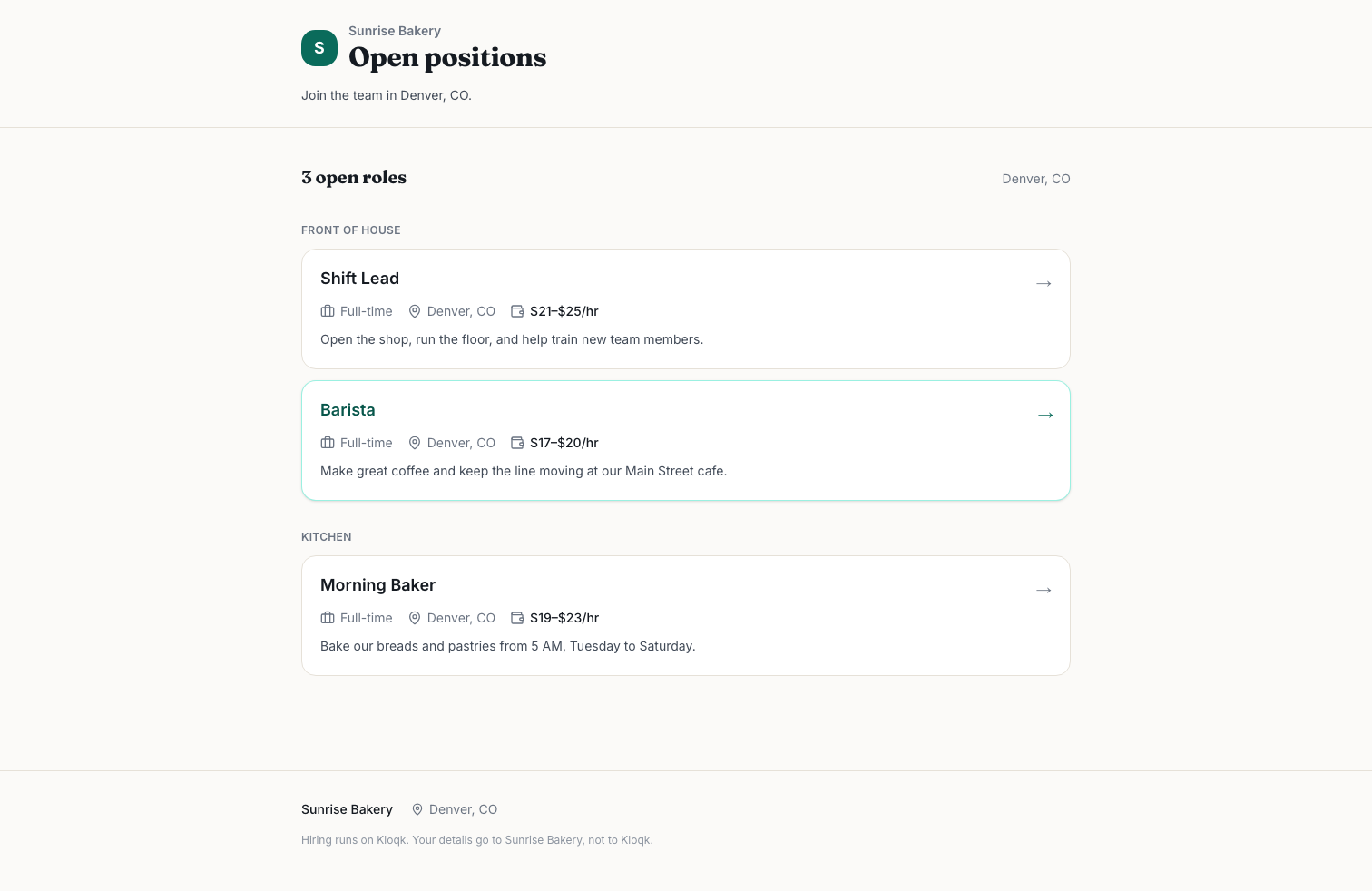
A careers page is the page on your own website that lists every open role, what it pays, where it is and how to apply. For a small business it's the one place job seekers can check you out on your terms, and it's where every job board listing should point back to.
Kloqk gives every business a free careers page in its own colors and logo, tied to an applicant pipeline, so this article also shows how that setup works. Most of it applies whatever tool you use.
If you hire hourly staff, people will look you up before they apply, often on a phone, often from a link a friend texted them. If all they find is a stale Indeed listing, you lose some of them. A plain company careers page with three honest job postings, pay ranges and a short application form fixes that.
TL;DR
- A careers page is your hiring home base. Job boards rent you attention; the careers site is the address you own and link everywhere.
- Every job posting needs a title, pay range, schedule, location, a short job description, benefits, how to apply and an equal opportunity employer line.
- Pay transparency laws now require a pay range in job postings in several states. California, Washington and Illinois set the line at 15 employees; New York at 4. Colorado requires the pay range for openings too.
- Keep the application form short. Name, contact, availability and two or three screening questions are enough for most hourly hiring.
- Build it to work on a phone and in the languages your applicants read. Spanish job posting support matters in a lot of hourly workplaces.
- You can build one free. Kloqk's careers page builder uses your logo and colors, offers job templates, lets you choose the application questions, posts in 8 languages and hires an applicant in one step.
What is a careers page, and why not just post on job boards?
A career page (people search both spellings) is a page on your domain, or on a web address your hiring software gives you, that holds all your open jobs in one list. Each job opens into its own posting with an apply button.
Job boards are still worth using. Indeed, local Facebook groups and free job posting sites for employers bring volume you won't get on day one from your own site. But a job board listing has problems a careers page doesn't:
- It expires. Free job posting slots get buried in days. Your careers page stays up as long as the role is open.
- It isn't yours. The board decides the layout, shows competitors' ads next to your job and may change its free tier whenever it wants.
- It splits your applicants. Three boards means three inboxes. If every listing links to one application form, every applicant lands in one place.
- It says nothing about you. A job board shows the job. A careers page can show the team, the shifts, the pay and why someone would stay a second year. That's your employer brand, even if you've never used the phrase.
The best setup for small business hiring is both: post on the boards, and have every post send people to your own careers page to apply.
What should a careers page include?
Two layers. The careers page itself (the list), and each job posting (the detail). Here's what goes on each.
On the main careers page
- Your logo, name and two or three sentences on what the business does and where.
- The list of open roles, each showing title, location, full or part time, and pay range.
- A short "what it's like to work here" section. Real details beat adjectives: "We close at 9 p.m., so nobody works past 9:30" is worth more than "fast-paced, fun team."
- Your benefits, stated plainly. If you offer paid sick time, a shift meal, a uniform allowance or flexible scheduling, list it.
- An equal opportunity statement (more on that below).
- What happens after someone applies, and roughly how fast you reply.
On each job posting
- Job title people actually search ("Line Cook," not "Culinary Associate II").
- Pay range or fixed rate, hourly or salary.
- Schedule: typical shifts, days, weekends, whether hours vary week to week.
- Location, and whether the job moves between sites.
- A job description: 4 to 8 bullets of what the person does, and the few requirements that are real (a driver's license for a delivery job, lifting 50 pounds for a stocking job).
- Benefits for this specific role, if they differ by role.
- How to apply, with the button above the fold on a phone.
A job description template saves time here. Write one good posting for each role you hire repeatedly (cashier, server, warehouse associate) and reuse it every time the role opens, updating the pay and schedule.
Which states require a pay range in job postings?
A growing number. Pay transparency rules differ by state, so check the official source for each state where the job is located. These are the ones we checked on the state's own site:
| State | Who's covered | What the job posting must show | Source |
|---|---|---|---|
| California | Employers with 15 or more employees | The pay scale: a good faith estimate of the salary or hourly wage range the employer reasonably expects to pay on hire. Any applicant can also ask for it. | Labor Code 432.3 |
| Washington | Employers with 15 or more employees | The wage scale or salary range (or the fixed wage if only one rate is offered), plus a general description of all benefits and other compensation | RCW 49.58.110 |
| Illinois | Employers with 15 or more employees, since January 1, 2025 | The position's compensation and benefits, in internal and external postings | Illinois Department of Labor |
| New York | Businesses with 4 or more employees | A job description and the compensation range (minimum and maximum annual salary or hourly rate), and a note if the job is commission based | NY Department of Labor |
| Colorado | Employers (Equal Pay for Equal Work Act) | Job openings must be announced with the pay range | SB19-085 |
A few things worth knowing from those pages. Washington's law gives employers a five business day window to fix a posting after notice, but only through July 27, 2027. California's section was most recently amended with changes effective January 1, 2026, so if you set up your postings a few years ago, reread it. And New York's 4-employee line means plenty of small shops are covered.
Even if your state has no rule, put the salary range in the job posting anyway. Hourly applicants skip listings without pay because they've learned "competitive pay" usually means the minimum. A range like "$17 to $19 an hour, based on experience" gets more of the right people applying, and fewer interviews that end when the number comes up.
This table isn't legal advice, laws change, and some cities add their own rules. Check the source links before you publish.
What is an equal opportunity employer statement, and do you need one?
An EEO statement is a sentence or two saying you hire without regard to race, color, religion, sex, national origin, age, disability or other protected traits. It isn't a legal requirement for every small business, but it's a good habit: it costs nothing, applicants notice it, and it reminds whoever screens applications what the rules are.
A plain version works fine: "We're an equal opportunity employer. We don't discriminate based on race, color, religion, sex, sexual orientation, gender identity, national origin, age, disability, veteran status or any other status protected by law." Put it at the bottom of the careers page and each job posting. If you'd make accommodations during the hiring process (a phone interview instead of in person, help filling out the form), say how to ask.
How do you make an accessible careers page?
The web standard is WCAG. The W3C describes it as the international standard for making web content accessible to people with disabilities, organized around four principles: perceivable, operable, understandable and robust. The current version is WCAG 2.2. You don't need to read all of it to get the basics right on an accessible careers page:
- Use real text, not an image of a flyer. Screen readers can't read a JPEG of your "Now Hiring" poster, and neither can Google.
- Keep contrast high. Light gray text on white fails a lot of readers, including anyone on a phone in sunlight.
- Label every field in the application form. "Phone number" above the box, not just as placeholder text that disappears when you tap.
- Make the apply button a real button with a clear label ("Apply for Line Cook"), big enough to tap. Don't put a time limit on the form.
- Write plainly. Short sentences help people reading in a second language as much as anyone else.
Careers page design: what do good careers page examples have in common?
Look at the careers site of any large retailer or restaurant chain and you'll see the same structure, because it works. Careers page examples that convert tend to follow these patterns:
- Jobs first. The list of openings is on the first screen, or one tap away. Nobody came to read a mission statement.
- Pay on the list. The best careers page design shows the pay range on the listing card, not buried in the posting.
- One apply path. One button, one application form, no account creation.
- Real photos, if any. Your actual kitchen beats stock photos.
- Consistent branding. Same logo, same colors as your main site, so applicants know they're in the right place.
For a small business careers page the bar is lower than people think: your logo, three jobs with pay, and a two minute form.
How do you get applicants on mobile and in other languages?
Assume your applicants are on a phone. Open your careers page on your own phone and apply to one of your jobs. If you have to zoom, scroll sideways, or type a cover letter with your thumbs, so do your applicants, and a lot of them stop.
A mobile application should load fast, show the apply button early and take a couple of minutes. No PDF job descriptions, no "download our application and email it back."
Language is the other half. If your current team speaks Spanish, so do a lot of your next hires. A Spanish job posting written properly (not run through a translator and left alone) reaches people your English listing never will. The same goes for any community you hire from. A multilingual job posting also cuts confusion later: people know what the job is before they show up.
Seasonal hiring makes this more urgent. When you need 10 people in three weeks, you can't afford a form that loses half of them.
How short should a job application form be?
Short. For hiring hourly workers, every extra question costs you applicants, and most of what a long form asks you'll cover in a 15 minute interview anyway. A good default:
- Name, phone and email
- Which role (prefilled if they came from the posting)
- Availability: days and shifts they can work
- Earliest start date
- Two or three screening questions that rule people in or out ("Are you 18 or older?" for a job that requires it, "Do you have reliable transport for a 6 a.m. start?")
- Resume upload, optional
Leave out things you shouldn't ask before an offer, like date of birth, marital status or salary history (Illinois, for one, bans salary history questions; its Department of Labor page linked above covers it). Keep application questions about the job.
Candidate experience after the form matters as much. Reply to every applicant, even with a short no. If you're interested, offer two interview times in the first message. Interview scheduling by text gets faster answers than email for most hourly roles.
Should your careers page show up in Google for Jobs?
It helps. Google shows job listings in a special search box when a posting has job posting schema (structured data). Google's job posting documentation lists the required properties as datePosted, description, hiringOrganization, jobLocation and title, with baseSalary and directApply recommended. It also says the structured data has to sit on the page with the job description that job seekers can read, not on a page that only lists jobs. So each job needs its own page, not a single PDF.
Careers page checklist
| Item | Why it matters | Done? |
|---|---|---|
| Logo, colors and a 2 to 3 sentence intro | Applicants know it's really you | ☐ |
| Every open role listed, with title, location and type | Job seekers find the right job fast | ☐ |
| Pay range on every job posting | Required in several states; more applicants everywhere | ☐ |
| Schedule and shifts described | Fewer no-shows from people who can't work the hours | ☐ |
| Benefits listed plainly | Required in Washington and Illinois postings; helps everywhere | ☐ |
| Short job description per role | Required in New York; sets expectations | ☐ |
| EEO statement | Shows the rules you hire by | ☐ |
| Application form under 3 minutes on a phone | Fewer dropouts | ☐ |
| Labeled fields, high contrast, real text | Accessibility basics | ☐ |
| Postings in the languages your applicants read | Reaches people English-only listings miss | ☐ |
| One page per job | Needed for Google for Jobs | ☐ |
| Every job board listing links back to it | All applicants land in one place | ☐ |
How to build a free careers page with Kloqk
Kloqk is a free time clock and HR app for small businesses, and hiring is part of it. The careers page and the applicant tracking system behind it are free, along with scheduling, time off and documents. Here's how the setup goes:
- Create your account. Sign up and add your business. Your careers page lives on your business's own Kloqk web address.
- Brand it. Add your logo and colors, so the careers page matches the rest of your business.
- Post a job from a template. Kloqk has job templates to start from. Edit the job description, pay range and schedule for your role.
- Choose the application questions. Pick what the application asks, so you can keep it short and add the screening questions that matter for that job.
- Pick the language. Post the job in English, Spanish, French, German, Italian, Dutch, Portuguese or Greek.
- Share the link. Put the careers page link on your job board posts, your website, your Google Business Profile and the sign in your window.
- Work the pipeline. Applicants land in an applicant pipeline (hiring is four tabs), so you can see who's new and who's moving forward.
- Hire in one step. When you hire an applicant, Kloqk creates the employee. No retyping their name and contact details into a second system.
That last step is where a free applicant tracking system for small business tied to your time clock pays off. The new hire already exists in Kloqk, so you can put them on the schedule and they can start punching in on the time clock kiosk with a 4-digit PIN on their first shift. If you want the background on how applicant tracking works in general, read what an ATS is.
On price: the core time clock is free for unlimited employees at one location, and hiring and the careers page are free too. Paid plans are $29 or $59 per location per month if you want more; the pricing page has the details.
What Kloqk doesn't do: it isn't a job board, so you'll still post on Indeed or wherever your applicants look, and link those listings to your careers page. It also doesn't write your pay ranges for you. You decide the numbers; the posting just shows them.
How do you get your first applicants from a new careers page?
A careers page doesn't create traffic by itself. Point things at it:
- Post the role on one or two job boards and put your careers page link in the description.
- Add a "We're hiring" link to your website and a QR code by the register.
- Ask your current staff to share the link.
If a posting gets clicks and no applications, check the pay, the schedule and the length of the form, in that order.
Frequently Asked Questions
What is a careers page?
A careers page is the page on your own website (or your hiring software's web address) that lists every open job with its pay, location, schedule and an apply button. Job board listings should link back to it so every applicant lands in one place.
Do I have to put a pay range in my job postings?
Depends on the state where the job is. California, Washington and Illinois require it from employers with 15 or more employees, New York from businesses with 4 or more, and Colorado requires the pay range for job openings. Check your state's labor department for current rules.
How long should a job application form be?
For hourly roles, short enough to finish on a phone in two or three minutes: name, contact details, availability, start date and two or three screening questions. Make the resume optional.
Can I make a careers page for free?
Yes. Kloqk includes a free careers page in your logo and colors on your business's Kloqk web address, with job templates, your choice of application questions, postings in 8 languages and an applicant pipeline. Hiring an applicant creates the employee in one step.
Do I still need job boards if I have a careers page?
Usually yes. Job boards such as Indeed bring volume a new careers page won't have on day one. Post there, and link each listing to your careers page so applications come into one place.
Sources
Every figure on this page traces to one of these. Primary law and government sources are listed first.
Written by
Priya NairPeople Operations Writer
Priya focuses on HR and hiring for small teams, onboarding, scheduling people fairly, and the day-to-day of managing hourly staff without an HR department.
Keep Reading
Track Hours the Easy Way
Kloqk is a free time clock that handles punches, breaks, overtime, and payroll-ready reports.
Start free