Concrete Pour Card Templates Every Site Engineer Should Use

A concrete pour card is the per-pour QA/QC record that ties batch tickets, fresh-test results, placement times, and signatures to a single placement event. It exists to prove, after the fact, that what got poured matches what was specified. For field use, grab a fillable PDF or a mobile form rather than a static paper sheet, since both let you capture data without transcribing it later.
At minimum, your pour card needs:
- Pour ID and location reference
- Mix design number and batch ticket details
- Slump, air content, and concrete temperature
- Placement start and finish times
- Sampling record with a sample ID
- Supervisor and QA sign-off
Key Takeaways
A concrete pour card works because it ties batch tickets, fresh-test results, and signatures to one traceable record for a single placement.
| Point | Details |
|---|---|
| Definition and purpose | A pour card documents batch ticket data, slump/air/temperature results, and sign-offs for one pour event. |
| Five essential field groups | Cover pour ID, mix/delivery, fresh tests, placement times, and pre/post checks on every card. |
| Pre-pour checklist matters | Confirm formwork, reinforcement, access, and sampling plan before the first truck arrives. |
| Format depends on job size | Use fillable PDFs for small pours, mobile forms for large multi-truck jobs needing real-time updates. |
| Digital verification closes gaps | Kloqk’s photo-verified, GPS-geofenced clock-ins back up pour card timestamps and settle delivery disputes. |
Templates and guidance worth bookmarking
- Concrete pour card checklist template for pre-pour inspection items.
- NCDOT pre-pour checklist for batch ticket compliance standards.
- Safety and compliance documentation overview for structuring broader site registers.
Table of Contents
- What Fields Belong on a Concrete Pour Card?
- How Do You Run a Pre-Pour Checklist on Site?
- Which Pour Card Format Fits Your Job: PDF, Excel, or Mobile?
- Why Digital Timestamps and Photos Make Pour Cards More Reliable
- How Do You Build a One-Page Field-Ready Pour Card?
- Sources
What Fields Belong on a Concrete Pour Card?
A pour card earns its keep only if it captures the right data in the right order. Miss a field, and you lose the ability to trace a problem back to its source months later when a crack shows up or an inspector asks questions.
Break the essential fields into five groups:
- Pour identification. Project name, pour ID or reference number, location grid or element (footing, slab, wall), date and time, and the supervisor of record.
- Mix and delivery. Mix design reference, batch ticket number and time, truck or load number, plant name, and volume delivered per load.
- Fresh-test results. Slump, air content, and concrete temperature, plus the sample ID and the exact sampling time.
- Placement details. Start and finish times, placement method (pump, chute, bucket), consolidation checks, and any notes on pump or chute positioning.
- Pre and post checks. Formwork condition, reinforcement placement, embedments, curing method applied, and a line for corrective actions if something went sideways.
That last group is where most cards fall apart. Crews rush the pour, skip the post-placement notes, and the card ends up half-finished by the time the truck leaves.
Pro Tip: Number your pour cards sequentially by project, not by date. A card labeled “Pour 014” is easier to cross-reference in a register than one labeled “March 12,” especially on jobs with multiple pours per day.
How Do You Run a Pre-Pour Checklist on Site?
Before the first truck arrives, walk the form and confirm it’s ready for concrete. Skipping this step is how honeycombing, exposed rebar, and blown-out forms end up in a punch list instead of a prevented problem.
Tick these items before you call for delivery:
- Formwork braced, aligned, and free of debris
- Reinforcement placed at correct cover and tied off
- Openings, sleeves, and embedments set and checked against drawings
- Site access clear for trucks and pump positioning confirmed
- Sampling plan agreed with the technician who will pull cylinders
Pre-pour checklists used by state DOTs require recording batch ticket numbers, quantities, and signatures specifically so a delivery can be verified against the mix design after the fact. Copy the batch time, truck number, and mix code directly from the ticket onto the pour card as each truck arrives. Don’t wait until the end of the pour to transcribe it; tickets get lost, and memory is unreliable after truck six.
Sampling cadence typically follows the project specification, but a common baseline is one set of cylinders per truck load or per a specified volume threshold, whichever comes first, pulled by a certified technician who signs the card directly. Pour-planning guidance recommends spacing deliveries based on truck capacity and placement rate specifically to avoid cold joints, and your pour card should log the actual interval between trucks so you can spot a gap before it becomes a defect.
When something deviates, from a slump that’s out of range to a truck that arrives late, write it on the card in the moment, note the corrective action taken, and get a second signature. That entry is what protects everyone during a QA review six months later.

Which Pour Card Format Fits Your Job: PDF, Excel, or Mobile?
Format choice depends on job size and who’s filling out the card. A fillable PDF works fine for a small footing pour with one truck and one inspector. A large multi-truck structural pour, especially one running across shifts, needs something that can be updated in real time by more than one person.
- Fillable PDF: portable, works offline, easy to print and file, but hard to update once multiple people need access simultaneously.
- Excel template: good for calculations (like tracking cumulative volume against the mix design), but prone to version conflicts when two people edit it.
- Mobile or digital form: captures timestamps and photos automatically, syncs across the crew in real time, and cuts down on the lost paper card problem entirely, since digital templates reduce missing information compared to handwritten sheets.
You can find editable pour card templates and combined pour card and placement record forms built specifically for this job, whichever format you land on.
Whatever you pick, name files consistently: project code, pour ID, and date, in that order. Link every completed card to your project’s master pour register so an auditor can find it without asking you where it lives.
Why Digital Timestamps and Photos Make Pour Cards More Reliable
Paper cards get water damage, get left in a truck, or get filled out from memory two hours after the pour finishes. A timestamped photo attached to a batch ticket entry removes the guesswork: you know exactly when that truck showed up, and you have a picture to prove it matched the ticket.
Digital capture also speeds up the paperwork nobody enjoys doing:
- Photo verification at crew sign-in ties a face and a time to every entry on the card.
- GPS geofencing confirms the crew and QA inspector were actually on site when they signed off.
- Kiosk clock-ins standardize how supervisors log their presence during placement.
- Exportable timestamps in PDF or CSV format drop straight into a project register without retyping.
Here’s a scenario that plays out more often than you’d think: a batch ticket says a truck arrived at 9:42 AM, but the site supervisor’s card says 10:05 AM. A geofenced, timestamped photo record settles the dispute in seconds instead of triggering a finger-pointing match weeks later.
Pro Tip: Pair your pour card with a mobile timekeeping app that photo-stamps clock-ins. It closes the exact gap that causes most delivery disputes: who was where, and when.
How Do You Build a One-Page Field-Ready Pour Card?
A pour card that takes more than one page to fill out won’t get filled out correctly. Keep it to a single sheet with clearly labeled blocks, and make every field big enough to write in with a gloved hand holding a pencil.
- Header block. Project name, pour ID, location, date, and supervisor name across the top third of the page.
- Batch ticket table. Rows for each truck: batch time, load number, mix design code, and volume delivered.
- Fresh-test row. Slump, air, temperature, sample ID, and sampling time, right below the batch table where it’s easy to cross-check against each load.
- Placement section. Start and finish times, placement method, and a short line for consolidation or pump notes.
- Signature block. Space for the placing supervisor and the QA/QC inspector, plus a small box for corrective action notes if anything deviated.
Use large checkboxes rather than tiny circles for pass/fail items, leave real white space for handwritten notes, and set margins wide enough that the sheet still reads clean after a photocopy or scan. If you’re building it as a fillable form, add dropdown menus for mix design codes, a photo-upload field next to the batch table, and a signature field that timestamps automatically when signed.
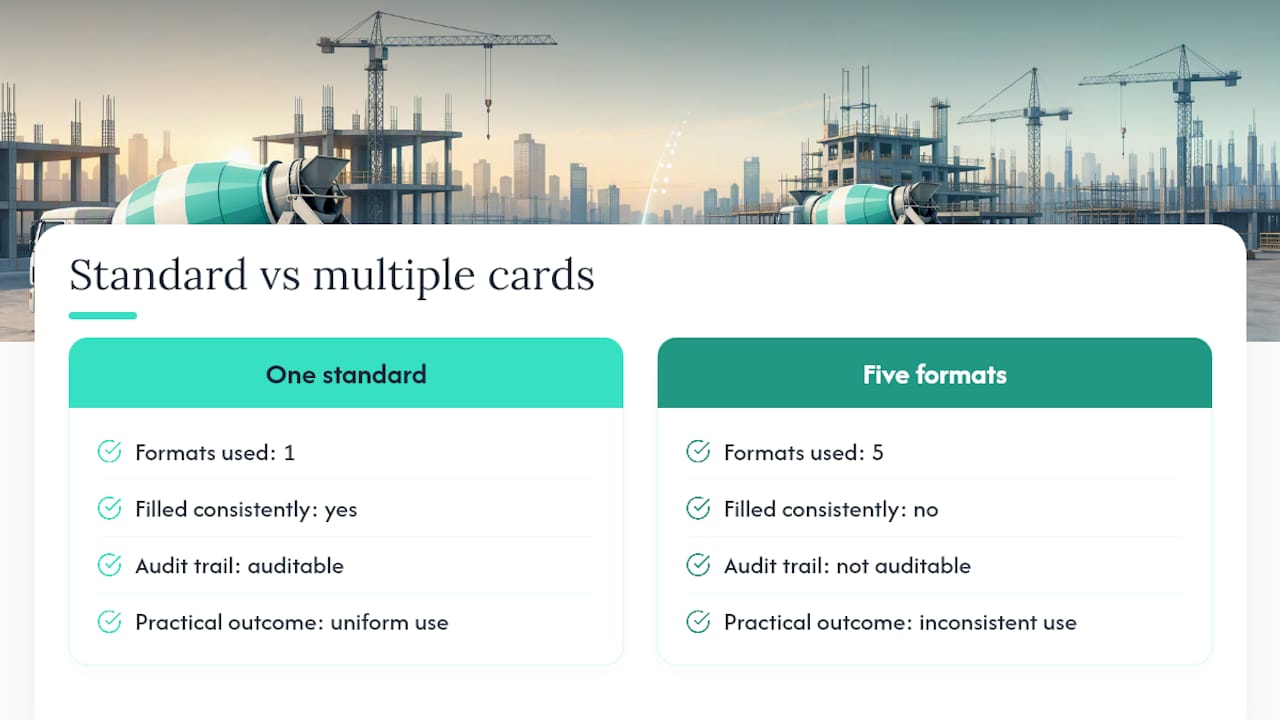
Author perspective: why one standard card beats five good ones
Every superintendent has a favorite pour card format, and that’s the problem. Standardizing one layout across a job, even a mediocre one, beats five well-designed cards that nobody fills out the same way twice. Consistency is what makes an audit trail actually auditable.
Backing your pour card with timestamped crew verification
A pour card only proves what someone wrote down. It doesn’t prove who was actually standing there when the truck rolled in, unless you pair it with a system that timestamps and photo-verifies who signed off. That’s the gap Kloqk closes for crews already juggling paper forms and time clocks on the same site.

Kloqk gives every crew member a photo-verified clock-in that matches a face to a timestamp, so when your pour card says the QA inspector signed off at 10:15 AM, you have independent proof they were on site at that moment. Add GPS geofencing to confirm crew presence at the actual pour location, not just somewhere on a sprawling job site, and export those timestamps straight into your project register alongside the completed card. If your crew works across multiple pours or multiple sites in a week, Kloqk’s free time clock handles that without a per-seat fee eating into the budget. Set up a location and start logging your next pour today.
Sources
- CONCRETE PRE-POUR CHECKLIST NCDOT
- Concrete pour card checklist template Sitemate
- Concrete pour card and placement record template MangoApps
- Concrete Pour Card Template, Civil Engineering QS
Recommended
Sources
Every figure on this page traces to one of these. Primary law and government sources are listed first.
Written by
Sam TolbertWorkforce Operations Editor
Sam writes about scheduling, shift work, and the software that runs an hourly workforce, what actually saves time on the floor versus what just adds clicks.
Keep Reading
Track Hours the Easy Way
Kloqk is a free time clock that handles punches, breaks, overtime, and payroll-ready reports.
Start free