What Is a Workforce Management System: A Practical Guide

A workforce management system is software that helps organizations track employee time, build schedules, forecast labor needs, and stay compliant with wage and hour laws, all in one place. If you’re a frontline manager drowning in spreadsheets, an HR team chasing down timesheets, or a small-business owner who’s ever paid someone for hours they didn’t work, this is the category of tool built for you.
The core outcomes most teams care about:
- Schedule coverage the right people on the right shifts, with no gaps or costly overstaffing
- Payroll accuracy clock-in data flows directly to payroll, cutting manual entry errors
- Labor-cost control overtime alerts, budget tracking, and real-time visibility into hours worked
- Compliance automated break rules, certification tracking, and audit-ready records
Table of Contents
- What does a workforce management system actually include?
- How does workforce management work, step by step?
- What are the real benefits of workforce management software?
- What challenges should you expect with WFM systems?
- How do you choose the right WFM solution?
- Where is WFM technology headed?
- Practical steps for small U.S. businesses getting started
- Key Takeaways
- The gap between what WFM promises and what actually matters
- Kloqk takes the friction out of getting started
- Useful sources
What does a workforce management system actually include?
WFM systems go well beyond a basic time clock. They combine several distinct modules that, together, cover the full employee lifecycle from clock-in to paycheck.
Core components:
- Time and attendance records when employees start, take breaks, and end shifts; the foundation every other module builds on
- Employee scheduling builds rosters based on availability, skills, and labor demand; includes shift-swap workflows and manager approvals
- Forecasting and demand planning uses historical data to predict how many people you’ll need, hour by hour; central to optimizing staffing against service levels and budgets
- Absence management tracks PTO, sick days, and leave requests with automated approval workflows and accrual calculations
- Payroll integration exports verified hours directly to payroll processors, eliminating re-keying and the errors that come with it
- Reporting and analytics surfaces labor-cost trends, overtime patterns, and schedule adherence in dashboards managers can actually use
- Skills and qualification management matches employees to shifts based on certifications, training records, or role requirements
- Mobile and self-service lets employees clock in, request time off, and swap shifts from a phone; reduces manager interruptions and builds trust
- Rules-based compliance enforces break requirements, overtime thresholds, and union rules automatically, so compliance tracking happens in the background rather than after the fact
Common sub-features worth asking about: GPS geofencing, photo verification for clock-ins, PTO accrual engines, shift-trade marketplaces, and configurable overtime rules by state.
Pro Tip: For small businesses, the three features that pay for themselves fastest are payroll-ready exports (eliminates hours of manual data entry), GPS geofencing (prevents time theft at job sites), and simple PTO workflows (cuts the back-and-forth that eats manager time). Start there before evaluating anything else.
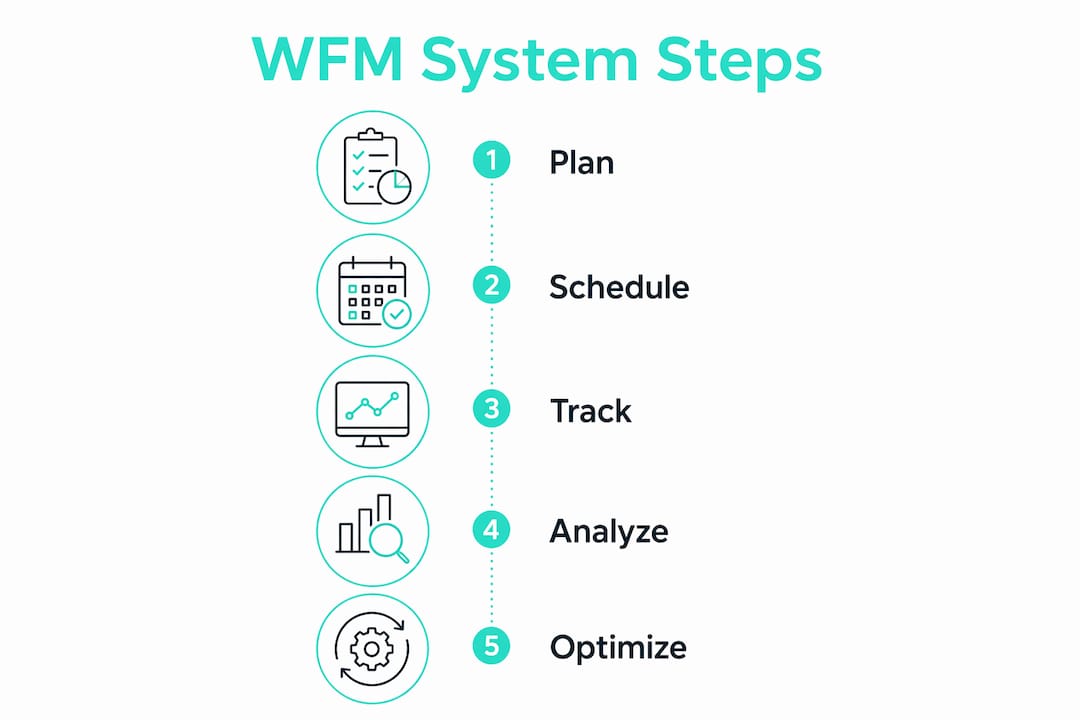
How does workforce management work, step by step?
The day-to-day flow of a WFM system follows a predictable cycle. Understanding it helps you spot where your current process breaks down and where a system would plug the gap.
The core workflow:
- Data capture employees clock in via a mobile app, web browser, or physical terminal; GPS coordinates and photos can be captured at this moment
- Forecasting the system analyzes historical traffic, sales, or service data to project how many staff you’ll need for each upcoming shift
- Schedule creation rosters are built automatically or semi-automatically, matching forecasted demand to employee availability and skills
- Real-time adjustments managers see live dashboards showing who’s on shift, who’s late, and when overtime thresholds are approaching
- Exception handling the system flags missed punches, unapproved overtime, or break violations for manager review
- Approval and payroll export approved timesheets flow directly to your payroll processor or HRIS, with no manual re-entry
A single restaurant shift illustrates the cycle cleanly: a server clocks in via the mobile app (photo captured), takes a 30-minute break that the system logs automatically, approaches eight hours and triggers an overtime alert, and at shift end the manager approves the timesheet with one tap. That record exports to payroll that night, no paper, no guesswork, no disputes.
Integrations are where many implementations succeed or fail. A WFM platform that connects cleanly to your HRIS, payroll processor, and point-of-sale system creates a single source of truth. One that requires manual CSV exports between systems just moves the busywork around. When evaluating scheduling and time-tracking software, always ask how data moves between systems and who owns the integration when something breaks.
Time tracking was among the first automated WFM processes; today’s systems layer forecasting, analytics, and AI-based optimization on top of that foundation.

What are the real benefits of workforce management software?
The business case for WFM software is usually made in three places: the payroll run, the schedule board, and the compliance audit. Here’s where the value actually shows up.
- Improved schedule coverage and service levels automated scheduling fills shifts based on demand forecasts rather than gut feel, reducing both understaffing (which hurts customers) and overstaffing (which hurts margins)
- Payroll accuracy and reduced wage leakage when clock-in data flows directly to payroll, the manual transcription errors that cause over- and underpayment disappear; accurate timesheets also reduce the disputes that damage employee trust
- Lower labor costs real-time overtime alerts and budget dashboards give managers the information to make staffing decisions before costs spiral, not after
- Compliance risk reductionWFM ensures the right people work at the right time while tracking breaks, certifications, and wage rules that vary by state; non-compliance can trigger fines and back-pay claims that dwarf the cost of the software
- Better employee experience and retention mobile self-service features like shift swaps and PTO requests give employees control over their schedules, which correlates with higher morale and lower turnover
- Clearer labor-cost visibility for managers modern WFM platforms surface labor-cost insights that help managers connect staffing decisions to business outcomes, not just headcount
The people-first angle matters more than most buyers realize. WFM software used purely as a surveillance tool, tracking every minute without giving employees any visibility or control, tends to increase resentment and turnover. The same system, deployed with self-service features front and center, can actually improve retention. The technology is identical; the implementation philosophy is what changes the outcome.
What challenges should you expect with WFM systems?
No software category has a perfect track record, and WFM is no exception. These are the friction points that derail implementations most often.
- Integration failures a WFM platform that doesn’t connect cleanly to your payroll or HRIS creates double entry; always test the integration with real data before signing a contract
- Employee resistance staff who feel monitored rather than supported will find workarounds; the fix is framing self-service benefits early and often, not adding more surveillance features
- Poor forecasting data garbage in, garbage out; if your historical sales or traffic data is incomplete, the system’s demand forecasts will be wrong and schedules will miss the mark
- Privacy and surveillance concernsGPS tracking and photo verification are powerful tools for preventing time theft, but they require clear policies, employee disclosure, and in some states explicit consent; check your state’s requirements before deploying biometric or location features
- Complexity for small teams enterprise WFM platforms often carry features and pricing structures that make no sense for a 15-person crew; right-sizing the tool to the team matters
- Union and collective bargaining constraints represented workforces have negotiated rules around scheduling notice, shift assignments, and overtime that the system must enforce correctly; a misconfigured rule can trigger a grievance
Red flags to stop the evaluation process: a vendor who won’t demo the system with your actual data, opaque pricing that changes after the pilot, no data export option (you should always own your records), and a mobile app that employees find genuinely difficult to use. For safety and compliance documentation requirements specific to your industry, verify that the platform can generate the records your state or sector requires.
How do you choose the right WFM solution?

The selection process is where most buyers either save themselves from a bad fit or lock themselves into one. A structured checklist cuts through vendor marketing faster than any demo.
Selection checklist by priority:
- Core functionality does it cover time and attendance, scheduling, and payroll export at minimum? Does it handle your specific overtime rules (California, for example, has daily overtime thresholds that most generic platforms miss)?
- Integrations which payroll processors, HRIS platforms, and POS systems does it connect to natively? What does a broken integration look like, and who fixes it?
- Compliance coverage does it enforce federal and state break rules, track certifications, and generate audit-ready records?
- User experience will your employees actually use the mobile app? Run a 10-minute test with a non-technical employee before committing
- Deployment and support how long does implementation take? Is there a dedicated onboarding contact, or do you get a knowledge base and a ticket queue?
- Pricing model is pricing per seat, per location, or flat? Are payroll exports, overtime calculations, and compliance features included, or are they add-ons?
- Security and privacy where is data stored? What happens to your records if you cancel?
Questions to ask in every vendor demo:
- Show me how overtime is calculated for [your specific state], walk me through the logic
- What export formats do you support, and can I pull my full data history at any time?
- What’s your support SLA for a payroll-blocking issue on a Friday afternoon?
- Can employees swap shifts without manager approval, or does every swap require a sign-off?
- How does the mobile app handle poor cell coverage at a job site?
Pilot recommendations: scope a 60, 90 day pilot with one team or location, define two or three measurable success metrics upfront (payroll processing time, manager hours spent on scheduling, employee adoption rate), and involve at least one frontline employee in the evaluation. A pilot that only involves managers will miss the adoption problems that kill rollouts.
Pro Tip: Ask the vendor to run the demo using a sample of your own data, even anonymized. A system that looks clean with demo data can behave very differently with your actual shift patterns, pay rules, and employee mix. Vendors who resist this request are usually hiding complexity.
For a deeper look at evaluation criteria, the SMB buyer’s guide to workforce management software covers what to prioritize at different team sizes.
Where is WFM technology headed?
The category is moving fast, and a few trends will shape what “standard” looks like within the next few years.
- AI-driven forecasting machine learning models that predict staffing needs from sales data, weather, local events, and historical patterns are becoming table stakes; buyers should require transparency about model inputs and measurable accuracy benchmarks before trusting any vendor’s AI claims
- Automated schedule optimization systems that don’t just forecast demand but automatically build compliant, cost-efficient schedules and flag conflicts before they happen
- Mobile-first UX the expectation that employees manage their entire work schedule from a phone is now the baseline, not a premium feature; platforms that still require a desktop for basic tasks are falling behind
- Contingent and remote workforce management remote and contingent workers make up a rising share of many companies’ workforces, and WFM platforms are adding features to track, schedule, and pay them alongside traditional employees
- People-first design the shift from WFM-as-surveillance to WFM-as-employee-tool is accelerating; platforms that give workers visibility into their own schedules, earnings, and PTO balances see measurably better adoption and retention outcomes
The “people-first” label gets used loosely in vendor marketing, but the underlying idea is real: employees who can see their schedule a week out, swap a shift without a phone call, and check their PTO balance at midnight are less likely to quit. That’s not a soft benefit, it’s a retention lever with a direct cost impact.
Pro Tip: When a vendor claims their AI “optimizes” schedules, ask two questions: what data does the model train on, and how do you measure forecast accuracy? A vendor who can answer both with specifics is worth continuing the conversation. One who pivots to a feature demo is telling you something.
Practical steps for small U.S. businesses getting started
Small businesses don’t need to boil the ocean. The fastest path to real value is a phased rollout that starts with the one thing every other module depends on: accurate time data.
Step-by-step rollout:
- Map your current process write down exactly how employees clock in today, how timesheets reach payroll, and where errors or disputes typically happen; this becomes your baseline
- Start with time tracking deploy a free time clock with GPS geofencing and photo verification; this single step eliminates buddy punching, location fraud, and manual timesheet transcription
- Automate payroll exports connect your time-tracking tool to your payroll processor so approved hours flow automatically; measure how much time this saves in the first two pay periods
- Add scheduling and PTO once time data is clean and payroll is running smoothly, layer in shift scheduling and PTO workflows; employees who already trust the time-tracking app will adopt scheduling features faster
- Run a 60, 90 day pilot measure three things: payroll processing time, manager hours spent on scheduling, and employee adoption rate; adjust before expanding to additional locations or teams
Features that deliver the fastest ROI for small businesses:
- Free time clock with no per-seat fees
- GPS geofencing to confirm employees are on-site when they clock in
- Photo verification to prevent buddy punching
- Payroll-ready exports that eliminate manual data entry
A small restaurant with 12 employees running two daily shifts is a good illustration. Before a WFM tool, the owner spends roughly two hours every pay period reconciling paper timesheets, chasing down missed punches, and manually entering hours into payroll software. After deploying GPS-verified clock-ins and automated exports, that two hours compresses to a 15-minute approval review. The payroll errors that caused employee complaints drop to near zero.
Change-management tips that actually work:
- Tell employees what the system does and why before you turn it on, surprises breed suspicion
- Lead with the self-service benefits: “You can request PTO from your phone at any time”
- Run a 20-minute training session by role, not a one-size-fits-all company meeting
- Check adoption weekly for the first month; a low clock-in rate usually means a UX problem, not a motivation problem
Key Takeaways
A workforce management system delivers the most value when it’s implemented as a people-first tool, starting with accurate time tracking, then layering scheduling and forecasting as the team’s data matures.
| Point | Details |
|---|---|
| Core definition | A WFM system tracks time, builds schedules, forecasts labor needs, and supports payroll and compliance in one platform. |
| Start with time tracking | Small businesses capture the fastest ROI by deploying accurate clock-ins and payroll-ready exports before adding forecasting. |
| People-first design matters | Self-service features like mobile shift swaps and PTO visibility improve employee retention, not just operational efficiency. |
| Pilot before you commit | Run a 60, 90 day pilot with one team, define measurable success metrics upfront, and include frontline employees in the evaluation. |
| Kloqk for small businesses | Kloqk offers free time tracking with GPS geofencing, photo verification, and payroll-ready exports built for small U.S. businesses. |
The gap between what WFM promises and what actually matters
Most WFM buying conversations start in the wrong place. Buyers focus on the feature list, forecasting algorithms, AI optimization, integration count, and underweight the two factors that actually determine whether the system pays off: data quality and employee adoption.
A sophisticated forecasting engine trained on bad historical data produces confidently wrong schedules. And a beautifully designed mobile app that employees don’t trust, because it was introduced as a monitoring tool rather than a convenience, gets abandoned within weeks. The technology is rarely the failure point. The implementation philosophy is.
The most underrated advice in this category: before you evaluate a single vendor, spend an hour documenting where your current process actually breaks. Is it missed punches? Payroll disputes? Managers spending Sunday nights building next week’s schedule? The answer tells you which module to prioritize, and it gives you a concrete success metric to hold the vendor accountable to after go-live.
WFM software is genuinely useful. But it’s a tool, not a strategy. The businesses that get the most out of it are the ones that deploy it with a clear problem in mind, involve employees from day one, and resist the temptation to turn on every feature at once.
Kloqk takes the friction out of getting started
For small U.S. businesses, the hardest part of WFM adoption isn’t choosing the right forecasting model, it’s getting accurate time data in the first place without paying for software that’s built for enterprise teams.

Kloqk is built specifically for that gap. It’s a free employee time-tracking platform with GPS geofencing, photo verification, and payroll-ready exports, no per-seat fees, no paywalled overtime calculations, no contract. Restaurant shift crews use it to eliminate buddy punching. Small construction teams use it to confirm employees are on-site before the clock starts. Multi-location retailers use the multi-location time clock to manage staff across sites without juggling separate systems.
The starting point is simple: try Kloqk’s free employee time tracking and run one pay period with GPS-verified clock-ins and automated exports. Most small-business owners see the payroll time savings within the first two weeks.
Useful sources
The following resources informed this guide and are worth bookmarking for deeper reading.
| Source | What it covers |
|---|---|
| NetSuite What Is Workforce Management? | Thorough definitions of WFM components, scheduling, forecasting, and people-first design principles; one of the most complete free overviews available. |
| TechTarget / WhatIs.com WFM Definition | Concise technical definition with historical context on how WFM evolved from basic time tracking to AI-enabled optimization. |
| SAP What Is Workforce Management? | Covers enterprise WFM trends including AI forecasting, contingent workforce management, and the shift to people-first features. |
| Workday Workforce Management Software | Useful for understanding how connected WFM platforms serve both managers and frontline workers in mid-to-large organizations. |
| Lifthcm Benefits of Workforce Management | Practical breakdown of WFM benefits with a focus on payroll accuracy, compliance, and operational visibility for growing businesses. |
| Parim Workforce Management Guide | Covers vendor selection questions, demo best practices, and pilot recommendations; useful for buyers in the evaluation stage. |
| Kloqk WFM Explained | Publisher’s own explainer on WFM concepts and use cases, with a focus on small-business implementation. |
| Kloqk Time and Attendance Buyer’s Guide | Detailed guidance on selecting and implementing time and attendance software, including compliance considerations. |
Recommended
Sources
Every figure on this page traces to one of these. Primary law and government sources are listed first.
Written by
Priya NairPeople Operations Writer
Priya focuses on HR and hiring for small teams, onboarding, scheduling people fairly, and the day-to-day of managing hourly staff without an HR department.
Keep Reading
Track Hours the Easy Way
Kloqk is a free time clock that handles punches, breaks, overtime, and payroll-ready reports.
Start free