Administrative Waste Examples Every Small Team Should Cut

The most common examples of administrative waste in small teams are not edge cases, they are the daily defaults: duplicate data entry, manual timesheets, status meetings that could be a two-line message, approval loops that bounce between inboxes, and tool sprawl that forces everyone to check four places before answering one question. Every one of them is reversible this week.
Here are the highest-impact examples and their fastest fixes:
- Duplicate data entry pick one system; delete the others.
- Weekly status meetings replace with a written async update; recover 1-2 hours per person per week.
- Manual timesheets switch to automated time tracking; eliminate reconciliation entirely.
- Approval bottlenecks assign a single named owner per approval type; set a 24-hour response rule.
- Tool sprawl audit every tool your team uses; cut any with fewer than three active users.
- Email chains as approvals move decisions to a task board where state is visible without asking.
- Manual payroll reconciliation export directly from a time clock; stop re-entering hours by hand.
- The report nobody reads cancel it; ask who actually uses it before reinstating.
Coordination overhead consumes 20%-40% of a growing team’s week. Run the 15-minute audit in Section 4 to find your worst offenders today.
Key Takeaways
Administrative waste in small teams is a structural problem, not a people problem, and the fastest fix is almost always retiring one meeting and picking one source of truth before anything else.
| Point | Details |
|---|---|
| Coordination overhead is measurable | Teams lose 20%-40% of their week to coordination tax; measure it before adding headcount. |
| Fast wins recover real money | Retiring one status meeting for a five-person team at $30/hour saves roughly $11,700 per year. |
| Run the 15-minute audit first | Check meetings, data sources, approvals, tools, and reports; flag anything over 30 minutes per person per week. |
| Systemic fixes follow a sequence | Standardize first, then consolidate tools, then automate, in that order, phased over 90 days. |
| Kloqk removes timesheet admin | Automated clock-ins, overtime calculations, and one-click payroll exports eliminate 2-4 hours of reconciliation per pay period. |
Table of Contents
- What do examples of administrative waste look like in a small team?
- Why do small teams accumulate administrative waste?
- How can you run a 15-minute admin-waste audit?
- What fast wins can you implement this week?
- What systemic fixes scale as your team grows?
- How does time tracking with Kloqk remove specific admin tasks?
- How do you measure progress after cutting admin waste?
- Copy-paste audit template and tracking table
- Why cutting admin waste is the highest-leverage leadership move
- Kloqk removes manual timesheet work from day one
- Sources
What do examples of administrative waste look like in a small team?
Waste rarely announces itself. It hides inside routines that feel productive.
The weekly status meeting. Six people, 45 minutes, every Monday. The actual information exchanged could fit in a five-line message. Multiply that across a five-person team and you lose roughly 3.75 hours of focused work before Tuesday starts.
The spreadsheet that lives in three places. Someone updates the project tracker in Google Sheets. Someone else updates the same data in the CRM. A third person maintains a local Excel copy “just in case.” When numbers conflict, a senior person spends 30-60 minutes adjudicating which version is correct. That reconciliation cost is the most expensive form of admin because it pulls the highest-paid people into the lowest-value work.
Manual timesheets. Employees estimate hours at the end of the week. Managers review, question, and correct. Payroll re-enters the numbers. A single payroll cycle for a ten-person team can consume 2-4 hours of combined manager and admin time, every pay period. The hidden costs of manual time tracking systems compound fast.
Approval loops. A purchase request goes to the manager, who forwards it to finance, who sends it back with a question, who waits three days for a reply. The actual decision takes five minutes. The loop takes a week.
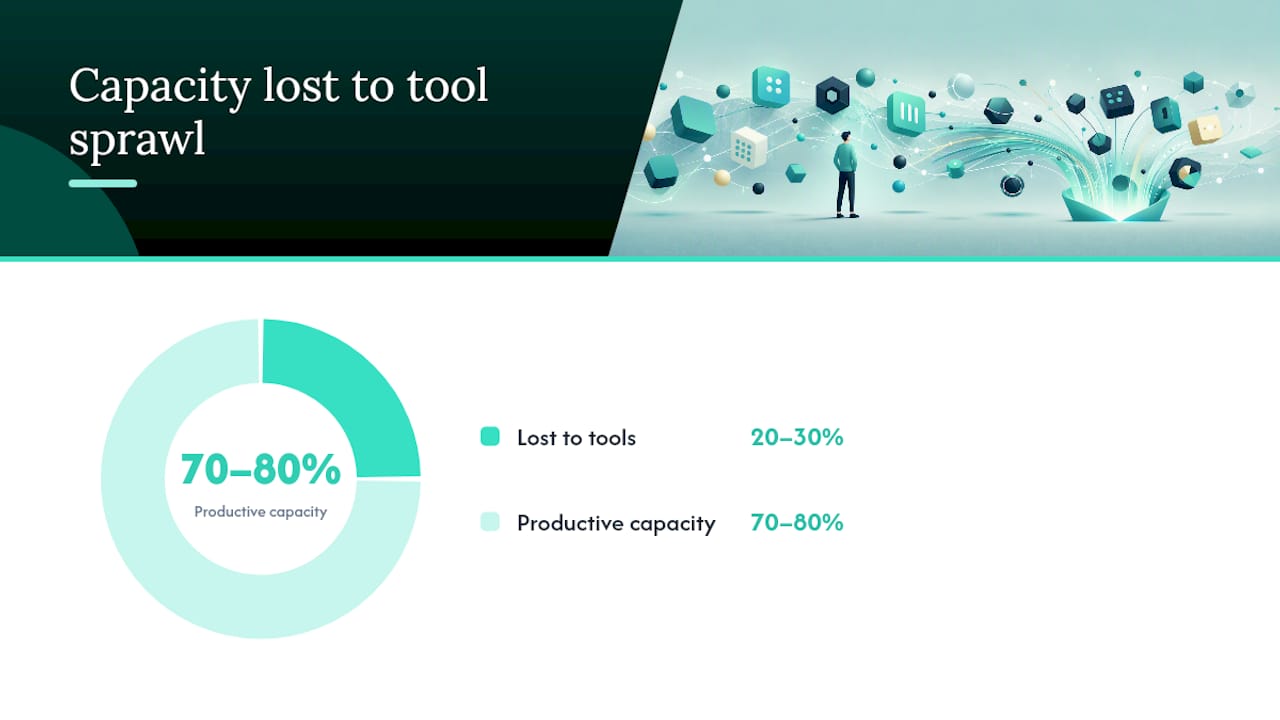
Tool sprawl. Teams using six or more disconnected tools spend 20%-30% of their capacity on context switching and reconciliation rather than actual work. That is not a productivity problem, it is a structural one.
Why do small teams accumulate administrative waste?
The root cause is almost never laziness or bad intentions. It is structure.
- Coordination tax: As teams add people, communication paths grow faster than headcount. With eight people, there are 28 possible communication channels each one a potential source of duplicate effort.
- Fragmented information: When the same fact lives in multiple tools, someone always has to reconcile them. That reconciliation is invisible on any calendar but very real in hours spent.
- Unclear handoffs: When nobody owns the next step, everyone follows up. Follow-ups are admin waste wearing a productivity costume.
- Zombie processes: Reports, meetings, and approval chains that were useful once and never retired. They persist because stopping them requires a decision nobody has made.
Managers instinctively respond to coordination friction by adding more check-ins. The higher-ROI move is the opposite: make task state visible without asking. Async updates and a single source of truth eliminate the need for most status meetings before they are ever scheduled.
How can you run a 15-minute admin-waste audit?
You can find your team’s biggest waste in 15 minutes by checking five things. Answer each question honestly; flag anything that costs more than 30 minutes per person per week.
The five checks:
- MeetingsList every recurring meeting. For each one, ask: what decision or output does this produce that could not happen asynchronously?
- Data sourcesCount how many places the same fact is stored (project status, hours worked, client info). More than one is a reconciliation risk.
- Approval pathsTrace your last three approvals. How many people touched each one? How many days did each take?
- ToolsList every tool your team pays for or uses weekly. Note which ones share overlapping functions.
- ReportsList every report produced weekly or monthly. Ask who reads each one and what they do with it.
Copy-paste audit checklist:
- [ ] List all recurring meetings with attendee count and duration
- [ ] Identify every place project status is recorded
- [ ] Map the last three approval requests: people involved, days to close
- [ ] List all active tools; mark duplicates and low-usage ones
- [ ] List all recurring reports; confirm each has an active reader
Recording results: For each item flagged, note estimated hours lost per person per week and mark priority as High (fix this week), Medium (fix this month), or Low (review next quarter). Five minutes of tally work at the end gives you a ranked list of fixes.
What fast wins can you implement this week?
Start here. Each fix takes a few hours to set up and pays back immediately.
- Retire one recurring meeting. Pick the lowest-value one from your audit. Replace it with a written async update. Most teams recover 45-90 minutes per person per week from a single cancellation.
- Require written async updates. Before any status meeting survives, it must prove it cannot be replaced by a five-line written update posted to a shared channel.
- Pick one source of truth. Choose one tool for project status and delete or archive the duplicates. The reconciliation cost disappears the moment there is only one version.
- Set a single owner for each approval type. Name the person, set a 24-hour response expectation, and document it somewhere everyone can see.
- Lock a short daily admin window. Move all admin tasks, timesheet review, expense approvals, report updates, to a fixed 20-minute window at the start or end of the day. Scattered interruptions cost far more than their face value because of the recovery time required to return to focused work.
- Automate timesheets. Replace manual hour entry with a time clock that exports payroll-ready data directly. This alone can recover 2-4 hours of combined manager and employee time per pay period.
Pro Tip: Convert your weekly status meeting into a five-line stakeholder update template: What did we complete? What is in progress? What is blocked? What is next? Who owns what? Teams that make this switch report the meeting never comes back.
What systemic fixes scale as your team grows?
Quick wins stop the bleeding. Systemic fixes prevent it from recurring.
The five highest-leverage changes, in order of long-term impact:
- StandardizationDefine where each type of information lives and how it is updated. One format, one location, one owner.
- Tool consolidationReduce the number of active tools. Every tool you eliminate removes a reconciliation path.
- Async visibilityMake task state readable without asking. A shared board where work status is always current replaces most status meetings permanently.
- Tracked handoffsTreat every handoff as a formal object: receiver, timestamp, acknowledgment. Invisible handoffs are where work disappears.
- AutomationAutomate any task that follows a fixed rule: timesheet export, overtime calculation, approval routing for low-risk decisions.
Phased implementation:
Choose your first systemic fix by effort vs. impact: retiring a meeting is low effort and high impact. Tool consolidation is medium effort and high impact. Full automation is higher effort but compounds over time. Start where effort is lowest and impact is highest.
How does time tracking with Kloqk remove specific admin tasks?
Manual timesheet reconciliation is one of the most expensive and most fixable examples of administrative waste small teams carry. Here is what the before and after looks like.

Before: Employees fill out paper or spreadsheet timesheets at week’s end. Managers review and correct. Payroll re-enters hours. Overtime is calculated manually. Errors trigger corrections the following cycle. Total time: 2-4 hours per pay period for a ten-person team.
After with Kloqk: Employees clock in and out via mobile or kiosk. Hours, breaks, and overtime calculate automatically. Payroll exports in one click. The entire reconciliation step is gone.
Specific tasks Kloqk eliminates:
- Manual hour entry replaced by mobile and kiosk clock-ins
- Overtime calculation automated per federal and state rules
- Break tracking logged automatically, no manager follow-up needed
- Payroll reconciliation payroll-ready timesheet exports replace manual re-entry
- Time theft and buddy punching photo verification and GPS geofencing remove the need for manual audits
Eliminating manual timesheet entry is not just a time saver, it removes an entire category of error-correction work that compounds every pay cycle. When hours are captured automatically and exported directly to payroll, the reconciliation loop closes permanently.
For teams with field or remote staff, GPS time tracking adds location verification without adding any manual verification work for managers.
How do you measure progress after cutting admin waste?
Five KPIs worth tracking from week one:
- Coordination tax % hours spent in meetings and status requests divided by total work hours. Target: below 15%.
- Hours in status meetings per week count before and after each fix.
- Time to approval average days from request to decision. Track per approval type.
- Duplicate record reconciliation hours hours spent resolving conflicting data per month.
- Timesheet admin hours per pay period combined manager and employee time.
Simple formula for dollars saved:
Hours saved per week × average hourly rate × 52 = annual savings
Example: A five-person team recovers 1.5 hours each per week from retiring one status meeting. At $30/hour average: 1.5 × 5 × $30 × 52 = $11,700 per year from one meeting cancellation.
Run the 15-minute audit monthly for the first quarter, then quarterly after that. Use the baseline from your first audit as the comparison point. The coordination tax formula gives you an early warning when headcount growth is about to create a new structural ceiling.
Copy-paste audit template and tracking table
Run this checklist and drop the results into the table below.
Audit checklist (copy into any doc):
- [ ] Every recurring meeting listed with duration and attendee count
- [ ] Every place project status is recorded, count the sources
- [ ] Last three approvals traced: people, days, outcome
- [ ] Every active tool listed; duplicates and low-usage flagged
- [ ] Every recurring report listed; confirmed reader named for each
Tracking table (paste into a spreadsheet):
| Task | Owner | Minutes/week | Suggested fix | Priority |
|---|---|---|---|---|
| Weekly status meeting | Team lead | 45 min × attendees | Replace with async update | High |
| Manual timesheet entry | Each employee | 20-30 min | Automate with time clock | High |
| Approval email chain | Manager | 30-60 min | Assign single owner + 24-hr rule | High |
| Duplicate data entry | Various | 15-30 min | Pick one source of truth | Medium |
| Report nobody reads | Admin | 30-60 min | Cancel; reinstate only if claimed | Medium |
Re-run this table every quarter. Any row where minutes per week has not dropped after 30 days needs a different fix, not more patience.
Why cutting admin waste is the highest-leverage leadership move
The conventional wisdom says small teams are lean by default. They are not. They are often more burdened by administrative overhead than larger teams, because there is no dedicated ops function to absorb it. Every hour a five-person team loses to a status meeting or a manual timesheet is a much larger percentage of total capacity than the same hour lost in a fifty-person organization.
The cultural piece matters as much as the tactical fixes. One practice worth building into your team’s rhythm: a monthly “kill a meeting” retro. Spend ten minutes asking which recurring meeting or report could be retired or replaced with an async update. Teams that make this a habit catch zombie processes before they calcify. The employee engagement benefit is real too, people who spend less time on low-value admin report higher satisfaction and ownership of their actual work.
The mistake most leaders make is treating admin waste as a people problem. It is a structure problem. Fix the structure, and the people perform.
Kloqk removes manual timesheet work from day one
If manual timesheets and payroll reconciliation are on your audit’s High priority list, Kloqk eliminates both without a complicated setup.

Kloqk’s free time clock gives small teams payroll-ready hours automatically. Employees clock in via mobile or kiosk; overtime and breaks calculate without any manager input; and payroll exports in one click. Photo verification and GPS geofencing remove manual audit work for hourly and field teams. No spreadsheet. No re-entry. No reconciliation loop.
- Free core time tracking with overtime and break calculations
- Payroll-ready exports compatible with major payroll providers
- Photo clock-in verification and GPS geofencing included
- Federal and state labor law compliance built in
- Mobile and kiosk punching for any work environment
Start tracking time for free and recover those hours in your first pay cycle.
Sources
- The Coordination Tax: Project Management Overhead Explained
- The fragmentation tax: Why teams work harder but move slower (and how to fix it)
- Repetitive Admin Work: Why 8 People Cost 28 Channels
Recommended
Sources
Every figure on this page traces to one of these. Primary law and government sources are listed first.
- 1. quire.io
- 2. devrev.ai
- 3. nexpivo.com
Written by
Sam TolbertWorkforce Operations Editor
Sam writes about scheduling, shift work, and the software that runs an hourly workforce, what actually saves time on the floor versus what just adds clicks.
Keep Reading
Track Hours the Easy Way
Kloqk is a free time clock that handles punches, breaks, overtime, and payroll-ready reports.
Start free